Email Marketing
Send targeted campaigns to unlimited members without per-contact fees. Pre-built segments, auto-personalization, and integrated tracking—no CSV exports or manual syncing.
What's Included
All features included with every i4a subscription—no add-ons required
- Drag-and-Drop Email Builder
- Auto-Personalization
- Mobile-Responsive Templates
- Saved Templates
- Custom HTML Option
- Pre-Built Member Segments
- Unlimited Email Sends
- Custom Messaging Types
- Follow-Up Based on Engagement
- Opens & Clicks Tracking
- Campaign Comparison
- Activity History Logging
- Download Campaign Data
- Test Email Function
- Schedule & Automate Sends
- Unsubscribe Management
- Draft Campaigns
- Plain-Text Versions
Drag-and-Drop Email Builder
Visual template builder, no coding required
Pre-Built Member Segments
Expiring soon, newly joined, lapsed, event non-registrants
Auto-Personalization
Insert member data—names, dates, custom fields
Unlimited Email Sends
No per-contact or per-email fees
Opens & Clicks Tracking
See who opened and what they clicked (Pro Plan only)
Schedule & Automate Sends
One-time or recurring campaigns
Follow-Up Based on Engagement
Resend to non-openers, send to clickers (Pro Plan only)
Mobile-Responsive Templates
Emails adapt to any screen size automatically
Saved Templates
Create reusable templates for recurring campaigns
Custom HTML Option
Full HTML editor for advanced customization
Unsubscribe Management
Unsubscribe links with automatic logging
Custom Messaging Types
Let members choose which emails to receive
Campaign Comparison
Compare multiple campaigns side-by-side
Test Email Function
Preview emails before sending to your list
Draft Campaigns
Save and return to campaigns later
Activity History Logging
All sent emails logged to member records
Download Campaign Data
Export opens, clicks, and recipients (Pro Plan only)
Plain-Text Versions
Include text-only for accessibility and spam compliance
Jump to details:
Why Email Works Better When Integrated
No CSV Exports or Manual Syncing
Your email campaigns pull directly from live member data—at the moment they are sent. When someone renews, joins, or registers for an event, your email segments update automatically—no importing, no delays, no outdated lists.
Unlimited Contacts at Flat Rate
Your pricing stays flat whether you email 1,000 members or 50,000+ members. Store historical contacts, lapsed members, and prospects without penalty. No per-contact fees. Ever.
Pre-Built Member Segments
Target "expiring in 30 days" or "joined last week" without manual list building. Segments update daily based on real membership data—not tags, not spreadsheets, not guesses.
Integrated With Your Membership Data
Standalone email tools like Mailchimp require constant CSV exports and imports to keep member lists updated. i4a's email marketing pulls directly from your live member database.
How it works:
- Real-time segments: "Members expiring in 30 days" automatically updates every day—no manual list management
- Auto-personalization: Insert member names, expiration dates, organization names, or any custom field directly from your database
- Activity logging: Every sent email logs to the recipient's activity history for complete communication tracking
- No sync delays: When someone renews or registers for an event, email segments reflect changes immediately
Result: Campaigns that take 15 minutes instead of 2 hours of spreadsheet work.
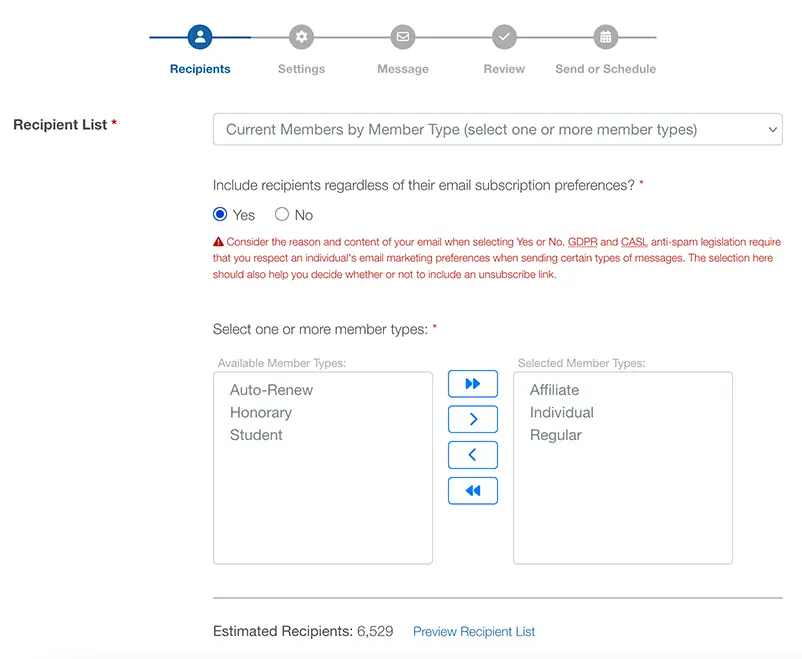
Target the Right People at the Right Time
Pre-built recipient lists that understand membership lifecycles
Members Expiring Soon
Send renewal reminders to members expiring in 7, 30, 60, or 90 days. Automate renewal campaigns at 30 days, then follow up at 15 and 7 days.
Newly Joined Members
Welcome members who joined in the last 7, 30, 60, or 90 days. Schedule weekly welcome series for new joins with onboarding content.
Lapsed Members
Re-engage members who expired 0-7, 8-30, 31-60, or 61-90 days ago. Send targeted win-back campaigns to recently lapsed members.
Event Non-Registrants
Target members who haven't signed up for a specific event. Send registration reminders to current members who haven't registered yet.
Contacts with Balances
Send account statements to members with outstanding balances. Automate monthly statements to billing contacts with unpaid invoices.
Member & Contact Types
Filter by any member type (Student, Professional, Corporate) or contact type (Board Member, Sponsor, Volunteer) for targeted content.
Need more control? Use Report Builder to create custom segments—combine member types, expiration ranges, custom fields, event attendance, and purchase history. For segmentation strategies and best practices, see our guide to email segmentation for associations.
Personalize With Real Member Data
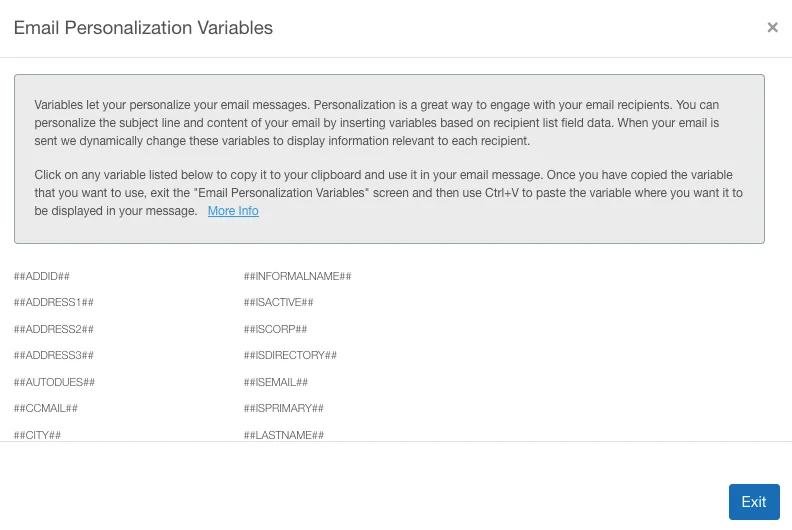
Generic emails get ignored. Personalized messages drive action. i4a automatically merges member data into every campaign—no manual work, no CSV uploads, no sync delays.
Personalization features:
- Subject line personalization: Add member names, expiration dates, or any field for higher open rates
- Message variables: Insert first names, organization names, membership types, expiration dates, and custom fields
- One-click variable library: Click any variable to copy it, then paste into your subject or message
Example personalized subject line:
"Hi ##FirstName##, Your Membership Expires ##ExpirationDate##"
Email Marketing for Your Organization Type
See how associations like yours communicate with members
Common Questions
Explore Related Features
See how our integrated platform works together
Association Email Marketing Guide
Expert strategies for association email marketing—from list building and segmentation to automation workflows and analytics.
Ready to Stop Paying Per Member?
See how i4a's all-in-one AMS with flat-rate pricing and unlimited contacts lets you grow your membership without increasing software costs. Schedule a 30-60 minute demo tailored to your organization's size and structure.
