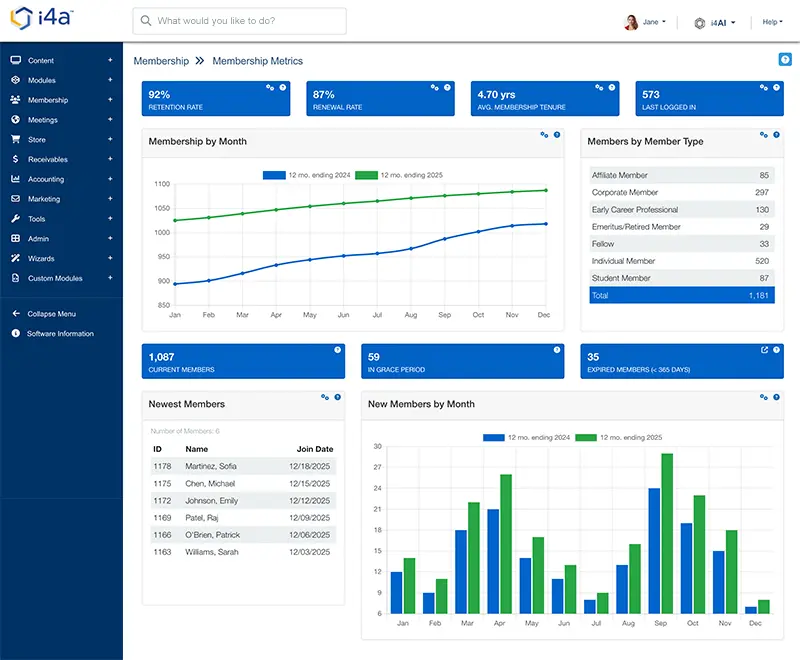










What Is Membership Management Software?
Membership management software is a specialized database system built for organizations that maintain ongoing member relationships. Unlike generic CRMs, membership software understands dues cycles, renewal dates, membership tiers, and retention tracking.
The core purpose: keep accurate member records and make renewals happen automatically. Everything else—reporting, communications, self-service portals—supports that fundamental goal. Modern platforms connect member data to every interaction: events, committees, emails, and payments. Membership management is a core component of a broader association management system (AMS).
A spreadsheet cannot send a reminder or take a payment, and a generic CRM can be bent toward membership only with custom work, because dues cycles, renewal dates, and membership tiers are not native to it. When each one fits is covered in our AMS vs. CRM comparison.
Problems It Solves
Before implementing dedicated membership management software, most organizations struggle with predictable operational pain points that purpose-built software addresses:
Scattered Member Data
Contact info in one spreadsheet, payment history in another, event attendance somewhere else. No single source of truth means staff waste time hunting for information and make decisions based on incomplete data.
Missed Renewals
Without automated reminders, staff manually track expiration dates and chase renewals one by one. Members lapse simply because nobody sent a reminder at the right time.
Manual Data Entry Overload
Staff re-keying information from paper forms, payment receipts, and event registrations into spreadsheets. Hours lost to data entry that should happen automatically.
No Member Self-Service
Every profile update, address change, or renewal requires staff intervention. Members expect online access but instead must email or call for basic tasks.
Poor Retention Visibility
No way to quickly see renewal rates, identify at-risk members, or measure trends over time. Board asks for retention numbers and staff scramble to calculate manually.
Unpredictable Software Costs
Per-member pricing means your software bill increases as you successfully grow membership. Budget uncertainty and surprise bills after successful recruitment campaigns.
Core Features to Look For
Effective membership management software provides four foundational capabilities that address the challenges above. Here's what to look for when evaluating membership management software platforms:
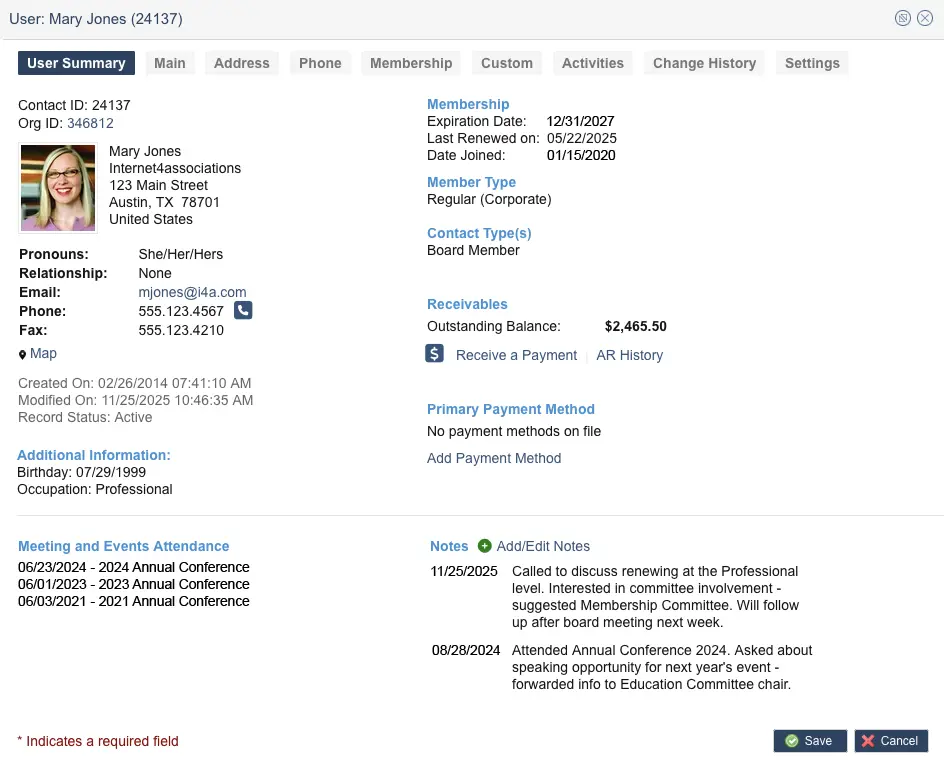
Member Database
The foundation of any membership system. Store unlimited member records with contact information, membership history, custom fields, and activity logs. Define custom fields specific to your organization—tracking specialty areas, certifications, or chapter assignments—without developer involvement.
Look for systems that maintain complete historical records. When a member rejoins after lapsing, their previous history should still be there.
Learn more about member database features →
Renewals & Billing
Automated renewal workflows are the single most important feature for protecting membership revenue. Look for the ability to set up scheduled email campaigns that automatically send to members expiring within a date range you define—such as 90, 60, 30, or 7 days before expiration.
Beyond reminders, look for grace period handling, lapse notifications, auto-pay options, and the ability to process credit card and ACH payments. The system should automatically update membership status based on payment, not require manual status changes.
Membership Renewal Automation Workflow
Membership renewal automation workflow diagram — configurable reminder sequences before expiration
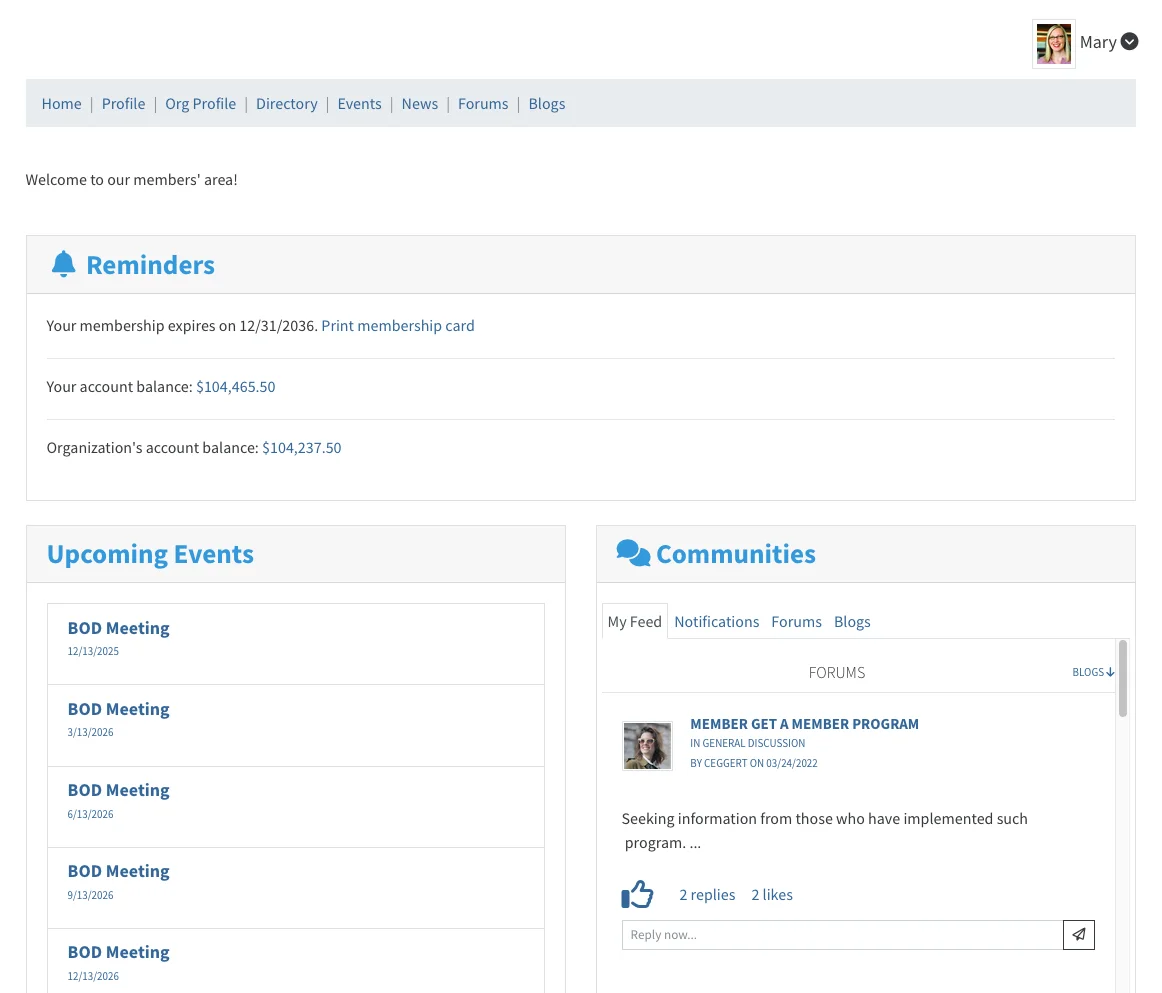
Member Self-Service
Give members 24/7 access to manage their own accounts. A good member portal lets members update contact information, view transaction history, renew memberships, and access member-only resources.
Self-service reduces staff workload dramatically—every profile update or renewal a member handles is one less call for your team.
Explore membership portal capabilities →
Looking specifically for dedicated association member portal software? Learn more about our full-featured member portal solution.
Forms & Applications
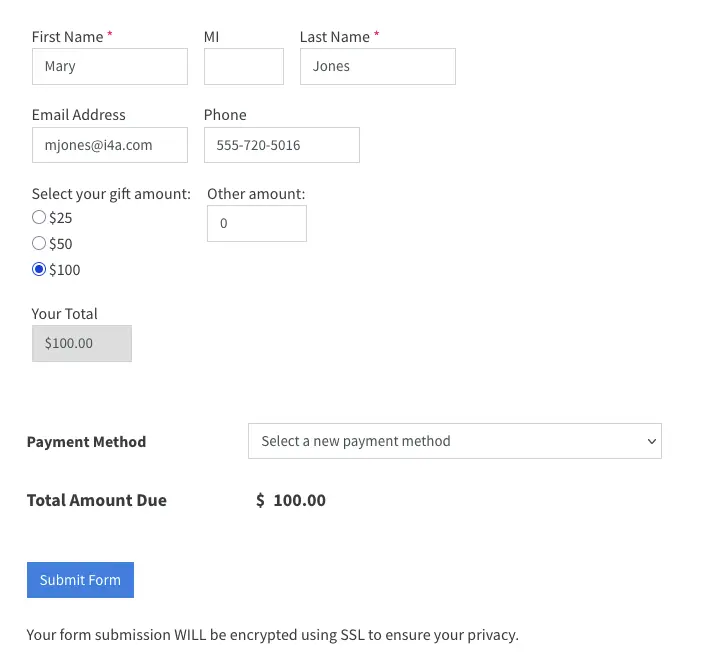
Collect membership applications online with configurable approval workflows. New member applications should flow into your database automatically, not require re-keying from paper forms or email submissions.
And our platform handles other types of form submissions: donations, speaker proposals, volunteer interest, committee applications. All tied to member records for a complete history.
Built for How Associations Are Organized
An association is rarely one flat list of people. i4a's member database is built around the structures associations actually have.
Chapters and local groups. State, regional, and local chapters, sections, and special interest groups live in the same member database as the national organization. Each chapter can have its own officers, events, and email lists. The national office reports across all of them, and a member can belong to more than one.
Organizational memberships. For trade associations the company is the member and its employees are contacts under that record. You designate primary and secondary contacts, set how many employee contacts each membership includes, bill the organization while emailing the individuals, and set dues by company size or tier.
Committees and boards. Committee assignments, board terms, and volunteer roles are stored on the member record with their history, and term end dates travel with each assignment. A committee roster or a list of terms expiring this quarter is a report, not a spreadsheet.
Dues levels and structures. Unlimited membership types, each with its own dues amount, benefits, renewal cycle, and portal access. Flat, tiered, and hybrid dues structures are configured without custom work, and members can pay in monthly installments or on stored payment methods with automated dues collection.
Membership Workflows: Join, Renew, Lapse, Re-engage
Effective membership management software automates the four critical stages of the member lifecycle:
Join
The new member onboarding workflow:
- Online application with payment collection
- Configurable approval (automatic or manual review)
- Welcome email campaigns for new members
- Member portal credentials delivered automatically
- New member data flows to directory and communications
Renew
The automated renewal workflow:
- Reminder emails at 90, 60, 30, and 7 days before expiration
- Self-service online renewal with stored payment
- Auto-pay option for members who prefer automatic billing
- Confirmation and thank-you emails on renewal
Lapse
The grace period and lapse handling workflow:
- Grace period continues access while renewal is pending
- Escalating reminder sequences during grace period
- Automatic status change to "lapsed" after grace expires
- Portal access restrictions for lapsed members
- Lapsed member records preserved for re-engagement
Re-engage
The win-back workflow for lapsed members:
- Identify lapsed members by time-since-lapse
- Targeted win-back email campaigns
- Special rejoining offers or incentives
- Preserve historical data when member rejoins
See renewals, dues, and the member portal on your own data
A personalized demo takes 30 to 60 minutes. One flat rate, unlimited members. Want your numbers first? Run the membership retention rate calculator.
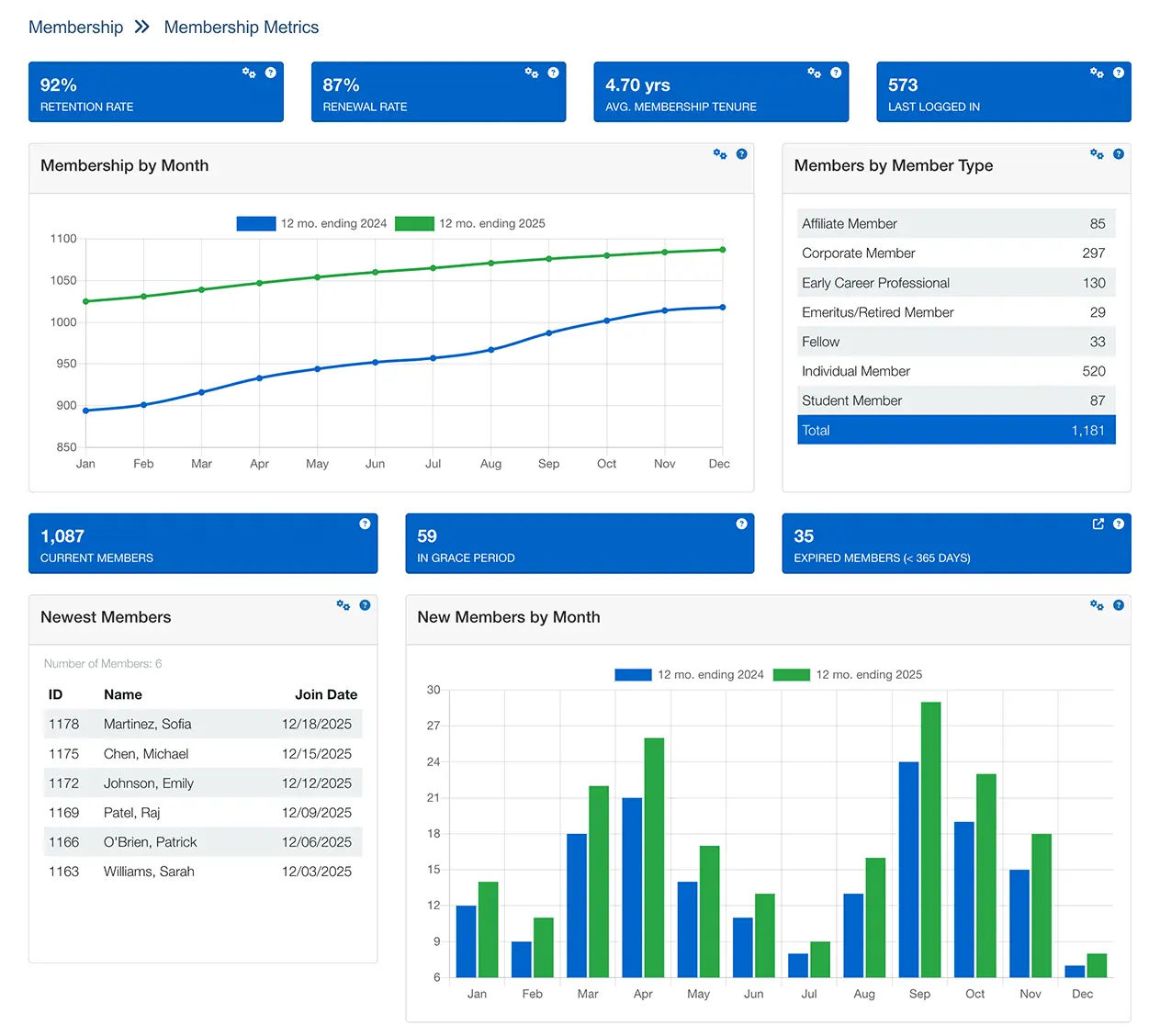
Reporting and KPIs for Membership
Membership management software should provide instant visibility into the metrics that matter for board reporting and strategic decisions:
Retention Rate
What percentage of members renew each year? Track overall and by membership type, chapter, or segment.
New Member Acquisition
How many new members join monthly/quarterly/annually? Track source of new members.
Lapse Analysis
Who lapsed, when, and why? Identify patterns to prevent future lapses.
Dues Revenue
Track revenue by membership type, payment method, and time period.
Transaction History
Complete payment records including dues, events, and store purchases per member.
Tenure Trends
Average member tenure and how it changes over time. Long-term retention health.
Good membership management software generates these reports with a few clicks—not hours of spreadsheet work.
Tying Membership to Events, Email, and Portal
Membership data becomes most valuable when it connects to every member touchpoint. The best membership management software platforms are part of an integrated system where:
Events Know Who's a Member
When members register for events, registration automatically records to their profile. Logged-in members receive member pricing without entering codes. See event management →
Email Uses Membership Data
Send targeted communications based on membership status, expiration date, chapter, or membership type. Renewal reminders can be scheduled as email campaigns. Explore email marketing →
Portal Reflects Member Status
The member portal shows each member their benefits, renewals, and resources based on membership level. View portal features →
Community Ties to Membership
Discussion forums and member directories pull from membership data. Only current members participate. Learn about community →
Which Associations Use It
The same membership database serves professional associations (individual practitioners, credentials, CE tracking), trade associations (companies as members, linked contacts, tiered dues), medical associations (member types, specialties, CME), education organizations, nonprofit membership organizations, and association management companies running several client databases. Each vertical page covers what that kind of association needs. This page covers the membership mechanics they all share.
Membership Software for Professional Societies and Associations
Society membership software must handle complexity that general membership tools weren't designed for. Professional societies differ from standard associations in key ways: membership is often organized into multiple tiers (Individual, Student, Retired, Organizational) with different dues and benefits, and members typically belong to chapters, sections, or technical divisions—each with their own leadership, events, and communications. Effective membership software for societies manages all of this within a single member database, and i4a's flat-rate pricing means a large society is not penalized for growth. For the full picture of how societies and professional organizations run on i4a, see our professional association software.
Membership Management Software Pricing: Per-Member vs. Flat Rate
The pricing model matters more than the sticker price. Per-member and per-contact plans raise your software bill every time membership grows. i4a charges one flat rate with unlimited members, priced by staff users, so a 1,000-member association and a 50,000-member association run the same platform without the larger one paying for its size.
Why Choose i4a
i4a has provided membership management software to organizations since 1996. Here's what sets our membership management software apart:
- Flat-rate pricing with unlimited members — Whether you have 1,000 members or 50,000+ members, your price stays the same. Grow without watching your software bill grow with you.
- Real support from real people — U.S.-based team that knows your name and your organization. No offshore call centers or week-long ticket queues. Talk to humans who understand associations.
- 30 years of stability — No venture capital, no pressure to exit, no acquisition risk. We've been serving membership organizations for three decades and plan to keep doing it.
- Built for membership from day one — Not a generic CRM adapted for associations. Membership concepts like dues cycles, renewals, and retention are native to the platform.
- Complete member history — Track every interaction, transaction, and engagement over the full member lifecycle. Nothing gets deleted to save on per-member costs.
- Fast implementation — Most organizations go live in 60-90 days, not 6-12 months. Get your team trained and running quickly.
- 4.9 out of 5 on Capterra (26 reviews)
- 4.85 out of 5 across 1,000+ client support surveys
- One flat rate with unlimited members, against per-contact tiers



See Membership Management in Action
Schedule a personalized demo to see how i4a handles member data, automates renewals, and gives your members self-service access—without per-member fees.
TL;DR Summary
- What it is: A specialized database system for storing member records, tracking membership status, automating renewals, and measuring retention
- Who uses it: Associations, nonprofits, clubs, professional societies, and any dues-collecting organization of any size
- Core features: Member database, renewal automation, member self-service portal, online forms and applications, reporting dashboards
- Key workflows: Join → Renew → Lapse → Re-engage—all automated without staff intervention
- Important KPIs: Retention rate, new member acquisition, lapse analysis, dues revenue, member engagement
- Pricing models: Per-member pricing (costs grow with membership) vs. flat-rate pricing (predictable costs regardless of size)
- i4a's approach: Flat-rate pricing, unlimited members, U.S.-based support, 30 years serving membership organizations
Frequently Asked Questions About Membership Management Software
Vendors price membership software two ways: per member or per contact, where the bill rises as you grow, or a flat rate. i4a charges one flat rate with unlimited members, priced by the number of staff users, and publishes it on the pricing page. Compare any quote on a three-to-five-year total, including what happens if your membership doubles.
Automated renewal systems send reminder emails based on each member's expiration date. You configure the timing (e.g., 90, 60, 30, and 7 days before expiration) and the message content once. The system then sends the appropriate reminder to each member automatically.
Good systems also handle grace periods (continuing to send reminders after expiration), lapse notifications, and can trigger different message sequences based on member type or history. This replaces staff manually tracking spreadsheets and sending individual emails.
Organizations typically outgrow spreadsheets around 300-500 members. Signs you need dedicated software include: spending significant time on manual renewal tracking, members complaining they can't do things online, juggling multiple disconnected tools, or difficulty producing reports for the board.
Most membership platforms serve organizations from 500 to 50,000+ members. i4a's flat-rate pricing makes it accessible to smaller organizations while scaling to handle large national associations.
Yes, data migration is a standard part of implementing new membership software. Most systems can import member records, transaction history, and activity data from spreadsheets, previous databases, or other AMS platforms.
The migration process typically involves exporting your current data to CSV/Excel, mapping fields to the new system, cleaning up inconsistencies, importing the data, and validating that records transferred correctly. Look for vendors that include migration support rather than leaving you to figure it out alone.
Organizational memberships (common in trade associations) require different database structures than individual memberships. The company or organization is the member entity, with individual employees linked as contacts.
Good membership software lets you: designate primary and secondary contacts, set limits on employee contacts per organization, bill the organization while communicating with individuals, track company-level and individual-level activity, and configure dues based on company size or tier.
Simple implementations go live in 30-45 days. Most mid-sized organizations complete in 60-90 days. Complex migrations may take 3-6 months. Be wary of vendors quoting 12-18 month implementations—that's often overly complex software.
Professional societies often have multiple membership tiers (Individual, Student, Retired, Organizational) with different dues amounts, benefits, and renewal cycles. Members may belong to chapters, sections, or technical divisions—each with their own leadership and events. Society membership software must manage these structures, handle tier-based dues, and support the organizational complexity that generic tools can't accommodate.
Yes. Our platform supports chapters, sections, technical divisions, and special interest groups within a single member database. Each group can have its own officers, events, and communications while sharing centralized member records. Members can belong to multiple groups simultaneously, and staff can report on engagement across all groups from one dashboard. See our association chapter management guide for best practices on structuring and managing chapters.
Yes. We serve professional societies including medical societies, scientific societies, and engineering societies. Our platform handles the specific needs these organizations have: CME/CE credit tracking, credential management, multi-session conference registration, multiple membership tiers, and chapter or division management. The Society of Plastics Engineers is one of many societies that trust i4a for their membership management.
Our platform supports unlimited membership tiers with different dues amounts, benefits, and portal access levels for each. You can create any membership categories your society needs—Individual, Student, Retired, Organizational, Honorary—with automated dues calculation and renewal reminders specific to each tier. Members can view their membership details and renew through the self-service portal.
Yes, on request. We set up a working site loaded with sample data, not your own records. Most associations get more from a personalized demo, 30 to 60 minutes, built around their own renewal process and reports, and we recommend starting there.