Forms Builder
Create secure online forms for donations, scholarship applications, product orders, surveys, and custom workflows. Pre-fill member data automatically, accept credit cards securely, and track every submission—all integrated with your membership database.
What's Included
All features included with every i4a subscription—no add-ons required
- Visual Form Builder
- Auto-Fill Member Data
- Form Templates
- Mobile-Responsive
- Text Fields
- Text Areas
- Radio Buttons & Checkboxes
- Dropdown Menus
- File Uploads
- Payment Fields
- Email Notifications
- Spam Protection
- SSL Security
- Real-Time Submissions
- CSV Exports
- Custom Reports
- Edit Submissions
- Unlimited Forms
Visual Form Builder
Build forms visually without coding
Auto-Fill Member Data
Pre-populate fields for logged-in members
Text Fields
Single-line inputs for names, emails, phone
Text Areas
Multi-line inputs for long-form responses
Radio Buttons & Checkboxes
Multiple choice with single or multiple selection
Dropdown Menus
Select lists for states, countries, categories
File Uploads
Collect documents, images, attachments
Payment Fields
Secure credit card processing built-in
Email Notifications
Custom confirmations to users and admins
Spam Protection
reCAPTCHA to block bots
SSL Security
All forms automatically encrypted
Mobile-Responsive
Forms adapt to phones, tablets, desktops
Form Templates
Copy forms to reuse layouts
Real-Time Submissions
View responses as they're submitted
CSV Exports
Download data for spreadsheets
Custom Reports
Filter by date, response, custom criteria
Edit Submissions
Update responses after submission
Unlimited Forms
Create as many forms as you need
Jump to details:
Why Forms Work Better When Integrated
Auto-Fill Saves Time and Reduces Errors
Your members already gave you their contact information. Why make them type it again? Forms auto-fill member data when they're logged in—reducing form abandonment and data entry errors while speeding up submission.
No Data Exports, No Manual Entry
Form submissions store directly in your database with payments posting to AR and syncing with accounting. No spreadsheet exports, no copy-pasting data between systems. It's all one database.
Payment Forms That Actually Work
Accept credit cards and eChecks on any form with PCI DSS Level 1 compliant processing. Payments post to member AR automatically, receipts email instantly, and transactions sync with QuickBooks export.
Integrated With Your Membership Data
Standalone form tools like Google Forms® or Typeform® require manual data exports to spreadsheets, then re-entry into your database. i4a's forms integrate directly with your member records.
How it works:
- Form submission tracking: All responses store in your database for review and reporting
- Payment integration: Payments post to AR, code to GL accounts, and sync with QuickBooks export
- No manual exports: View form responses in real-time reports—no CSV exports required
Result: Eliminate manual data entry and reduce processing time from hours to minutes.
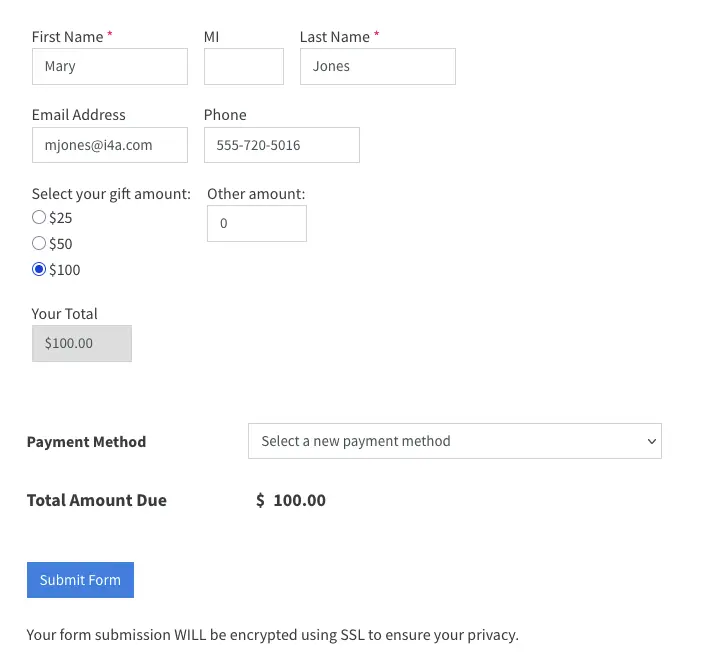
Stop Making Members Type Their Information Twice
Pre-fill form fields with known member data automatically
How Auto-Fill Works
Map form fields to your database columns during form setup:
- Map fields: "First Name" → contact.firstname, "Email" → contact.email
- Members log in: When they access the form, mapped fields auto-populate
- Edit if needed: Members can update any field before submitting
- Faster checkout: Payment forms complete in seconds instead of minutes
Benefits of Auto-Fill
Pre-filled forms improve completion rates and data quality:
- Fewer errors: No typos in email addresses or phone numbers
- Reduced abandonment: Less friction means more completed submissions
- Better experience: Members appreciate not retyping information
- Faster processing: Staff don't need to verify or clean up contact data
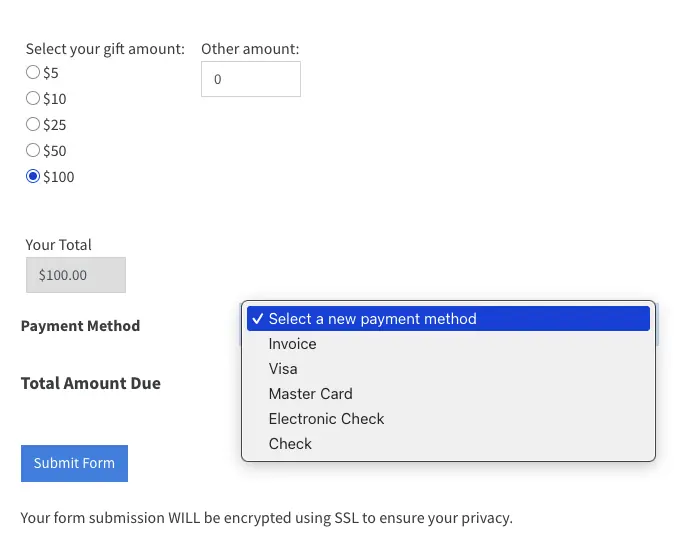
Accept Payments Securely on Any Form
Add payment processing to any form with PCI DSS Level 1 compliant credit card processing via our gateway, 8am™ AffiniPay. Payments automatically post to AR and sync with accounting.
Payment features:
- Fixed prices: Set specific amounts for form submissions
- Open amounts: Let users enter their own amount for donations or sponsorships
- Multiple options: Radio buttons with different prices for ticket types or levels
- Automatic totals: Forms calculate totals when users select multiple paid items
- SSL encryption: All payment forms use HTTPS automatically
- Instant receipts: Members receive email confirmations with transaction details
Automatic accounting:
Payments post to member AR, code to GL accounts, and appear in QuickBooks export—no manual reconciliation
Common Questions
Explore Related Features
See how our integrated platform works together
Ready to Stop Paying Per Member?
See how i4a's association management software with flat-rate pricing and unlimited contacts lets you grow your membership without increasing software costs. Schedule a 30-60 minute demo tailored to your organization's size and structure.
Google Forms® is a registered trademark of Google LLC. Typeform® is a registered trademark of TYPEFORM S.L. i4a is not affiliated with or endorsed by Google or Typeform.
