Association Member Directory Software
Create searchable association member directories and member registries with our directory builder. Customizable filters, map integration, and automatic updates from your membership database. No coding required.
Everything You Need to Connect Your Members
Online membership directory software with maps, privacy controls, and automatic updates
Multiple Directory Styles
Choose from listing-only, detail pages, or map-based directory formats
Customizable Search Fields
Select what fields are searchable—name, organization, location, custom fields
Real-Time Auto-Updates
Directory updates instantly when members edit their profiles
Google Maps Integration
Plot member locations with radius search and interactive markers
vCard Contact Downloads
One-click exports to phones, Outlook, and contact managers
Privacy Controls
Members set field visibility (members, public, or private). Staff control directory access by member type.
Unlimited Directories
Create separate directories for members, consultants, vendors, chapters
Hidden Field Filtering
Create filtered views without showing complex search options
Profile Photo Display
Show member headshots in directories and contact cards
Advanced Search Filters
Text search, dropdowns, checkboxes, location radius, custom fields
Member Opt-Out Options
Members control their directory visibility from profile settings
Randomized Search Results
Randomize result order to give all members equal visibility
Mobile-Responsive Design
Full directory functionality on phones, tablets, and desktops
No Coding Required
Point-and-click builder—no web developers needed
Reusable Templates
Save directory configurations and duplicate for new segments
Unlimited Member Listings
No per-member fees—list 500 or 5,000 at the same price
Integrated Directories vs. Standalone Tools
Real-Time Updates, Zero Manual Work
When members update their profile—new job title, phone number, address, certification—your directory updates instantly. No exports from one system, imports into another, no spreadsheets to maintain. Other platforms require manual data syncing or overnight batch processes.
Set Your Own Search Criteria
Most directory tools limit you to name, location, and maybe job title. i4a lets you pick and choose your own search fields. Include custom fields specific to your database as search options.
Unlimited Directories From One Database
Create separate directories for members, corporate partners, certified consultants, board members, chapter leaders, and volunteers—all from the same database with no duplicate data entry. Other platforms charge per directory or limit how many you can create.
Flexible Search Options
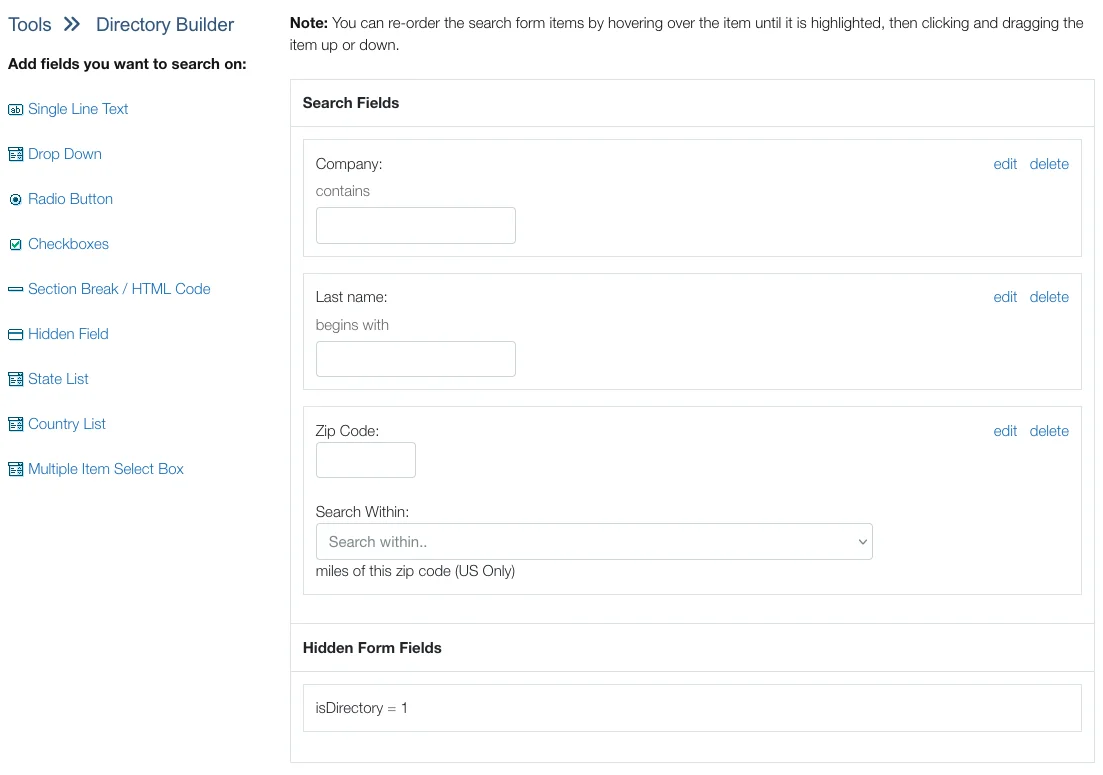
You choose what database fields are searchable. Filter members by location, expertise, certification status, member type, or custom fields unique to your organization.
Search Field Types:
- Text search for names, job titles, company names
- Dropdown filters for categories, member types, industries
- Location search by city, state, zip code, or radius (US zip codes show distance from search location)
- Checkbox filters for areas of expertise, certifications, interests
- Custom fields unique to your organization's needs
Hidden Field Filtering:
- Use hidden filters to automatically show/hide members based on criteria
- Create targeted directories without cluttering the search interface
- Build consultant directories showing only members with active certifications
Three Directory Formats for Different Needs
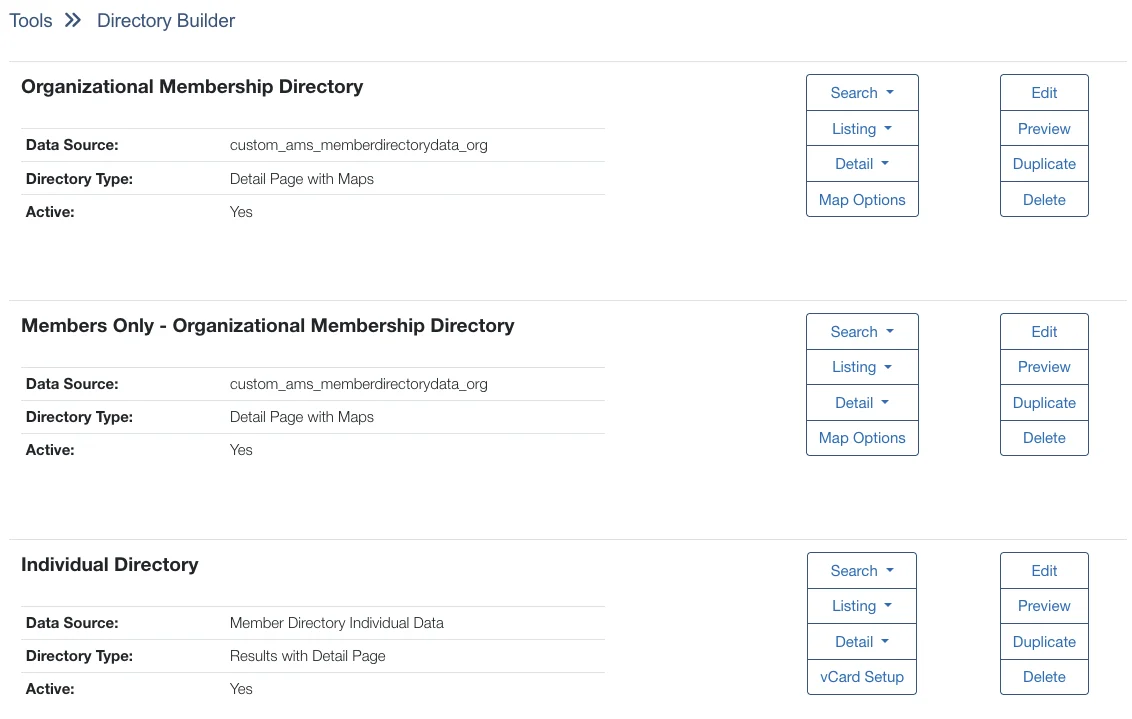
Choose the directory format that best serves your members' networking needs.
Listing Only:
- Display member listings in a clean, searchable format
- Perfect for simple directories where members need to find contact information quickly
- Best for: Contact directories, committee rosters, chapter member lists
With Detail Pages:
- Show summary membership directory listings with links to full member profiles
- Great when members need to learn more about each other before connecting
- Best for: Consultant directories, speaker bureaus, expert networks
With Map Integration:
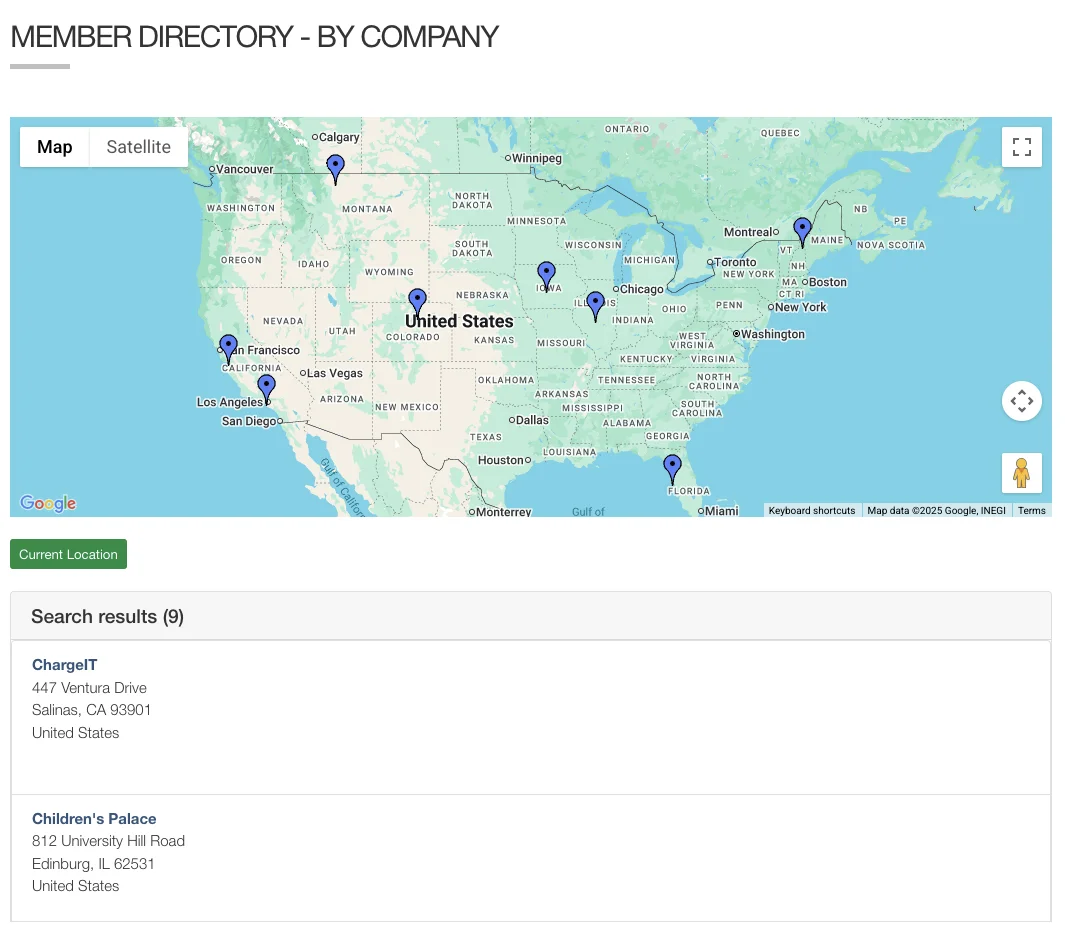
- Plot member locations on an interactive map powered by Google Maps
- Members search by radius, zoom to specific areas, find colleagues nearby
- Best for: Regional networking, chapter locators, service provider directories
Find Members by Location on a Map
Help members discover colleagues, chapters, or service providers near them with integrated Google Maps functionality.
Map Features:
- Plot member locations automatically using address data from your database
- Search by radius to find members within 10, 25, 50, or 100 miles
- Click map markers to view member details or contact information
- Combine with other filters to find certified consultants in a specific region
vCard Downloads:
- One-click contact exports to phones, Outlook, or other contact managers
- Include profile photos in exported contact cards
- Select which fields appear in vCard exports (phone, email, address, social links)
- Universal compatibility with all major contact management systems
Directory Builder FAQ
Explore Related Features
See how our integrated platform works together
Boost Member Engagement With Directories
Membership directories are a key engagement tool that drives retention. Learn how to promote networking, encourage profile completion, and demonstrate membership value in our retention guide.
Ready to Stop Publishing Outdated PDF Rosters?
Schedule a demo to see how i4a's association management software directory builder works with customizable search fields, automatic updates, and privacy controls for your organization.
