Payments & Accounting
Accept online payments, track every transaction, and export to QuickBooks—all without juggling multiple systems. Integrated payment processing and accounting that scales with unlimited members and transactions.
What's Included
All features included with every i4a subscription, members & contacts never leave your web site—no add-ons required
- Online Credit Card Processing
- eCheck (ACH) Support
- Offline Payment Tracking
- Saved Payment Methods
- Refunds & Credits
- Automatic GL Coding
- Complete Audit Trail
- Transaction History
- QuickBooks-Compatible Export
- AR Aging Reports
- Real-Time Revenue Dashboards
- Revenue by GL Account
- Transaction Reports
- Invoice Management
- Member Balance Tracking
- Payment Reminders
- Auto-Renewal
Online Credit Card Processing
Process Visa, Mastercard, Amex, and Discover payments securely on your own domain—no redirects to outside platforms.
eCheck (ACH) Support
Electronic checks with lower fees than credit cards
Offline Payment Tracking
Record checks, cash, wire transfers
Automatic GL Coding
Every payment codes to the correct account
Complete Audit Trail
Every transaction cross-references from journal entries to invoices to payments.
Transaction History
View all receipts, invoices, credits, debits
AR Aging Reports
Track balances by 30/60/90+ day aging
Real-Time Revenue Dashboards
Monitor dues, events, store revenue at a glance
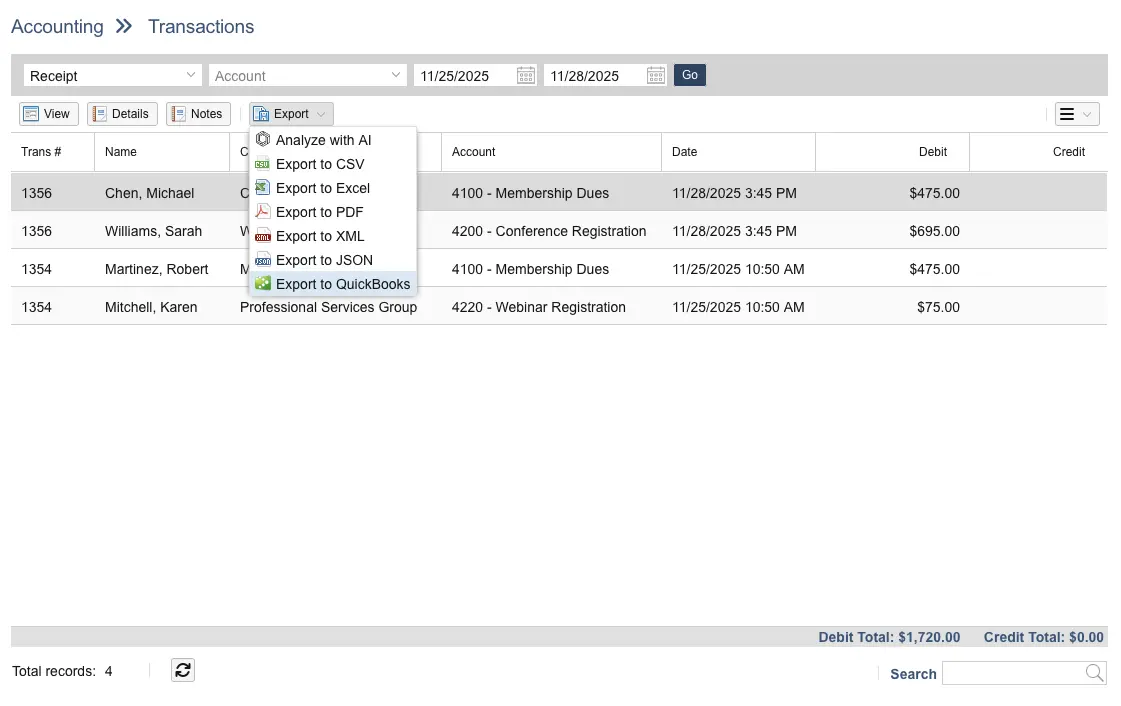
QuickBooks-Compatible Export
Generate formatted transaction batches
Summary Journal Entries
Batch transactions by date range with GL totals
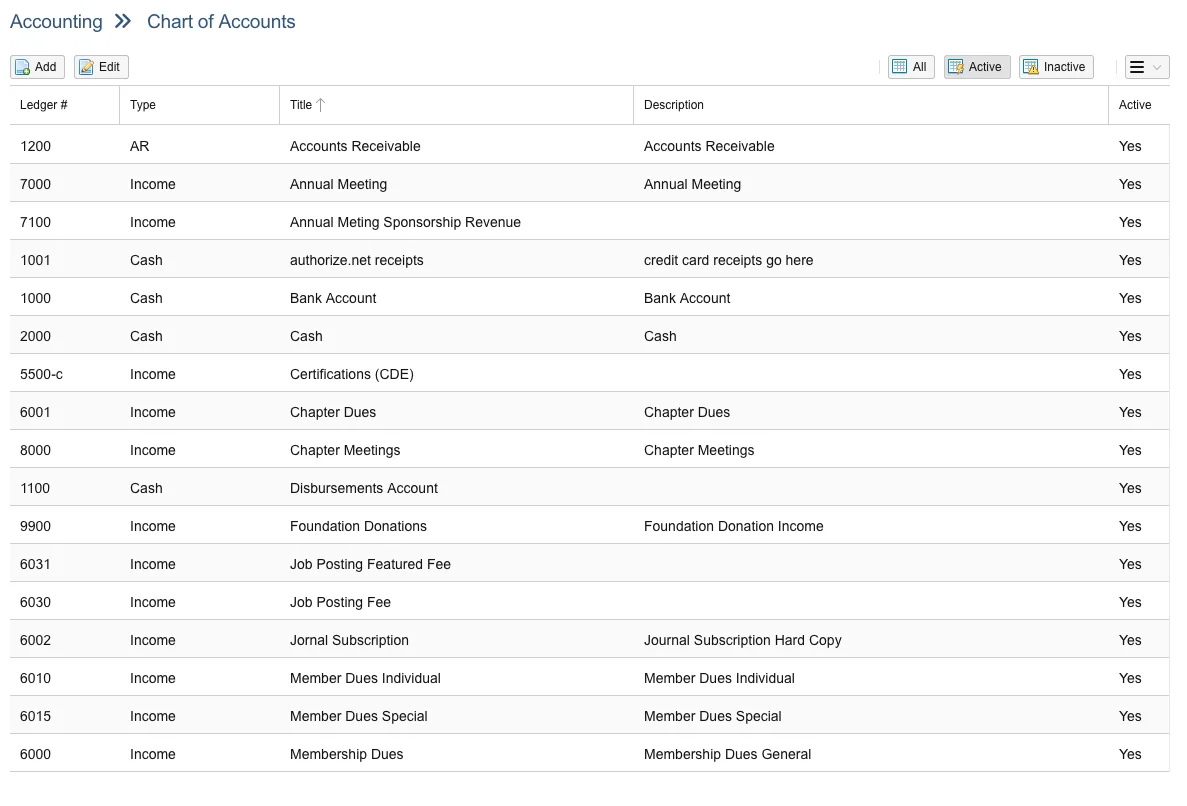
Chart of Accounts Management
Configure GL accounts to match your system
Split & Partial Payments
Accept payments over time and track balances
Refunds & Adjustments
Process refunds and post account adjustments
Automatic Email Receipts
Instant confirmations with transaction details
Saved Payment Methods
Securely save multiple payment methods for faster checkout.
PCI DSS Level 1 Compliant
Secure processing meeting highest standards
Deposit History
Track payments by deposit date and method
Payment Confirmations
Automated receipts with invoice numbers
Jump to details:
Why Payment Processing Works Better When Integrated
No Manual Entry or Reconciliation
Payments automatically link to member records, code to the correct GL account, and appear in transaction history—instantly. No copying data between Stripe™ and QuickBooks™, no missing transactions, no reconciliation nightmares.
Unlimited Transactions at Flat Rate
Your pricing stays flat whether you process 100 transactions or 100,000. No per-transaction platform fees, no per-contact charges for invoices. Just credit card processing fees from your payment gateway.
QuickBooks Desktop Export
Export transaction batches with GL coding already assigned in a format compatible with QuickBooks Desktop™. Your accountant gets properly formatted files ready to import using tools like Transaction Pro Importer.
Integrated With Your Membership Data
Standalone payment processors like Stripe™ require constant manual reconciliation with your membership system. i4a's integrated payment gateway connects directly with your member database.
How it works:
- Automatic linking: When a member renews online, the payment automatically links to their member record and renewal transaction
- Auto GL coding: Every payment codes to the correct GL account based on membership type, event, or product
- Activity logging: All transactions log to the member's activity history for complete tracking
- Real-time dashboards: View dues, events, and store revenue without waiting for month-end reports
Result: Cut monthly close time from days to hours.
Accept Payments Wherever Members Interact
Integrated payment processing across membership, events, and store
Secure Online Credit Card Processing
Accept credit card payments directly through your membership platform:
- Payment gateway integration (8am™ AffiniPay): Level 1 PCI DSS compliant with next-business-day deposits (gross amount)
- eCheck (ACH) support: Electronic checks with lower percentage fees
- Saved payment methods: Members save multiple cards and bank accounts securely for faster checkout
- Simple fee billing: Gateway fees debited once monthly—no deductions from your deposits, no additional monthly fees. No PCI scans.
- Stay in your domain: No redirects to external payment pages
Offline Payment Options
Record and track non-credit card payments:
- Check payments: Record check number, amount, and deposit date
- Cash receipts: Log cash payments with proper GL coding
- Wire transfers & ACH: Track electronic payments from banks
- Invoice billing: Generate invoices for members to pay later
- Apply credits: Use existing credits to satisfy outstanding balances
Export Transaction Batches to QuickBooks
Stop manually entering transactions into QuickBooks. Export formatted batches with GL coding already assigned in a format ready to import with Transaction Pro Importer.
Export features:
- Export invoices separately: Export invoices first, then receipts in the proper format for QuickBooks
- Everything coded: Dues, event fees, products—each transaction type assigned to its own GL account
- Transaction Pro compatible: Import directly into QuickBooks Online or Desktop
- Balance verification: Ensure AR balances match between systems
How it works:
Filter transactions by date range → Export file with GL accounts and amounts → Import to QuickBooks with Transaction Pro → Verify AR balances match
Common Questions
Yes. Members can securely save multiple credit cards and bank accounts (ACH/eCheck) in their profile for faster checkout. Saved payment methods are tokenized—we never store actual card numbers on our servers.
This enables:
- Faster renewals: Members renew dues without re-entering payment details
- Auto-renewal: Automatically charge saved payment methods before membership expires
- Faster event registration: Check out quickly for conferences and events
- Multiple payment methods: Members can save both personal and business cards
Members control their own saved payment methods through the member portal and can add, update, or remove them at any time.
Credit card processing is handled through AffiniPay, a PCI DSS Level 1 compliant payment processor that specializes in associations and non-profits. Processing rates are typically 2.9% + $0.30 per transaction for credit cards, with lower rates available for ACH/eCheck payments.
These are standard industry rates paid directly to the payment processor—i4a does not add any additional transaction fees on top of what AffiniPay charges. Your subscription price stays the same regardless of how many transactions you process. We don't charge per-transaction fees.
Yes. You can configure a convenience fee that's added at checkout when members pay by credit card. This is displayed transparently to the member before they complete their payment.
Many organizations use this to offset processing costs, especially for larger transactions like conference registrations or annual dues. Members can choose to pay by ACH/eCheck (lower fees) or accept the convenience fee for credit card payments.
You control whether to enable this feature and how much to charge. Some organizations absorb processing fees as a cost of doing business; others pass them through. It's your choice.
Funds are typically deposited into your bank account next business day, with the exception of Friday, which are deposited the following Tuesday.
You'll have real-time visibility into all transactions in your i4a dashboard, and AffiniPay provides detailed deposit reports showing exactly which payments are included in each deposit. This makes reconciliation straightforward. Your money is deposited gross. Processing does not deduct its percentage. This they collect by direct debit to your account once a month.
Explore Related Features
See how our integrated platform works together
Ready to Stop Paying Per Member?
See how i4a's membership platform with flat-rate pricing and unlimited contacts lets you grow your membership without increasing software costs. Schedule a 30-60 minute demo tailored to your organization's size and structure.
