Survey Builder
Create online surveys for members, event attendees, or the public. Control who can respond, email survey links directly from the platform, view real-time results, and export response data for analysis.
Survey Builder Features
Everything you need to collect feedback from members and stakeholders
Flexible Access Control
Public, members only, specific member types, or members and non-members by contact type
Email Survey Links
Send surveys directly from the module—access restrictions apply automatically
Real-Time Results
View percentage breakdowns as responses come in
Multiple Question Types
Select, Multi Select, Radio buttons, and Checkboxes
Predefined Option Lists
Common answer sets included—Yes/No, satisfaction scales, and more
Custom Option Lists
Create your own reusable answer options for industry-specific questions
One Submission Per User
Optionally require login and limit to one response per person
Export Raw Data
Run reports and export individual responses for analysis
Respondent Results View
Optionally show results to respondents after submission
Email Response Notifications
Receive responses via email as they're submitted
reCAPTCHA Spam Protection
Reduce bot submissions with Google reCAPTCHA integration
Copy Surveys
Duplicate existing surveys to save setup time
Custom Instructions & Thank You
Add formatted text with images before and after the survey
Return URL Redirect
Send respondents to a specific page after completion
Website Integration
Link surveys on your website via Content Manager
Email Survey Respondents
Follow up with people who completed your survey
Why Use Integrated Surveys?
Key benefits of surveys connected to your member database
Target by Member Type
Survey specific member segments without exporting lists to third-party tools. Send to all members, specific member types, or custom contact groups—access controls are built in.
Email Directly from Platform
No need to copy survey links into separate email tools. Send survey invitations directly from the Survey Builder module, and your access restrictions apply automatically to the recipient list.
One Response Per Member
When you require login, the system can limit each user to one submission. This prevents duplicate responses and ensures accurate data without manually checking for duplicates.
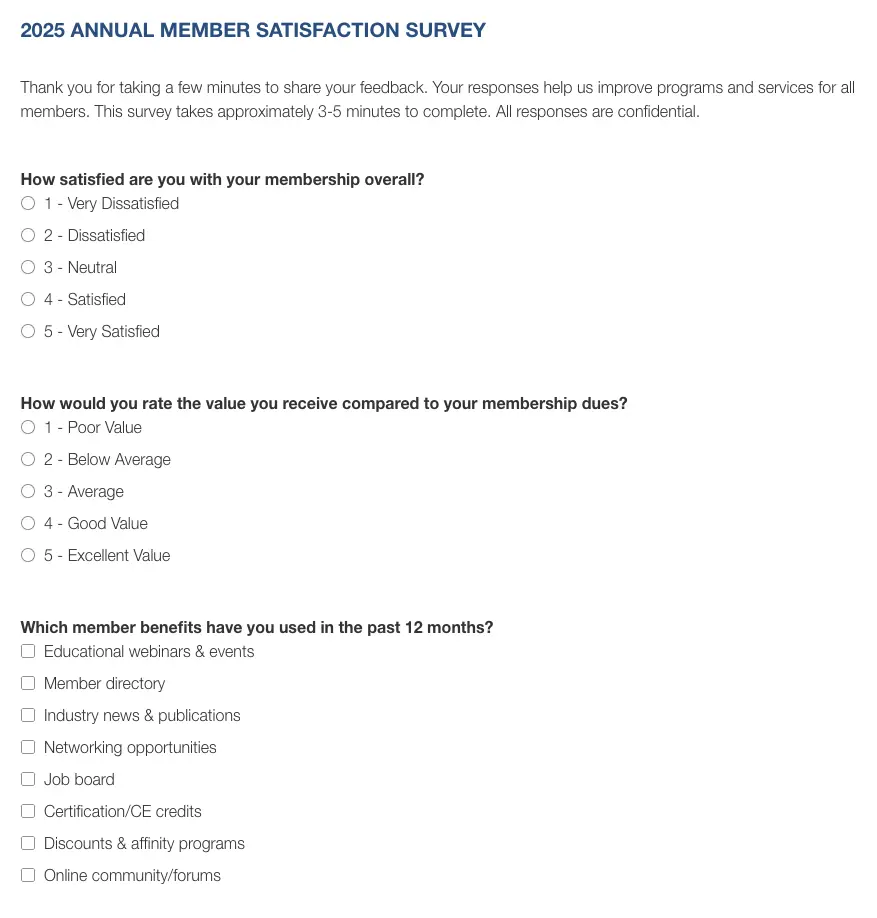
Create & Manage Surveys
Build surveys with multiple question types, custom instructions, and thank-you messages. Set access controls, enable spam protection, and configure response notifications—all from one interface.
- Add survey questions with Select, Multi Select, Radio, and Checkbox response types
- Use predefined option lists or create custom answer choices
- Set access controls—public, members only, or specific member types
- Add instructions and thank-you text with formatting and images
- Enable reCAPTCHA to prevent spam submissions
- Copy existing surveys to quickly create similar questionnaires
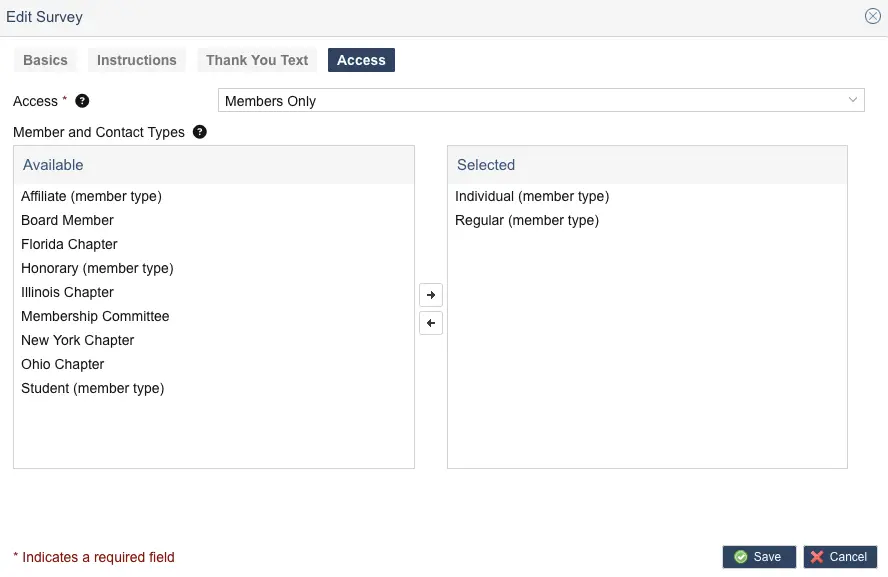
Control Access & Distribution
Decide who can access each survey and how it reaches them. Email survey links directly from the platform, link surveys on your website, and control whether respondents can submit multiple times.
- Set access by audience—anyone, members, specific member types, or contacts
- Email survey links directly from Survey Builder
- Link on your website via Content Manager page options
- Limit to one submission per user when login is required
- Copy the survey URL to share via other channels
- Set active/inactive status to control availability
Real-Time Results & Reporting
See response percentages calculated in real-time as submissions arrive. Run reports on raw data, export for analysis, and optionally let respondents view results after completing the survey.
- Real-time results—percentages update as responses come in
- View tabulated results for each question in the admin
- Run reports on raw survey data
- Export response data for analysis in Excel or other tools
- Optionally show results to respondents after submission
- Email survey respondents if you collected their email address
Common Survey Use Cases
How associations use Survey Builder to gather feedback
Member Satisfaction
Annual or quarterly surveys to gauge member satisfaction, identify improvement areas, and track sentiment over time. Limit to one response per member for accurate data.
Event Feedback
Post-event surveys for conferences, webinars, and meetings. Collect feedback on sessions, speakers, and logistics to improve future events.
Needs Assessment
Survey members about topics for upcoming conferences, training needs, or new services they'd value. Use responses to guide programming decisions.
Frequently Asked Questions
Explore Related Features
See how our integrated platform works together
Member Engagement Guide
Surveys are one tool in your engagement toolkit. Learn strategies for building engaged member communities through feedback loops, participation programs, and meaningful member connections.
Ready to Gather Member Feedback?
Schedule a demo to see how i4a's AMS platform handles surveys with member-type access controls, direct email distribution, and real-time results reporting.
