Quick Summary: AMS Implementation Timeline
- Typical timeline is 60-120 days: Most associations under 10,000 members go live in 60-90 days from contract signing.
- Five phases: Kickoff & Planning → Data Migration → Configuration → Testing & Training → Go-Live.
- Data migration drives the schedule: Clean, organized data always moves faster through the process.
- Success factor: Associations with a committed internal project lead finish faster with better results.
Part of our AMS implementation guide
Your AMS implementation timeline depends on data complexity, team readiness, and customization needs—but most associations go live in 60-90 days. Here's what to expect.
It's a fair concern. Your team needs time to plan, your members expect continuity, and your board wants clarity on when results will start to appear.
After guiding hundreds of associations through transitions over the past three decades, here's the reality: timelines vary. Your schedule is shaped by your data, your team's preparedness, and the complexity of your workflows. That said, there are clear patterns—and realistic ranges—you can plan around.
This guide walks you through every phase of a typical AMS implementation, with realistic timeframes and practical advice for staying on track.
Setting realistic expectations
Anyone promising a complex AMS rollout "in a few weeks" is oversimplifying. Real implementations take real time. As association technology consultants at Effective Database Management note, successful implementations require adequate planning, stakeholder buy-in, clean data, and proper training—none of which can be rushed.
Based on decades of implementation experience, the timeline scales with organizational size, data complexity, and customization needs:
| Association Size/Complexity | Typical Timeline | Key Factors |
|---|---|---|
| Small (under 2,500 members) | 45–75 days | Single data source, standard setup |
| Mid-size (2,500–10,000 members) | 60–90 days | Multiple data sources, moderate customization |
| Large (10,000+ members) | 90–120+ days | Complex data, chapters, extensive configuration |
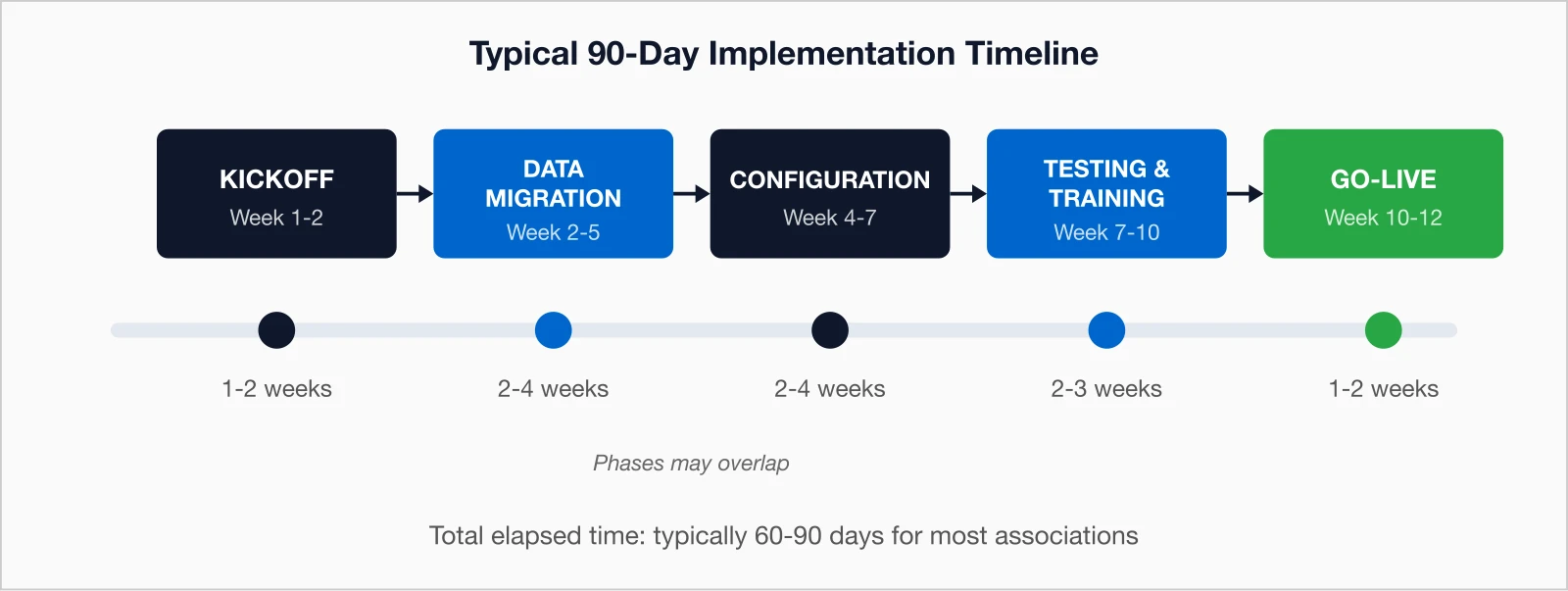
Timeline tip: The fastest implementations happen when associations have already cleaned their data and have a dedicated staff member coordinating the project.
Phase 1: Kickoff & planning (weeks 1–2)
This opening stage lays the groundwork. It's where your project manager sets expectations, finalizes scope, and establishes communication protocols.
What happens
- Kickoff meeting — Align goals and confirm the timeline
- Requirements review — Define workflows and system needs
- Data assessment — Identify migration complexity
- Project plan finalization — Confirm milestones and responsibilities
- Access setup — Create admin accounts for project stakeholders
Your role
- Appoint a project lead (5–10 hours per week)
- Provide system and data access
- Approve the project plan and stakeholder list
i4a approach: Every implementation includes a dedicated project manager who becomes your single point of contact throughout the process.
Phase 2: Data migration (weeks 2–5)
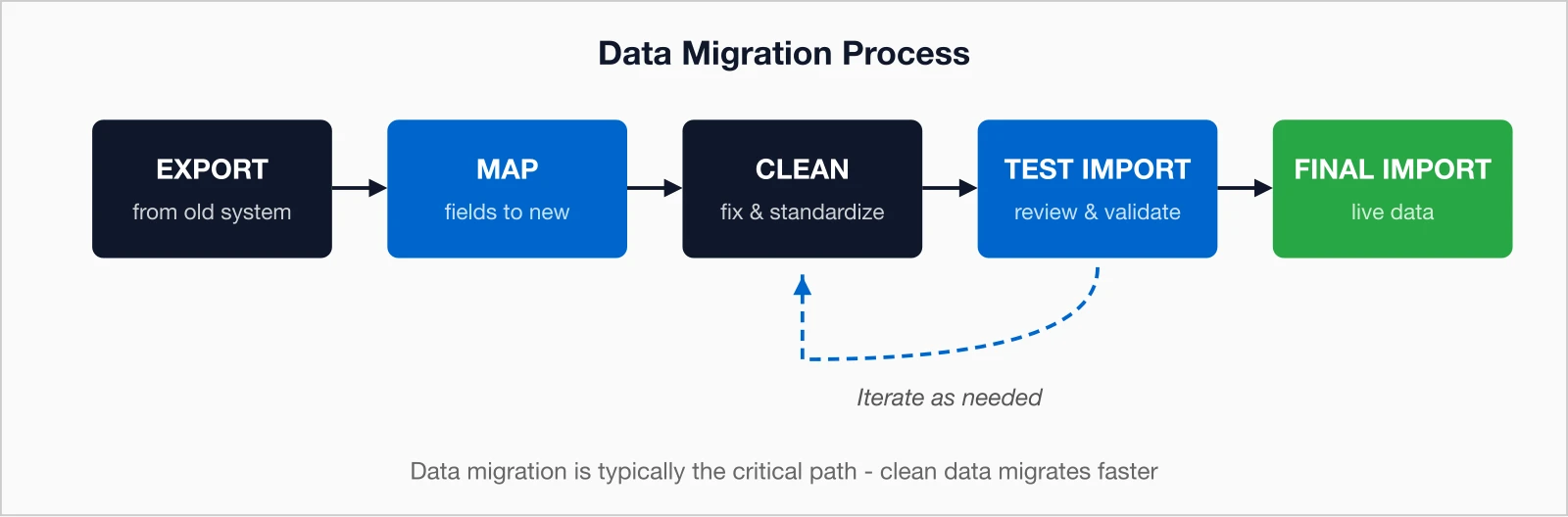
Data migration is often the pacing item—the process that defines your overall timeline. It's where years of member history move safely to your new system.
Migration steps
- Export — Extract data from your current systems
- Map — Match fields to the new AMS structure
- Clean — Remove duplicates, fix inconsistencies, standardize formats
- Test import — Load data and confirm accuracy
- Validate — Review and adjust as needed
- Finalize — Complete the live import
Common slowdowns
- Multiple data sources (old AMS, spreadsheets, email lists)
- Poor data quality or inconsistent formatting
- Complex membership structures (corporate or chapter-based)
- Requirements to import long transaction histories
Pro tip: Begin cleaning your data before you sign a contract. Every duplicate removed early saves time later.
Phase 3: Configuration (weeks 4–7)
While migration continues in the background, configuration tailors your AMS to your workflows. This stage is where the system starts feeling like yours.
Configuration areas
- Membership types — Individual, corporate, student, retired
- Dues rules — Pricing, pro-rating, auto-renewal settings
- Renewal workflows — Reminder schedules, grace periods, lapse processes
- Email templates — Welcome emails, renewal notices, receipts
- Member portal — Visibility and permissions
- Event setup — Registration forms, pricing tiers, capacity limits
- Integrations — Website, accounting, email marketing connections
Your role
- Provide documentation of current processes
- Make timely decisions when options arise
- Review and approve configurations
- Participate in weekly check-ins
Phase 4: Testing & training (weeks 7–10)
Before launch, your staff must test and learn the system thoroughly. This is where issues surface—and get resolved—before members ever see them.
Testing tasks
- User acceptance testing — Test all major functions
- Process walkthroughs — Validate complete workflows (join → renew → register → pay)
- Data checks — Spot-check migrated records for accuracy
- Integration testing — Verify connections to website, accounting, etc.
- Portal validation — Test the member experience
Training components
- Admin training — 4–8 hours for power users
- Staff training — 2–4 hours for daily workflows
- Resource access — Tutorials, documentation, and videos
- Live Q&A — Ask questions before go-live
i4a training: Your setup fee includes 15 hours of onboarding support—online training sessions, implementation guidance, and step-by-step wizards. After launch, you'll have free access to tutorial videos and documentation.
Phase 5: Go-live (weeks 10–12)
Go-live is where the preparation pays off. If testing went smoothly, launch day should feel exciting—not stressful.
Go-live checklist
- Final data sync — Transfer any changes since the last migration
- System cutover — Switch from old system to new
- DNS/website updates — Point member login to new portal
- Team communication — Internal announcement
- Member communication — Notify members about the new platform
Post-go-live support
- Hypercare — Extra help during the first 1–2 weeks
- Quick fixes — Rapid issue resolution and tuning
- Transition — Hand-off to the ongoing support model
Timing tip: Avoid launching during peak renewal season or your annual meeting. Choose a quieter window when your staff can focus.
Factors that influence your timeline
Every project moves at its own pace, but these patterns are consistent across associations:
Speeds Things Up
- Clean, organized data
- Single source system
- Dedicated internal leader
- Efficient decisions
- Standard processes
- Engaged stakeholders
Slows Things Down
- Messy or scattered data
- Multiple data sources
- Committee-by-committee approvals
- Unclear requirements
- Complex structure or staff turnover
Laying the groundwork for success
A smooth implementation starts before you sign the contract. The better prepared your data and processes, the faster—and easier—everything moves.
-
Audit your data
Count records, identify duplicates, gather all sources.
-
Document your workflows
Renewals, joins, events, and key member activities.
-
Assign a project lead
Someone who can dedicate 5–10 weekly hours.
-
Get buy-in
Align leadership and staff on timeline expectations.
-
Start cleanup now
Standardize and update records.
-
Plan your go-live
Pick a calm season to make the switch.
The bottom line
A successful AMS implementation is a partnership. Expect about 60–120 days to reach go-live, depending on complexity. Clean data and engaged staff shorten that range significantly.
- Data migration drives the schedule—clean data means faster migration.
- Active participation leads to stronger adoption.
- Testing and training time pay off tenfold post-launch.
- Timing matters—schedule go-live around your quiet periods.
When implementation wraps, you'll have a modernized system that streamlines your team's work and enhances your members' experience. The effort is real—but so are the rewards.
Key takeaways
- Typical timeline: 60–120 days from contract signing to go-live for most associations under 10,000 members
- Five phases: Kickoff & Planning → Data Migration → Configuration → Testing & Training → Go-Live
- Critical path: Data migration—clean, organized data always moves faster
- Success factor: Associations with a committed internal lead finish faster and with better results
- i4a baseline: 60–90 days for most implementations, including a dedicated project manager
Ready to Start Your Implementation?
i4a implementations typically take 60–90 days for most associations. Your setup fee includes 15 hours of onboarding support, guided wizards, and access to our U.S.-based support team.
Schedule a ConsultationRelated resources
AMS vs CRM: What Does Your Association Really Need?
Understand the key differences and choose the right software for your membership organization.
Membership Software Selection Guide
Complete guide to evaluating and selecting membership software for your association.
Association Management Software Guide
Learn what AMS platforms can do and how they help associations run more efficiently.
10 Critical Questions to Ask During Software Demos
Essential questions to ask vendors before committing to new membership software.
