Quick Summary: Membership Automation
- Time savings are substantial: Mid-sized associations save 84+ hours monthly—worth $40,000+ annually at typical staff rates.
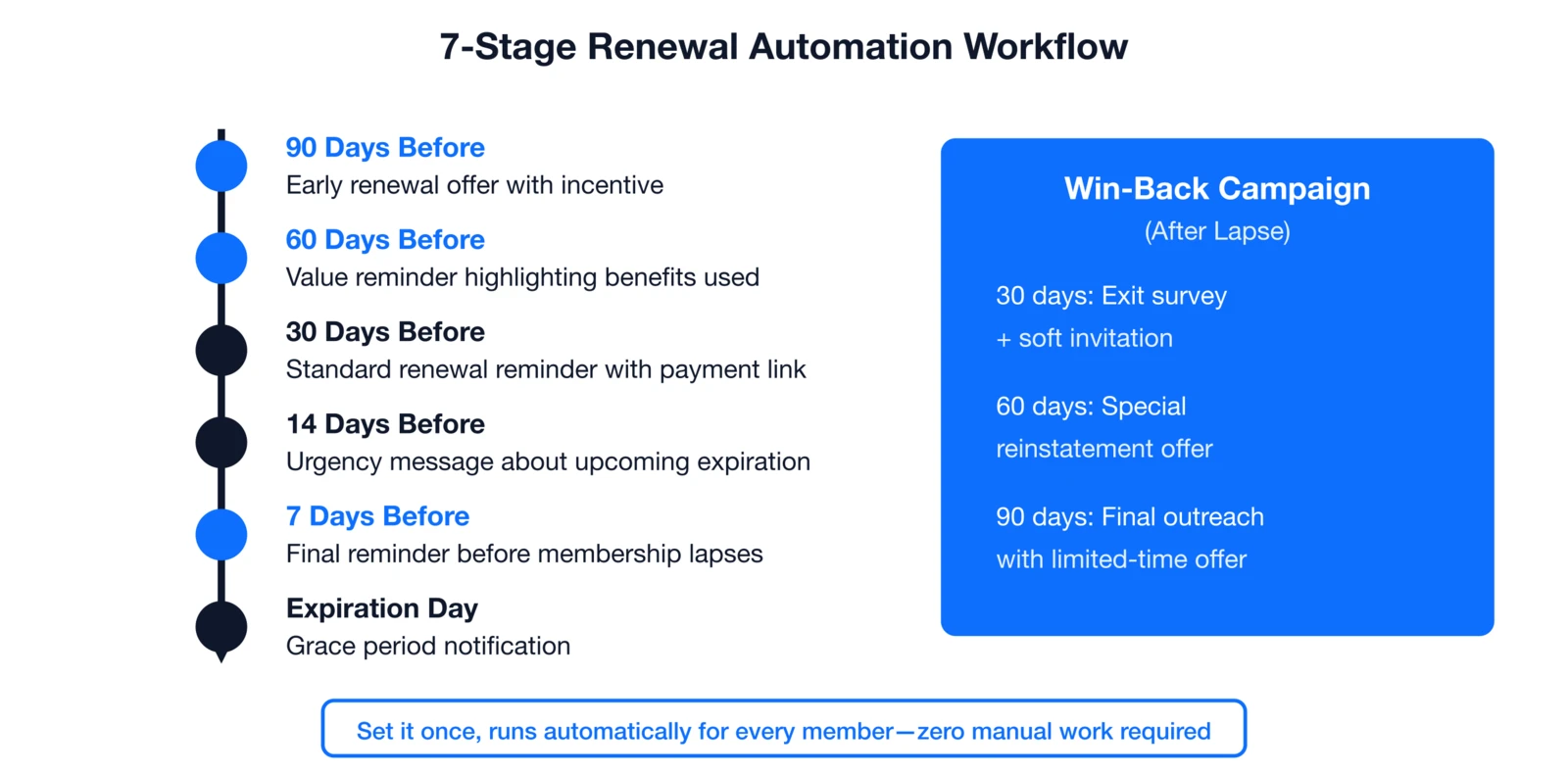
- Renewals offer the biggest ROI: A 7-stage automated sequence can cut weekly renewal processing from 12 hours to 2.
- Onboarding scales efficiently: A 90-day welcome series saves 12–24 hours monthly depending on new member volume.
- Start with quick wins: Phase 1 focuses on welcome emails, receipts, and confirmations—automations you can launch in 30 days.
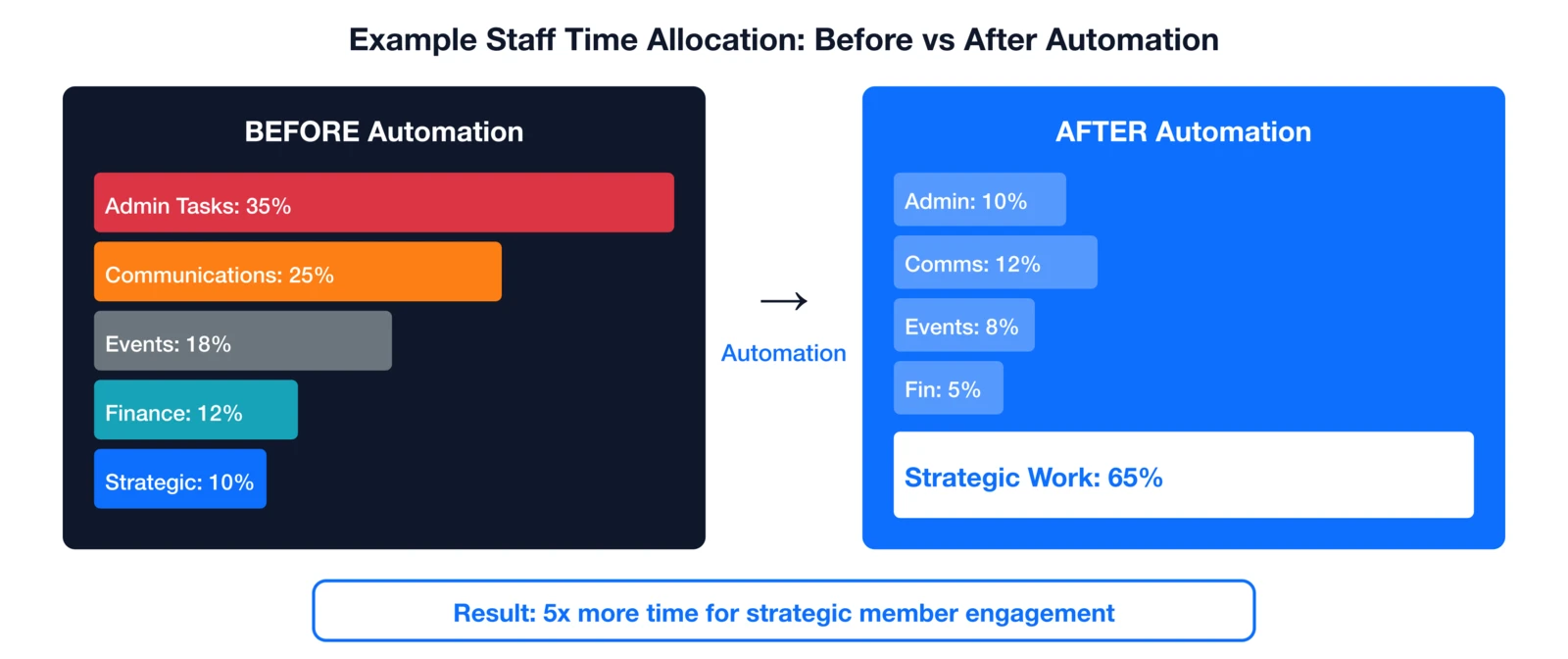
- Shift time to strategy: Automation moves staff from 35% admin work to 65% strategic activities like engagement and development.
Part of our automation guide
Membership automation frees staff from manual renewals, onboarding, events, and communications—often saving hours every week. Here's exactly how to implement it—with time savings calculators and a 4-phase roadmap.
After working with associations for nearly 30 years, I've seen a clear pattern: the organizations that thrive aren't necessarily bigger or better funded—they're the ones that free their staff to focus on members instead of data entry. This guide shows you how to make that shift without replacing anyone on your team. Whether you run a professional association, trade association, or AMC, these steps deliver real savings.
The time drain reality
Association teams face constant pressure from limited resources, making every hour critical for growth. According to MGI's 2025 Association Outlook Report, 45% of associations dedicate just one full-time equivalent to membership, while 52% view staff capacity as a top barrier. This reality underscores why spotting and fixing time drains matters now more than ever.
In a typical 2-3 person association office, here's an example of how staff time might break down before automation:
- 30-40% on admin tasks like data entry and filing
- 20-25% on communications such as emails and calls
- 15-20% on event logistics including registrations
- 10-15% on financial processing like invoicing
- Only 10-20% on strategic efforts like engagement and development
Without automation, risks include burnout, inconsistent member experiences, delays, errors, missed opportunities, and higher costs that erode retention.
Before vs. after automation
Seeing time allocation shift dramatically helps teams grasp automation's power. This before-and-after view for a small-staff association shows how strategic work can dominate—five times more focus on member engagement. It sets the stage for calculating your own gains and tackling high-impact areas first.
Calculate your savings
Putting numbers to potential savings motivates action and justifies investment. For a mid-sized association (1,500 members, 50 new/month, 125 renewals/month, 15 events/year, weekly newsletter, 2.5 FTE), here's a realistic monthly breakdown. These figures prove automation adds the equivalent of extra staff without headcount growth.
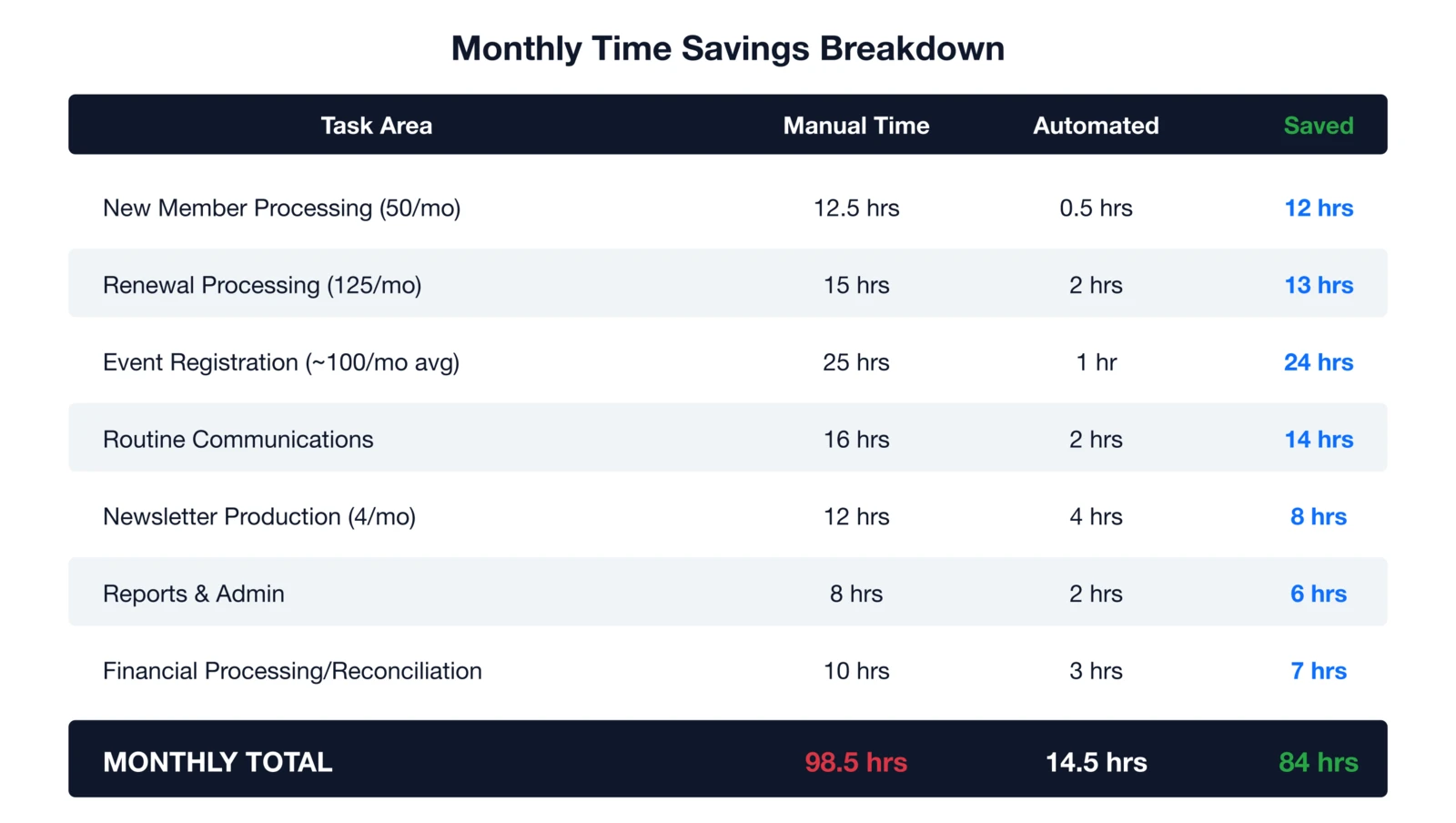

In this example, 84 hours monthly equals over 1,000 yearly—at $40/hour loaded rate, that's $40,000+ value. Typical savings can reach 10-20 hours weekly per staffer, potentially 500-1,000 hours annually depending on association size and processes.
How to automate renewals
Renewals directly impact retention and revenue, making them a top automation priority. Manual handling can consume 10-15 hours monthly for 100 expiring members, but a structured sequence changes that. Implementing this frees staff while boosting completion rates through timely, personalized nudges.
Set up a seven-stage sequence:
- 90 days out: Early offer with incentive
- 60 days: Value reminder of benefits used
- 30 days: Standard reminder with payment link
- 14 days: Urgency on expiration
- 7 days: Final pre-lapse alert
- Expiration day: Grace period notice
- Post-lapse win-back: 30-day survey, 60-day offer, 90-day final outreach
Auto-renewal drops opt-in work to zero for members who enroll. One of our clients reduced weekly renewal time from 12 hours to 2 on exceptions—saving 40+ hours monthly. Here's what I've learned over the years: the associations with the highest retention rates aren't chasing members at the last minute. They're reaching out early, reminding members of the value they've received, and making renewal effortless. That's what this workflow does.
How to streamline onboarding
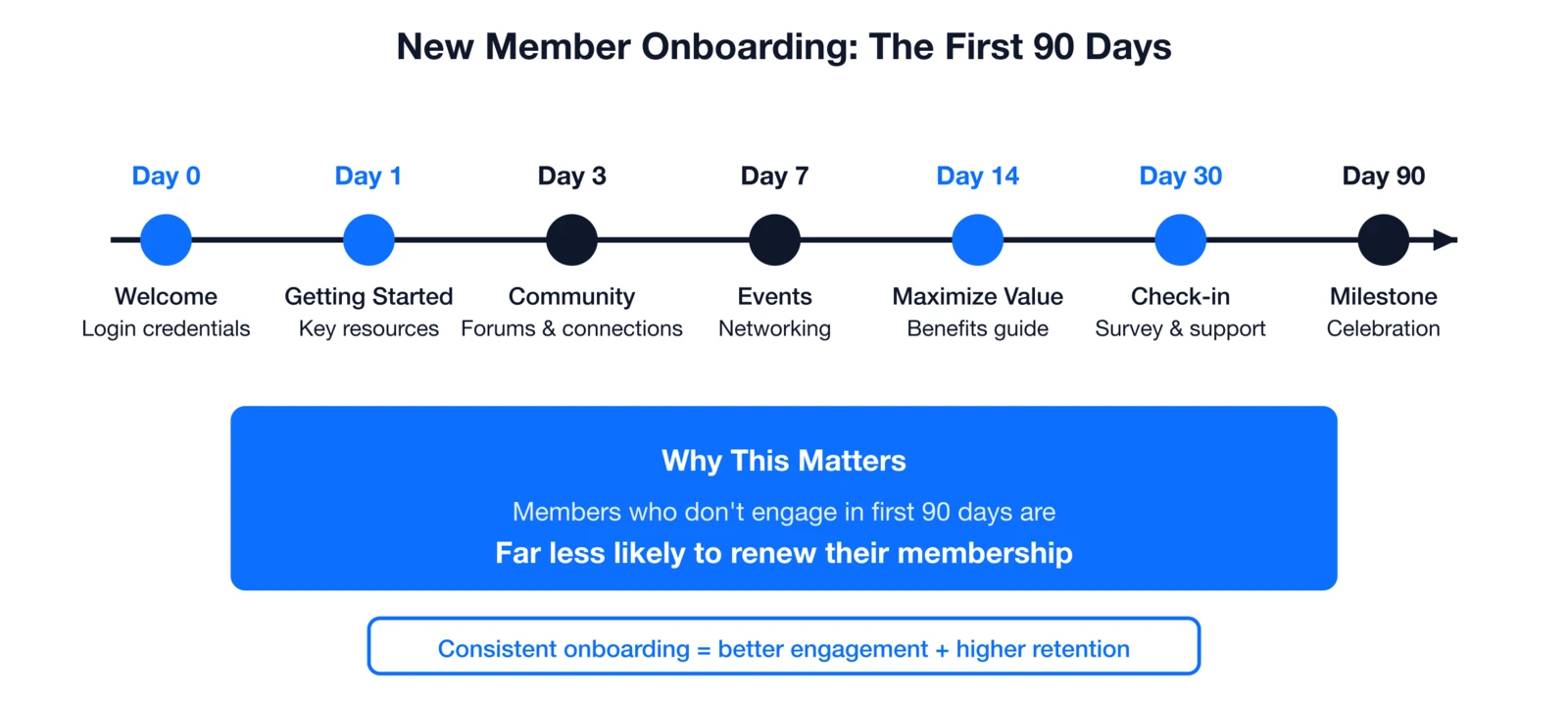
Onboarding shapes first impressions and long-term engagement for new members. Those who don't engage in the first 90 days are far less likely to renew. Automation ensures consistency, saves 15+ minutes per application, builds lasting habits—and after implementation, redirects staff time to proactive relationship-building.
Automate a 90-day sequence:
- Day 0: Welcome with login and next steps
- Day 1: Getting-started guide and resources
- Day 3: Community and forum intro
- Day 7: Events and networking
- Day 14: Maximize-value benefits guide
- Day 30: Check-in survey and support
- Day 90: Milestone celebration
Savings scale:
| Monthly New Members | Manual (15 min ea.) | Automated | Savings |
|---|---|---|---|
| 20 | 5 hrs | 15 min | 4.75 hrs |
| 50 | 12.5 hrs | 30 min | 12 hrs |
| 100 | 25 hrs | 1 hr | 24 hrs |
Self-service portals eliminate update time too.
How to automate events
Events eat staff time on registrations, confirmations, and logistics—often 20 minutes or more per signup manually. Automation standardizes this, enabling focus on high-touch elements like networking. For associations with frequent events, automation can save dozens of hours annually on communications alone.
Trigger on signup:
- Immediate confirmation with details
- 30 days out: Save-the-date and prep
- 14 days: Agenda and logistics
- 7 days: Final travel info
- 1 day: See-you-tomorrow details
- Event day: Check-in and reminders
- Post-event: Thanks, survey, recordings
- 7 days later: CEU certificates
Advanced: Abandoned-cart recovery, waitlists, session reminders, networking matches, calendar invites.
How to automate communications
Routine emails seem quick but stack up into major time sinks across welcomes, reminders, and notices. Automating them eliminates manual sends while keeping messages timely and relevant. Behavior triggers make it feel personal, driving better engagement than date-based blasts.
Common automations:
| Type | Manual Time | Frequency |
|---|---|---|
| Welcome emails | 10-15 min ea. | Per new |
| Birthday/anniversary | 5-10 min ea. | Daily |
| Cert expiration reminders | 15-20 min/batch | Monthly |
| Committee reminders | 10-15 min ea. | Per meeting |
| Failed payments | 10-20 min/issue | As needed |
| Waitlist notices | 5-10 min ea. | As needed |
Key triggers: Joins, profile updates, first events, downloads, inactivity, payment fails, milestones. Newsletters gain dynamic blocks, auto-sends, personalization—potentially saving hours per issue.
How to automate admin work
Administrative backend tasks like approvals, data entry, and reporting quietly drain productivity. Automating them streamlines operations and reduces errors across the board. This foundation lets teams handle exceptions only, reclaiming significant time on reporting alone.
Key automations:
- New member approval routing
- Auto-populate from forms
- Invoice/receipt generation
- Scheduled stakeholder reports
- Duplicate detection/merging
- Status-based access grants
- Lead/task assignment
Solutions include templates, auto-schedules, real-time dashboards, self-service for leaders.
How to set up milestone campaigns
Milestone touches foster loyalty without effort, turning transactions into relationships. Simple automations like birthdays or anniversaries make members feel seen and valued. They require minimal setup but deliver outsized emotional impact over time.
Examples:
- Birthdays: Greeting with offer
- Anniversaries: "X years" note
- Professional wins: Cert/promotion nods
- Org milestones: Success stories
How to build drip campaigns
Drip sequences guide members toward key goals like upgrades or volunteering with progressive nurturing. They build momentum through tailored content at perfect intervals. This targeted approach converts better than one-off messages.
Examples:
- Certification: Step-by-step guidance
- Volunteers: Impact highlights
- Upgrades: Premium pitches
- Donations: Giving buildup
- Conferences: Excitement builders
- Referrals: Colleague invites
Redirect saved time effectively
Saved hours shine when redirected to growth-driving activities. This shift elevates associations from reactive to proactive. Teams report stronger retention and innovation as a result.
Categories:
- Relationships: At-risk check-ins, personal welcomes, lapsed follow-ups, interest matches
- Programs: Member research, content dev, event innovation, partnerships
- Strategy: Board prep, committees, advocacy, planning
- Development: Skills training, conferences, cross-training, trends
Your implementation roadmap
Phased rollout prevents overwhelm and builds momentum with quick wins first. Each stage compounds savings while letting you measure and adjust. Follow this to go live systematically.
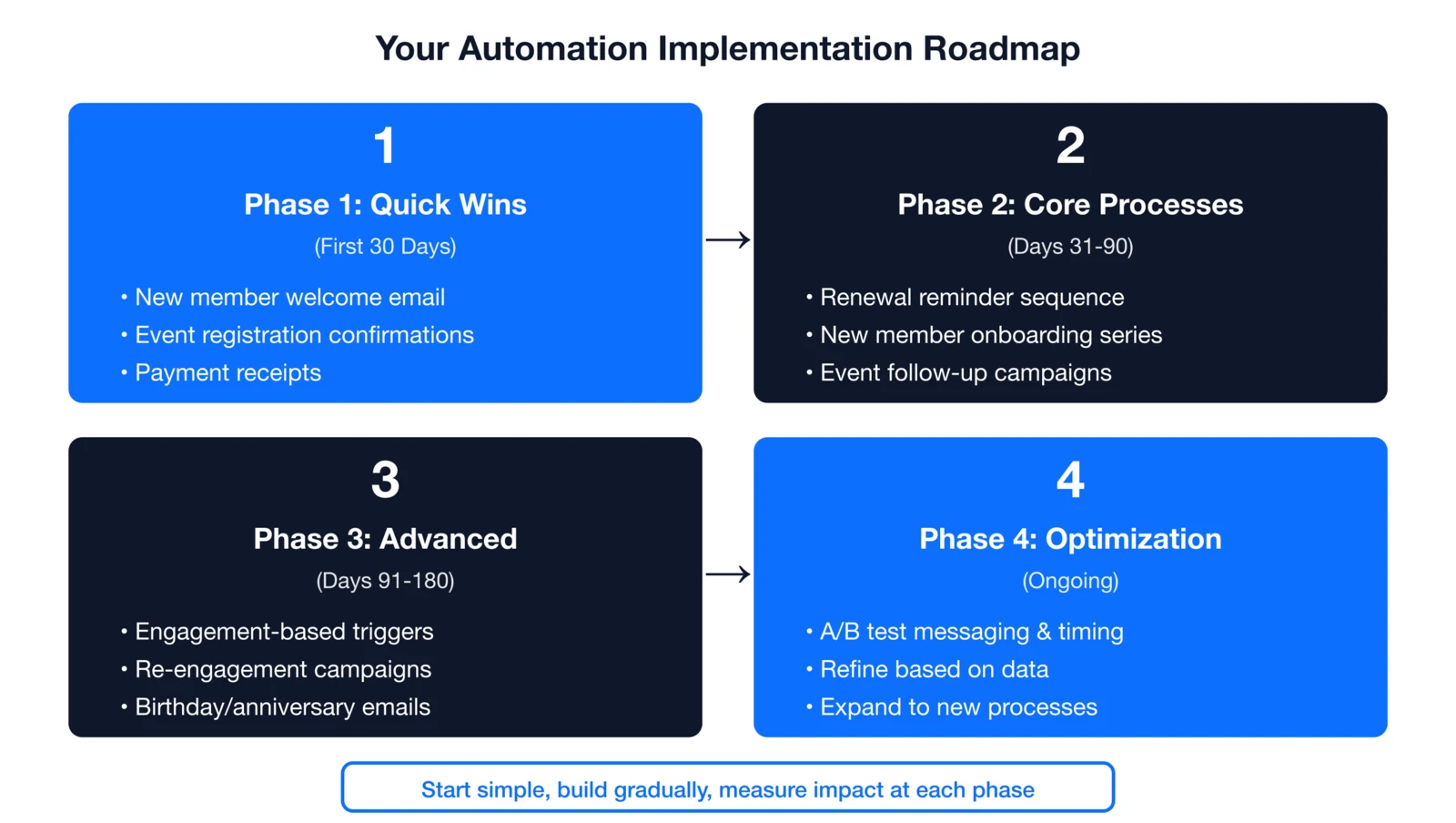
Full details in our Association Automation Guide.
Automation best practices
Best practices ensure automations enhance, not frustrate, members and staff. Balance efficiency with humanity for sustainable results. Regular checks keep everything fresh and effective. One thing I always tell association executives: automation works best when it feels invisible to your members. They should feel like you remembered their birthday or noticed their membership anniversary—not like they're getting batch emails from a machine. The goal is to make your small team feel like a much larger one, without losing the personal touch that makes associations special.
- Do: Start simple, test fully, personalize, monitor metrics, update content, add delays, enable opt-outs
- Don't: Over-automate, set-and-forget, ignore feedback, strip human touch, blast generics
Essential platform features
The right platform unlocks full potential, as tech adoption rises. According to MGI's 2025 Membership Marketing Benchmarking Report, 18% of associations now use AI for membership marketing (with another 13% implementing), and 25% initiated new member onboarding programs in the past year. Prioritize these capabilities:
- Visual workflow builder
- Triggers (dates/actions/changes)
- Segmentation/personalization
- Multi-channel delivery
- Integrations/testing/analytics/A-B
Automate Your Membership Processes
i4a's membership platform includes powerful automation tools for renewals, onboarding, events, and engagement—helping you save 20+ hours per week while delivering exceptional member experiences.
Let's Talk About AutomationRelated resources
Complete implementation guide for association workflow automation including membership, events, and communications.
Membership Automation Platform
Comprehensive guide to membership databases, automated renewals, self-service portals, and choosing the right membership software.
How to Automate Membership Renewals
Step-by-step guide to renewal automation that reduces churn.
Payment Processing Best Practices
Optimize dues collection with auto-pay, ACH, and failed payment recovery.
