Quick Summary: Email Deliverability
- Authentication is mandatory: SPF, DKIM, and DMARC are now required by Gmail and Yahoo for bulk senders—without them, messages face delays or rejection.
- Reputation works like credit: ISPs track bounce rates, spam complaints, and engagement patterns to decide if you're trustworthy.
- Clean lists protect you: Remove hard bounces immediately, re-engage 12-month inactives, and never buy or rent email lists.
- Engagement fuels inbox placement: Opens, clicks, and replies signal wanted mail—low engagement triggers spam filtering.
- Monitor proactively: Keep bounces under 2%, spam complaints under 0.1%, and watch for declining open trends.
Part of our email strategy and marketing guide
Email deliverability determines whether your messages reach member inboxes or vanish into spam. This guide covers SPF, DKIM, and DMARC authentication (now required by Gmail® and Yahoo®), plus list hygiene and reputation strategies that work.
Industry benchmarking data shows 51% of associations rank email as their most effective channel for new member acquisition, outpacing events, calls, and conferences. Sequence Consulting's 2026 Association Trends Report notes that 50% struggle with tailored communications, and deliverability failures make engagement even harder—what's a 25% open rate worth if 20% never arrive?
This guide breaks down how to land emails in inboxes, from authentication protocols to reputation-building habits. After nearly 30 years with associations, I've seen teams transform programs by mastering these basics—ISPs like Gmail® and Outlook® reward senders they trust.
Understanding deliverability
Email deliverability measures the percentage of emails hitting primary inboxes, not spam or bounces—unlike delivery rate, which just checks server acceptance. Receiving servers decide inbox placement in milliseconds based on factors you can control.

Setting up authentication
These protocols verify your identity, blocking spoofers—ISPs now demand them for bulk sends.
Critical requirement: Since February 2024, Google® and Yahoo® require SPF, DKIM, and DMARC for bulk senders (5,000+ daily emails to personal accounts), or messages face delays and rejections.
SPF (sender policy framework)
Add a DNS TXT record listing authorized servers—your ESP, AMS, transactional services. It confirms the sender matches your domain.
DKIM (domainkeys identified mail)
Publish a public DNS key; your platform signs emails with the private key. Verifies no tampering in transit.
DMARC (domain-based reporting)
Builds on SPF/DKIM with policies (monitor/quarantine/reject) and reports to your address.
DMARC policy progression
Progress DMARC gradually:
- p=none (Monitor): Deliver all, get reports. Use for 2-4 weeks to spot legitimate sources.
- p=quarantine: Spam failed ones; continue refining.
- p=reject: Block failures after cleanup is complete.
Many associations uncover forgotten tools here—event platforms, old newsletters—before enforcing.
Building sender reputation
Think of reputation as your email credit score: ISPs track patterns to gauge trustworthiness. Strong reps land in inboxes; weak ones hit spam.
What affects reputation
| Factor | Good Target | Problem Threshold |
|---|---|---|
| Bounce rate | < 2% | > 5% |
| Spam complaints | < 0.1% | > 0.3% |
| Spam trap hits | 0 | Any |
| Engagement | Steady opens/clicks | Low/declining |
| Volume | Predictable | Sudden spikes |
IP reputation ties to your server (shared OK for most; dedicated for 100k+/month). Domain reputation sticks with you—prioritize it.
Mastering list hygiene
Clean lists protect reputation—bad addresses signal poor maintenance. Automate where possible.
- Hard bounces: Remove instantly (nonexistent addresses).
- Soft bounces: Retry 24-72 hours; treat as hard after 3-5 fails.
- Inactives (12+ months): Re-engage first, then reduce frequency or remove.
- Never buy/rent lists: They plant spam traps and tank long-term rep—I've seen months of recovery from one bad buy.
Re-engagement campaign
Win back inactives with a 3-email sequence (5-7 days apart):
- Email 1: "We miss you" – Remind value.
- Email 2: "Update preferences" – Tailor content/frequency.
- Email 3: "Last chance" – Warn of removal.
Non-openers go; open-but-no-clicks to low-frequency; engagers return fully.
Crafting spam-safe content
Filters scan deeply—avoid classics while nailing tech basics.
- No ALL CAPS, excessive !!, spammy phrases ("FREE!!!", "Act now!").
- Match subject to content; no hidden text.
- Clean HTML (no Microsoft® Word residue, nested tables).
- Balanced text/images; reputable links (skip shorteners).
- Prominent unsubscribe (CAN-SPAM must).
Boosting engagement signals
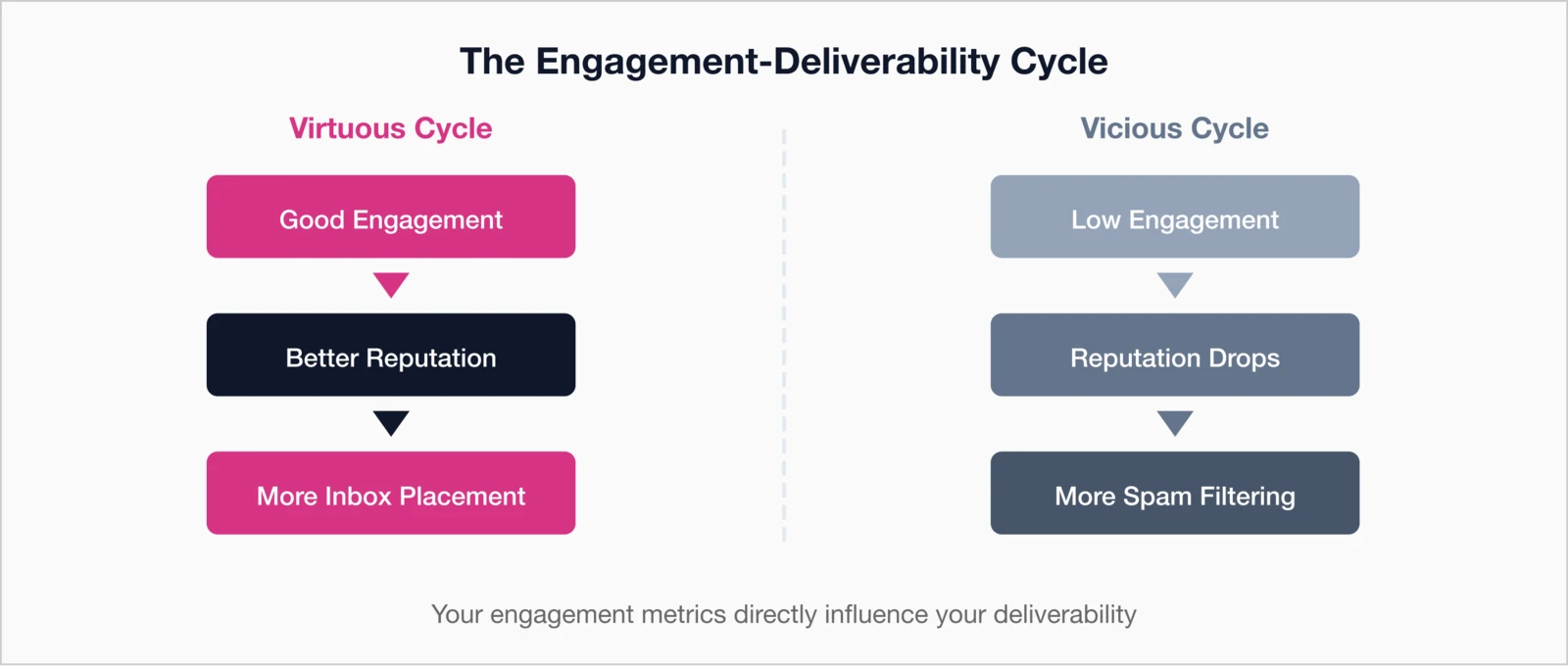
ISPs prioritize wanted mail—engagement fuels a virtuous cycle.
Positive signals: Opens, clicks, replies, contacts adds.
Negative signals: Ignores, deletes, spam marks, unsubs.
Tips: Segment by engagement, send relevant content, optimize times/subjects. See our email segmentation guide.
Monitoring metrics
Track to improve—set alerts for thresholds.
| Metric | Target | Action If... |
|---|---|---|
| Hard bounces | < 1% | > 2%: Clean list |
| Spam complaints | < 0.1% | > 0.2%: Investigate |
| Open trends | Stable/up | Declining: Dig in |
| Inbox placement | > 90% | < 80%: Act |
Tools: Google® Postmaster (domain rep, spam), Microsoft SNDS, DMARC reports, ESP dashboards. Start with Postmaster—it's free.
Recovering from issues
Patience pays—diagnose then fix systematically.
- Check auth/reputation/lists/content.
- Fix tech, clean lists, cut volume to engagers.
- Send high-value content; expand slowly.
Weeks of good habits rebuild trust.
Prevention beats recovery: Hygiene and monitoring prevent most issues—maintenance is easier than repair.
Key takeaways
- Authentication (SPF/DKIM/DMARC) is mandatory.
- Clean lists via hygiene and re-engagement.
- Engagement drives ISP trust.
- Watch bounces >2%.
Deliverability foundations let great emails shine. Build habits so it "just works"—members expect to hear from you. Explore our full Association Email Marketing Guide or metrics benchmarks.
Ensure Your Member Emails Reach the Inbox
i4a's email platform tracks opens and clicks, with optional DKIM and DMARC authentication—so you can focus on content, not technicalities.
See Our Email Marketing FeaturesRelated resources
Email Segmentation for Associations
Target the right members with the right messages.
Understand what good looks like for association emails.
Complete strategy guide for association email marketing.
Member Communication Best Practices
Effective strategies for all member communications.
