Quick Summary: Enterprise Association Software
- Enterprise = complexity, not size: Multi-chapter structures, organizational memberships, and credentialing programs define enterprise needs.
- Automation is essential: What works at 1,000 members breaks at 10,000—sophisticated automation keeps operations running.
- Organizational membership management: Managing companies with multiple contacts, hierarchies, and varied benefits is crucial.
- Integration flexibility: Large associations need connections to financial systems, websites, and learning management.
Part of our enterprise software guide
When your association manages 10,000+ members, multiple chapters, and complex organizational relationships, your technology needs expand beyond the basics. You require enterprise-level functionality—but that doesn't have to come with enterprise-level pricing or complexity.
Large associations juggle demanding operations: hundreds of corporate accounts, thousands of individual contacts, credentialing programs, and an ongoing need for accurate data and reporting. According to Sequence Consulting's 2026 Association Trends Report
After nearly 30 years of working with associations of all sizes, I've noticed a pattern: the organizations that struggle most aren't necessarily the ones with the most members—they're the ones with the most complexity and the least flexibility in their software. The good news? You don't have to choose between power and usability.
This guide highlights the capabilities that matter most for enterprise associations and helps you separate essential features from unnecessary noise.
What makes an association "enterprise"
Size alone doesn't define enterprise status. Some 15,000-member associations operate simply, while smaller ones—3,000 members or fewer—manage intricate operations that qualify as enterprise. The real factor is complexity.
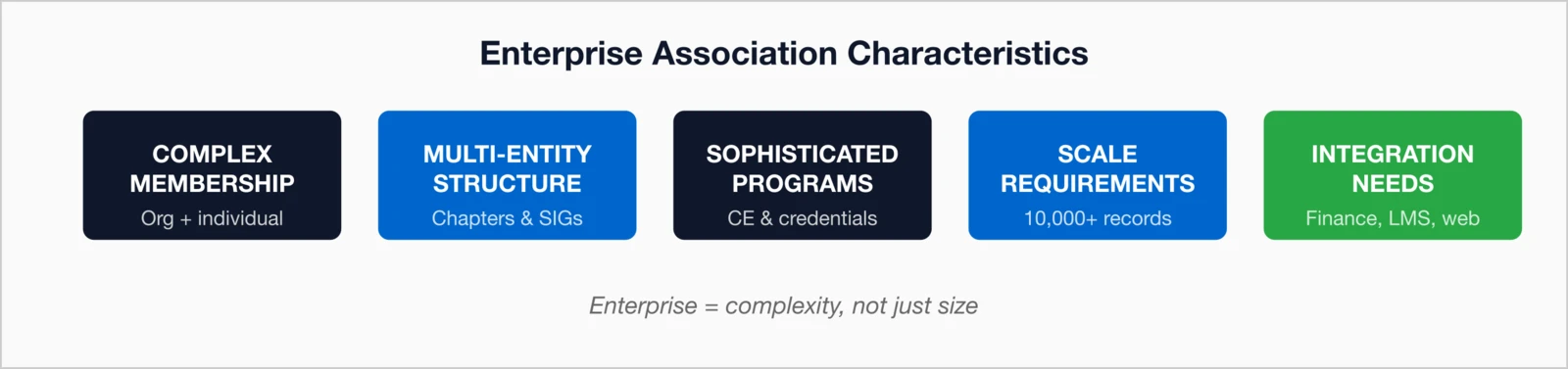
You likely have enterprise needs if you have:
- 10,000+ member records (including lapsed and prospects)
- Organizational memberships with multiple contacts per company
- Chapter or component structures with local affiliates
- Credentialing or certification programs
- Multi-user staff permissions and roles
- Complex pricing and dues structures
- Integration needs with accounting, LMS, or other systems
Key insight: Enterprise doesn't have to mean complex for users. The best platforms manage complexity behind the scenes while keeping daily tasks intuitive.
Core enterprise features
Enterprise-grade association management software
Organizational Membership Management
- Manage company or organizational records with multiple contacts
- Designate and manage primary and billing contacts
- Track benefits and billing at both company and individual levels
- Handle bulk employee memberships and hybrid billing
Multi-Level Access Control
- Role-based permissions and department-specific access
- Chapter administrator roles with localized control
- Audit logging and compliance tracking
- Custom user-type restrictions
Credentialing & Certification
- Track multiple credentials and continuing education credits
- Manage application, approval, and recertification workflows
- Automate reminders and certificate generation
Advanced Event Management
- Coordinate multi-day conferences and session-level registration
- Manage speakers, exhibitors, and CE credit assignments
- Print badges, monitor check-ins, and sync attendance data
Managing complex membership structures
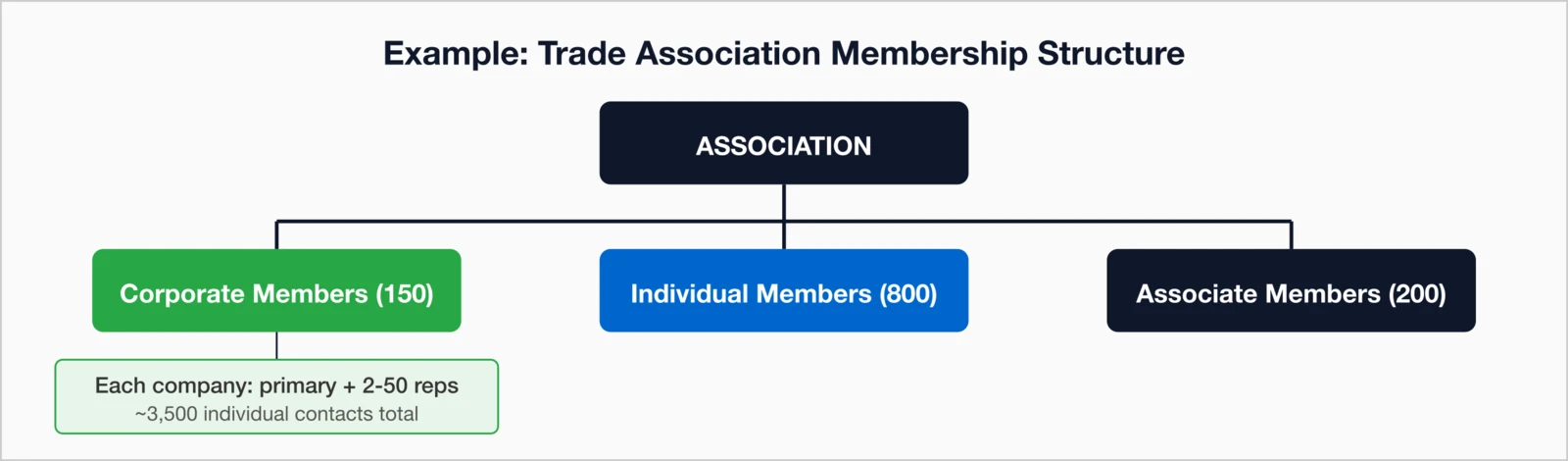
Large associations often outgrow "single-tier" membership systems. Strong platforms can accommodate intricate structures across organizations, chapters, and individuals.
Organizational memberships
Trade and professional associations
- Company records with detailed billing and renewal tracking
- Multiple contact roles—primary, billing, and representatives
- Employee rosters to assign benefits
- Tiered corporate levels (e.g., Gold, Silver, Bronze)
- Hybrid billing: corporate dues + optional individual fees
Chapter or component structures
Associations with local or regional entities need chapter-specific support.
- Automatic chapter assignment by geography or member selection
- Dual membership tracking (national + local)
- Chapter-level reporting and admin access
- Revenue share tracking by chapter
Advanced automation requirements
At enterprise scale, manual work quickly breaks down. Automation is the backbone of efficiency, ensuring consistency and timely engagement without staff intervention.
Here's the thing: I've seen associations with 15,000 members running smoothly with a small team, and I've seen 3,000-member organizations drowning in manual processes. The difference is almost always automation. When renewal reminders, status updates, and welcome sequences happen automatically, your staff can focus on the work that actually requires human judgment—member relationships, strategic planning, and program development.
Renewal automation
- Multi-stage reminders customized by member type
- Automated status transitions (active → grace → lapsed)
- Pro-rated dues and auto-renewal with payment on file
Communication automation
- Triggered, personalized emails tied to key actions or dates
- Onboarding drip campaigns for new members
- Scheduled automated reports for leadership
Workflow automation
- Multi-step approval processes for applications or credentials
- Automated CE notifications and committee term rotations
- Event follow-up sequences
Automation payoff: Targeted, timely reminders can recover a large percentage of members who would otherwise lapse.
Enterprise reporting requirements
Enterprise associations operate in a data-rich environment. Leadership, finance, and membership teams all need visibility into performance metrics and trends.
Executive dashboards
- Real-time membership, growth, and retention data
- Financial snapshots by source or category
- Engagement analytics: event participation, portal logins, email response
- Trend visualization and forecasting
Operational reports
- Renewal and retention pipelines
- Lapsed member analysis and recovery tracking
- Event performance reporting
- Chapter comparisons and roll-ups
Custom reporting
- Ad-hoc report builders for self-service queries
- Saved templates for recurring needs
- Export tools (Excel, CSV, PDF)
- Automated report delivery to stakeholders
Integration requirements
Enterprise associations rarely operate in isolation. The right software connects seamlessly with existing systems to ensure data consistency across every platform.
| Integration Type | Why It Matters |
|---|---|
| Financial Systems | Automate posting of dues and event revenue |
| Website/CMS | Enable member login and gated content |
| Learning Management | Single sign-on and sync of CE credits and course data |
| Email Marketing | Keep contact records consistent |
| Event Platforms | Track attendance and CE credits |
API and authentication requirements
- Well-documented REST APIs for custom integration
- Webhook support for real-time notifications
- Bulk data access for BI and analytics
- Single sign-on (SSO) for unified user experiences
Enterprise evaluation framework
Before you commit, assess each platform through these key lenses:
| Capability Area | Key Questions |
|---|---|
| Scalability | Can it handle our size now and double later? Any performance limits? |
| Organizational Members | How does it manage multi-contact companies and benefits? |
| Chapter Support | Can chapters self-manage members and revenue? |
| Credentialing | Does it handle multiple credentials and recertification? |
| Automation | Which workflows can we easily automate in-house? |
| Reporting | Are dashboards customizable? Can we build new reports? |
| Integration | What prebuilt integrations exist? What's the API depth? |
| Support | What coverage and account management come standard? |
The bottom line
Enterprise associations demand tools that can manage complexity smoothly, not amplify it.
One thing I've learned from working with large associations: the software selection process often gets overcomplicated. Committees spend months evaluating features they'll never use while overlooking the basics that matter most—reliable support, transparent pricing, and a system that won't punish you for growing. The best enterprise platform is one your team will actually use every day, not one that looks impressive in a demo but creates friction in practice.
- Enterprise = complexity, not just size. Structures, credentials, and governance drive real requirements.
- Automation is essential. What works for 1,000 members breaks at 10,000.
- Reporting has to deliver. Leaders, boards, and chapters need tailored views.
- Integrations keep data flowing. No large association thrives in isolation.
- Simplicity still matters. The best platforms hide the complexity from everyday users.
- Predictable pricing helps everyone. Scalable, flat-rate models promote growth without sticker shock.
The right enterprise platform lets your staff focus on impact—while the system intelligently manages the scale, structure, and automation that keep your organization running.
Key takeaways
- Enterprise = complexity, not size: Multi-chapter structures, organizational memberships, and credentialing programs define enterprise needs
- Automation is essential: What works at 1,000 members breaks at 10,000—sophisticated automation keeps operations running
- Organizational membership management: Managing companies with multiple contacts, hierarchies, and varied benefits is crucial
- Reporting has to deliver: Leaders, boards, and chapters all need tailored views and custom reporting capabilities
- Integration flexibility: Large associations need connections to financial systems, websites, and learning management
Enterprise Features Without Enterprise Complexity
i4a delivers enterprise-grade capabilities with a user-friendly interface your team will actually want to use. See how we support large associations.
Schedule a DemoRelated resources
Small Association Software Guide
Right-sized solutions for growing organizations.
What to expect during software transition.
Unlimited Members Software Guide
Why flat-rate pricing benefits large associations.
Solutions for organizational membership structures.
