Quick Summary: Software Demo Questions
- Ask about hidden fees first: Per-member costs, transaction fees, setup, support tiers, and training can turn a $99/month platform into $500+.
- Data migration determines success: Ask who handles it, timeline estimates, testing procedures, and whether migration costs are included.
- Test the member experience: Request live demos of member-facing portals, renewal flows, and event registration—not just admin dashboards.
- Evaluate support and security: PCI compliance, response times, and support channels matter as much as features when problems arise.
Part of our software evaluation guide
Software demo questions separate informed buyers from those who regret their choice a year later. In just 30-60 minutes, you need to uncover hidden fees, migration risks, and support reality—not just watch a polished presentation.
Too many organizations walk away from demos impressed by flashy features but without answers to their most important concerns. Months later, after implementation, they discover limitations that could have been identified upfront.
Don't let that happen to you. Here are 10 critical questions to ask during every membership software demo to ensure you make an informed decision.
"What is your pricing model, and are there any hidden fees?"
Pricing transparency should be your first priority because it reveals how a vendor does business. Many vendors advertise attractive base prices that balloon once you add essential features, payment processing, or additional users—turning a $99/month platform into a $500/month commitment. Understanding the true total cost of ownership upfront prevents budget surprises that can derail your implementation or force you into an uncomfortable renegotiation mid-contract.
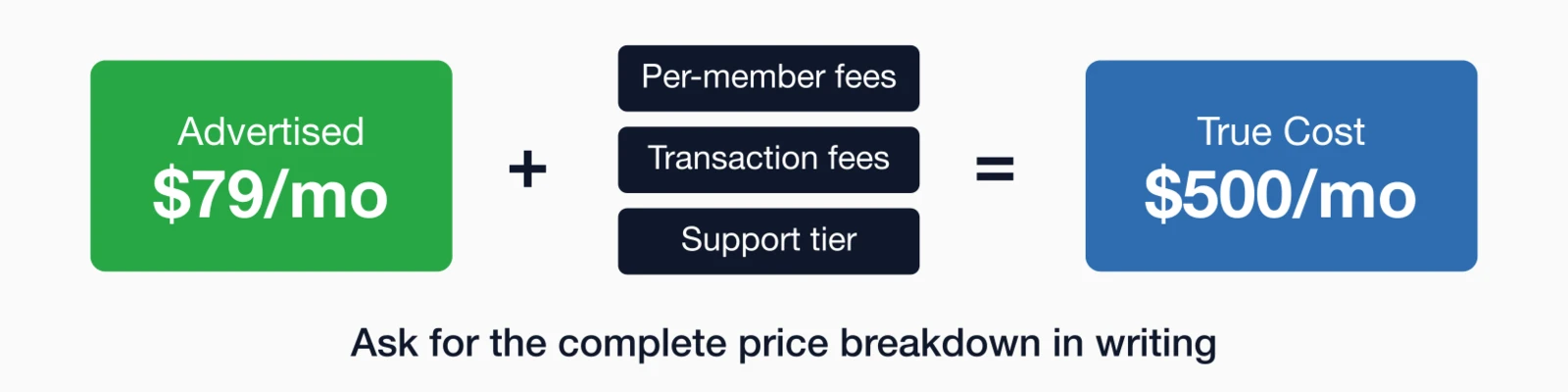
Specifically ask about:
- Per-member fees (does the price increase as you grow?)
- Transaction fees on payments
- Charges for additional users or administrators
- Costs for support, training, or implementation
- Fees for integrations or API access
- Email sending limits and overage charges
- Data migration costs
Pro Tip: Ask for a complete price breakdown in writing before the demo ends. If a vendor is hesitant to provide transparent pricing, that's a red flag.
"How does data migration work, and what support do you provide?"
Data migration is where implementations succeed or fail. Your member database represents years of accumulated relationships, historical transactions, and engagement data—and moving it to a new platform introduces risk at every step. A vendor's migration process reveals their experience level and commitment to your success, since organizations that struggle with migrations often face months of data cleanup, angry members who lost their history, and staff scrambling to reconstruct missing records. Understanding the migration process upfront is essential.
Key points to clarify:
- Do they provide data migration assistance or is it self-service?
- What data formats can they accept (CSV, Excel, database export)?
- How long does migration typically take?
- Can you test the migration before going live?
- What happens to your data if you decide to leave their platform?
- Are there additional fees for data migration services?
"Can you show me how a member would [specific action] on their own?"
The member-facing experience determines whether your platform drives engagement or creates friction. Sales demos typically showcase the admin interface with its impressive dashboards and automation tools, but your members never see that side—they only interact with the portal, renewal forms, and event registration pages. A platform that's powerful for staff but confusing for members generates support tickets, renewal abandonment, and frustrated complaints to your team. Instead of watching a guided tour, ask to see the member experience for your most common use cases.
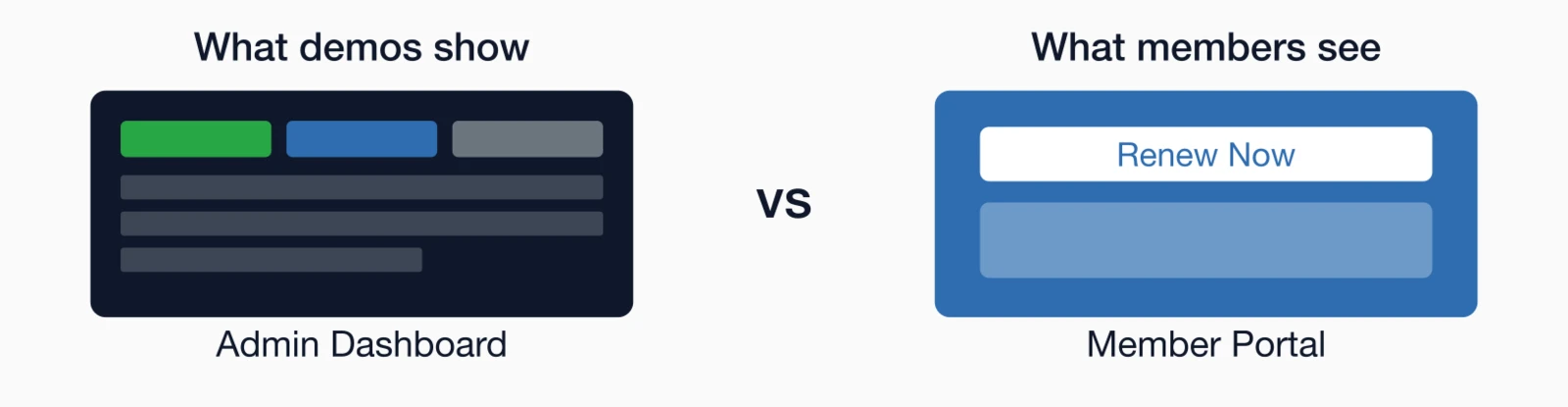
Examples of actions to request:
- "Show me how a member would renew their membership online"
- "Walk me through registering for an event with multiple session options"
- "How would a member update their profile information?"
- "Can you demonstrate how someone would access member-only resources?"
- "Show me the mobile experience on your phone"
This reveals how intuitive the platform really is and whether your members will embrace it or resist it. The quality of the membership management interface and event registration experience directly impacts member satisfaction and adoption rates.
"How customizable is the platform for our specific needs?"
Associations aren't interchangeable, and neither are their software requirements. Your membership structure, pricing tiers, committee workflows, and communication preferences reflect decades of organizational evolution and member expectations. Forcing your processes into rigid software templates creates workarounds, manual interventions, and frustrated staff who spend time fighting the system instead of serving members. Your software should adapt to your processes, not force you to change how you operate.
Ask about customization options for:
- Custom fields and data collection
- Membership types and pricing tiers
- Automated workflows and business rules
- Email templates and communications
- Reports and dashboards
- Forms and applications
- Website design and branding
Request to see examples from organizations similar to yours to gauge what's possible. Strong reporting and analytics capabilities are essential for tracking the effectiveness of your customizations.
"What integrations do you offer, and is there an open API?"
Modern associations rely on an ecosystem of specialized tools, and your membership platform sits at the center of that ecosystem. Without proper integrations, staff spend hours manually transferring data between systems, members receive duplicate or conflicting communications, and your financial records never quite match your membership reports. A platform with strong integration capabilities eliminates these silos and keeps your data synchronized across all systems.
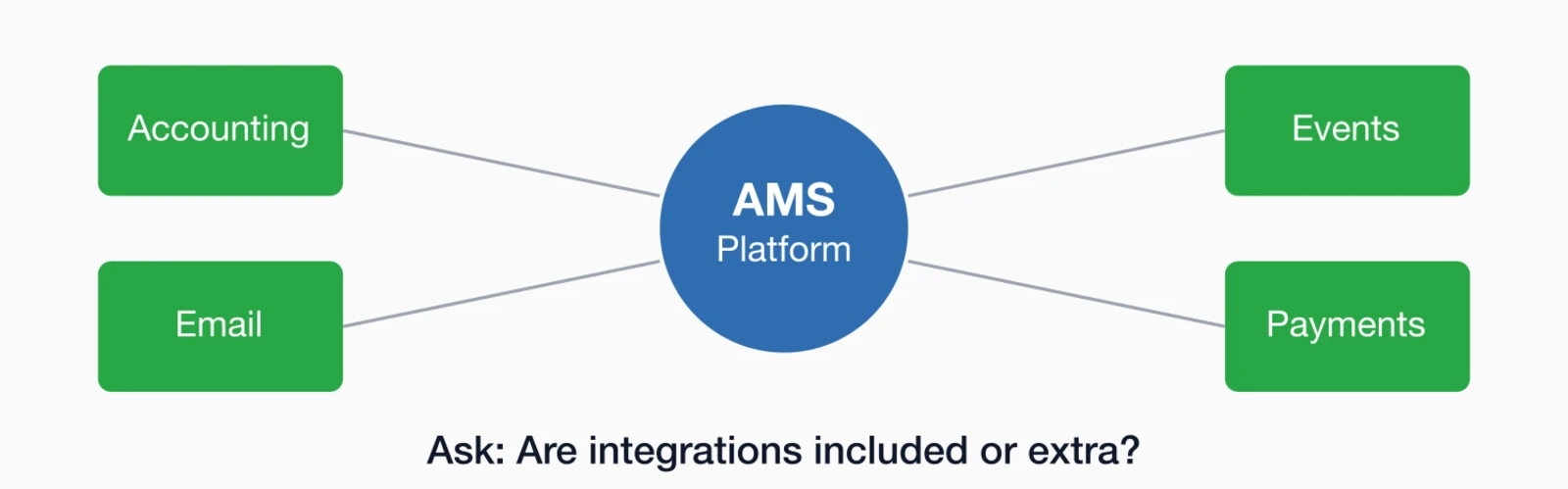
Important integration questions:
- Do you have native integrations with [specific tools you use]?
- Is there an open API for custom integrations?
- Are integrations included or do they cost extra?
- How often does data sync between systems?
- Can you provide documentation or developer resources?
Note: If a vendor doesn't offer integrations with your essential tools, find out if there are workarounds or if they plan to add them.
"What level of support do you provide, and is it included?"
Support quality becomes obvious only after you've signed the contract—and by then it's too late. Some vendors offer genuine partnership with knowledgeable staff
Support questions to ask:
- What support channels are available (phone, email, chat)?
- What are your support hours?
- What's your average response time?
- Is support included in the base price or an upgrade?
- Do you offer onboarding and training?
- Is there a knowledge base or video tutorial library?
- Will we have a dedicated account manager?
"How often do you release updates, and how are they deployed?"
A platform that stopped evolving two years ago will feel increasingly outdated as member expectations and technology standards advance. Regular updates signal an actively developed product with a committed team, while stagnant platforms often indicate a vendor in maintenance mode—collecting subscription fees without meaningful investment in improvements. Understanding a vendor's development cadence and deployment process also helps you prepare your team for changes rather than being surprised by new interfaces or features. Technology evolves quickly, and your software vendor should continuously improve their platform with new features and security updates.
What to learn:
- How frequently are updates released?
- Do updates cause downtime or disruption?
- How do you communicate upcoming changes?
- Can customers request features or vote on the roadmap?
- Do you maintain backward compatibility?
- How do you handle security patches?
"What security measures and compliance certifications do you have?"
A data breach doesn't just compromise member information—it damages the trust your organization has built over years and can expose you to significant legal liability. Members share sensitive personal and financial details with your association, expecting you to protect that information as carefully as you'd protect your own. Evaluating a vendor's security posture, compliance certifications, and breach response procedures is due diligence that protects both your members and your organization's reputation. Security should be a top priority because you're entrusting this vendor with sensitive member data—financial information, personal details, and more.
Security is no longer just an IT checkbox; it is a governance priority. Experts at the Thomson Reuters Institute note in their 10 Global Compliance Concerns for 2026
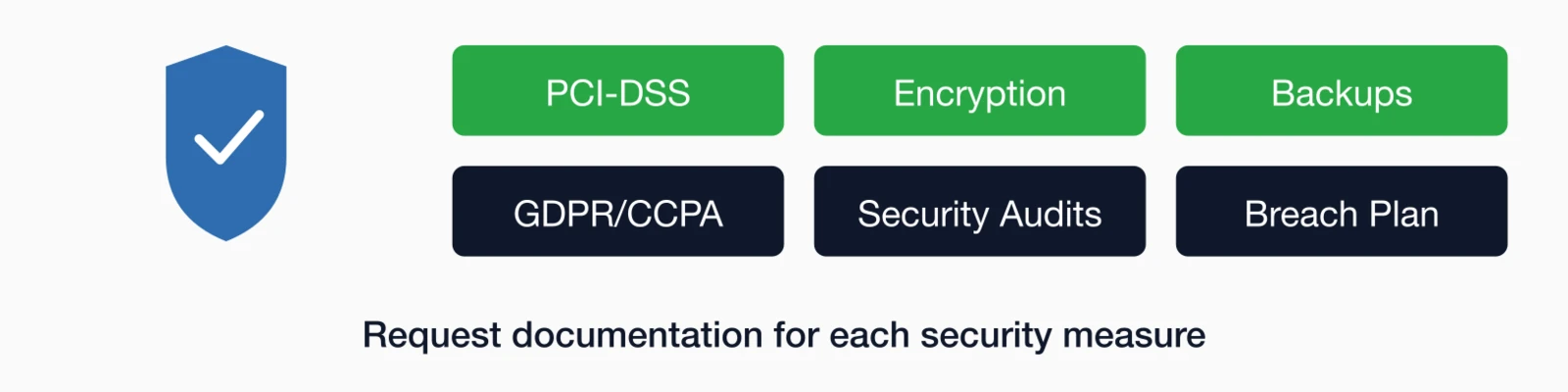
Security and compliance questions:
- Are you PCI-DSS compliant for payment processing?
- What encryption do you use for data at rest and in transit?
- Where are your servers located, and who has access?
- Do you conduct regular security audits or penetration testing?
- What's your backup and disaster recovery plan?
- How do you handle GDPR, CCPA, or other privacy regulations?
- Have you ever had a data breach, and how was it handled?
"Can you provide references from organizations similar to ours?"
Vendors present their best face during demos, but current customers tell you what the relationship is really like. Reference calls uncover implementation challenges the sales team glossed over, support responsiveness during critical moments, and whether the platform actually delivers on its promises. Talking to organizations similar to yours—in size, industry, and complexity—provides insights no demo or brochure can match. Nothing reveals a vendor's strengths and weaknesses like talking to their actual customers—especially ones with similar needs to yours.
When requesting references, ask for:
- Organizations of similar size
- Same industry or association type
- Organizations using specific features you need
- Long-term customers (3+ years) to assess ongoing satisfaction
Questions to ask references:
- What surprised you (positively or negatively) after implementation?
- How responsive is their support team?
- Would you choose this platform again?
- What's one thing you wish you'd known before signing up?
"What's your implementation timeline and process?"
Implementation is where the excitement of selecting new software meets the reality of actually making it work. A vendor who promises you'll be "up and running in two weeks" may be oversimplifying a process that typically takes 60-90 days when done properly. Understanding the full implementation timeline, required staff involvement, and key milestones helps you plan resources and set realistic expectations with your team and members before you're mid-migration and scrambling.
Implementation details to clarify:
- How long does typical implementation take?
- What's required from our team during implementation?
- Can we launch in phases or must everything go live at once?
- Is there a project manager assigned to our implementation?
- What training is provided for our staff?
- Can we do a soft launch or trial period?
- What happens if we encounter issues after launch?
Bonus: Questions about the vendor
Software features matter, but so does the company behind them. A vendor's financial health, track record, and long-term vision directly affect whether the platform you choose today will still be supported and improved five years from now. Taking time to evaluate the company alongside the product helps you avoid the costly disruption of switching platforms when a vendor gets acquired, pivots strategy, or goes out of business. Beyond the software itself, consider the stability and vision of the company behind it:
- How long have you been in business? - Established vendors provide more stability
- What's your customer retention rate? - High retention signals satisfaction
- What's your product vision for the next 2-3 years? - Understand their strategic direction
- Do you have investors or are you bootstrapped? - Financial structure affects priorities
Making the most of your demo
Having the right questions is only half the battle—you also need to structure your demo time strategically. Too many organizations passively watch a sales presentation without steering the conversation toward their specific needs and pain points. By preparing in advance, bringing the right stakeholders, and insisting on seeing real workflows rather than curated highlights, you transform a marketing pitch into a genuine evaluation session. To get maximum value from your software demos:
Software selection is just the first step in a broader digital shift. According to Gartner's CIO Guide to Digital Transformation
The right questions lead to the right choice
Choosing membership management software is a significant decision that will impact your organization for years. By asking these critical questions during your demos, you'll uncover information that marketing materials and presentations often gloss over.
Don't be afraid to dig deep, push back on vague answers, or request additional information. A vendor that's confident in their product will welcome your questions and provide transparent, detailed responses.
Remember: A software demo isn't just about seeing features—it's about determining if this platform and this vendor will be a true partner in your organization's success.
Key takeaways
- Start with pricing transparency: Ask about per-member fees, transaction charges, setup costs ($1,000-$5,000 typical), training fees, support tiers, and email sending limits before discussing features
- Data migration is critical: 70% of implementation problems stem from poor data migration planning—ask who handles it, timeline estimates, testing procedures, and whether costs are included
- Test the member experience: Request a demo of the member-facing portal since members interact with it daily—ease of use directly impacts engagement and support ticket volume
- 10 essential questions to ask: Pricing model, data migration support, member portal demo, customization limits, integration capabilities, support response times, update frequency, security compliance, customer references, and implementation timeline (typically 60-90 days)
Ready to Ask These Questions?
Reach out to i4a and get transparent answers to all your questions—plus learn about our association management software with unlimited members starting at just $99/month.
Start the ConversationRelated resources
Membership Management Software Guide
Comprehensive guide to membership databases, automated renewals, self-service portals, and choosing the right membership software.
Learn how AMS platforms combine membership, events, email, and payments in one integrated system for associations.
What Features to Look for in Membership Software (2026 Guide)
Essential features every membership management platform should have.
How to Migrate Your Membership Data Without Losing Records
Ensure a smooth transition to your new platform with these proven strategies.
