Quick Summary: Virtual Event Platforms
- Match platform to event type: Simple webinar tools work for educational sessions; virtual conferences need multi-track and networking features.
- Integration matters most: A platform that syncs with your AMS saves hours of manual data work per event.
- Test the real attendee experience: What looks good in demos may frustrate members with complex logins or technical requirements.
- Watch the pricing model: Per-attendee pricing gets expensive for large events—look for flat-rate options.
Part of our conference management guide
Virtual event platforms range from simple webinar tools to full conference suites—and the wrong choice means frustrated attendees and data that never syncs to your AMS. Here's how to evaluate what actually matters.
I've watched associations struggle with this decision. Some choose platforms that look impressive but create technical headaches for attendees. Others pick simple solutions that work fine for small webinars but fall apart at scale. The right choice depends entirely on what you're trying to accomplish and how your events fit into your broader member engagement strategy.
This guide will help you evaluate virtual event platforms based on what actually matters for association events—not just flashy features, but practical capabilities that affect your members' experience and your team's workload.
Understanding virtual event types
Not all virtual events have the same requirements. Before evaluating platforms, clarify what types of events you need to support—because the platform that works perfectly for a monthly webinar series may be completely wrong for your annual virtual conference. Each event type has distinct technical needs, audience expectations, and engagement patterns. Choosing a platform without first understanding your event mix often leads to overspending on features you don't need or, worse, discovering mid-event that the platform can't handle your requirements.

Webinars and educational sessions
These are typically 60-90 minute presentations with one or a few speakers and a larger audience. The focus is on content delivery with some Q&A interaction.
- Audience size: 50-500 attendees
- Interaction: Chat, Q&A, polls
- Technical needs: Screen sharing, slides, video
- Recording: Almost always recorded for on-demand viewing
Virtual conferences
Multi-session events spanning hours or days, often with concurrent tracks and networking components.
- Audience size: 200-2,000+ attendees
- Interaction: Live sessions, networking lounges, virtual exhibit halls
- Technical needs: Multiple simultaneous streams, session selection
- Recording: Full session recordings for later access
Hybrid events
Combinations of in-person and virtual audiences, which add complexity but expand reach. For a deeper dive into this format, see our guide on hybrid event strategies
- Audience: Split between on-site and remote
- Interaction: Virtual attendees need to feel included, not second-class
- Technical needs: Professional AV, streaming integration
- Recording: Often streamed live and recorded simultaneously
Member meetings and town halls
Interactive sessions where participation matters more than polished production.
- Audience size: 25-200 attendees
- Interaction: Two-way video, breakout rooms, voting
- Technical needs: Video conferencing with moderation tools
- Recording: Optional, depends on content sensitivity
Core features to evaluate
When comparing platforms, focus on these capabilities that directly impact your events. Feature lists can be overwhelming, and vendors love to showcase flashy capabilities that may never matter for your use cases. The features that actually determine success are often the practical ones—reliable registration, smooth video delivery, intuitive attendee navigation, and solid recording capabilities. Prioritize the features that affect your members' daily experience over impressive demos of tools you'll use once a year.

Registration and access control
- Member pricing integration: Can you offer member/non-member rates automatically?
- Single sign-on: Can members use their existing login credentials?
- Payment processing: Does it handle payments or require a separate system?
- Access management: Can you control who sees what content?
Presentation and production
- Video quality: HD streaming without buffering issues
- Screen sharing: Smooth slide and demo presentations
- Multiple presenters: Easy switching between speakers
- Branding options: Custom logos, colors, and layouts
- Backstage/green room: Private space for presenters before going live
Audience engagement
- Live chat: Moderated discussion during sessions
- Q&A management: Submit and upvote questions
- Polling: Real-time audience feedback
- Breakout rooms: Small group discussions
- Networking features: 1:1 video meetings, attendee directories
Recording and on-demand
For associations, on-demand access often provides more value than the live event itself. Many members can't attend live but will watch recordings.
- Automatic recording: Every session captured without manual setup
- On-demand library: Easy access to past recordings
- Chaptering: Navigate long recordings by topic
- Transcription: Searchable text and accessibility
- Analytics: Who watched what and for how long
Pro Tip: Ask vendors about their typical attendee drop-off rates and technical support response times. A platform that looks great in demos can still frustrate attendees if it's unreliable or hard to use.
Platform categories
Virtual event platforms fall into several categories, each with strengths and limitations. Understanding these categories helps you avoid the common mistake of evaluating platforms that were never designed for your needs. A video conferencing tool optimized for corporate meetings won't deliver the experience you need for a 1,500-person virtual conference, and a full-featured virtual event platform is overkill for monthly committee meetings. Matching the platform category to your event types is the first step toward a successful selection.
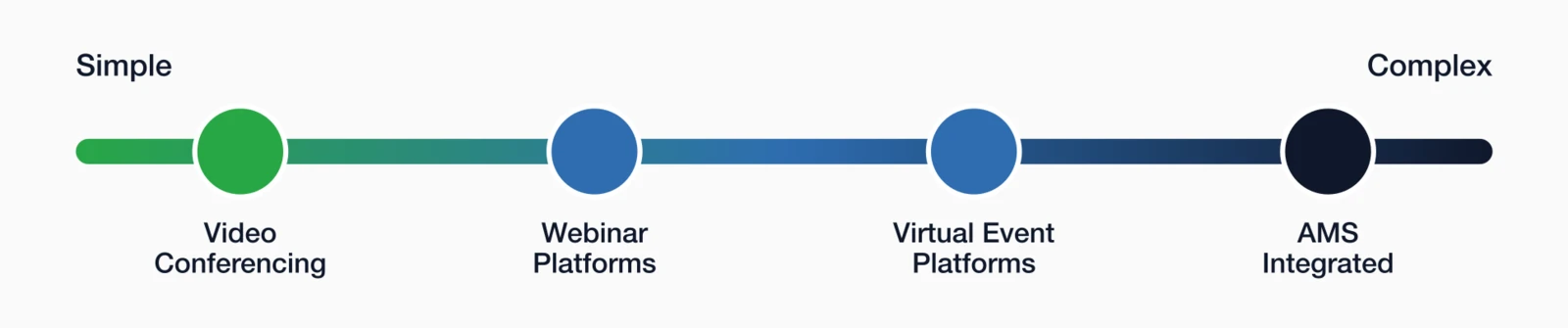
Video conferencing tools
Best for: Small to medium webinars, member meetings, town halls
- Pros: Familiar to attendees, reliable, affordable
- Cons: Limited branding, basic registration, no built-in networking
- Association fit: Good for regular webinars and committee meetings
Webinar platforms
Best for: Educational webinars with professional production
- Pros: Better branding, automated workflows, analytics
- Cons: Still limited for multi-track events or networking
- Association fit: Professional webinar series, CE programs
Virtual event platforms
Best for: Large virtual conferences with networking and exhibits
- Pros: Multi-track scheduling, virtual booths, networking features
- Cons: More complex setup, higher cost, steeper learning curve
- Association fit: Annual conferences, trade shows going virtual
AMS-integrated solutions
Best for: Associations wanting seamless data flow between events and membership
- Pros: Single system for registration, attendance tracking, CEU credits
- Cons: May have fewer bells and whistles than standalone platforms
- Association fit: Organizations prioritizing data integration over flashy features
Integration with your AMS
This is where I see associations make costly mistakes. A platform might have impressive features, but if it doesn't connect to your membership database, you're signing up for hours of manual work after every event. Integration isn't just about convenience—it affects data accuracy, member experience, and your ability to track engagement across all touchpoints. The flashiest virtual event platform becomes a liability when it creates data silos that disconnect your event activity from your member records.
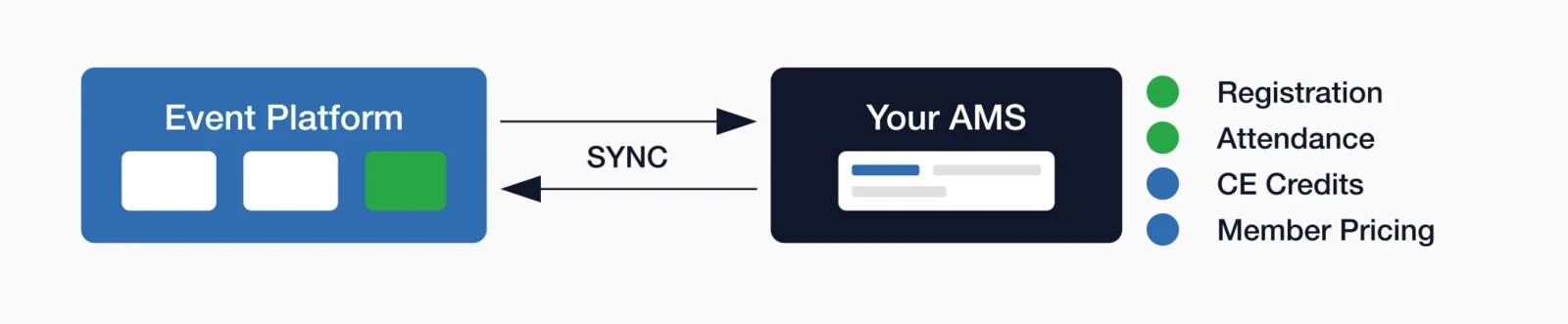
What integration should provide
- Registration sync: Event sign-ups appear automatically in member records
- Attendance tracking: Know who actually attended, not just who registered
- CEU/credit tracking: Continuing education credits applied to member profiles
- Member pricing: Automatic member rates without manual verification
- Single sign-on: Members use existing credentials to access events
- Historical data: All past event participation visible in one place
A deeper look: The hidden cost of poor integration
Let me paint a picture of what happens without proper integration. After a virtual conference, your staff spends half a day exporting attendee lists from the virtual platform, matching them against your membership database, manually updating member records, and reconciling payment data between systems. Multiply that by 20-30 events per year, and you're looking at a significant staff time investment that could be automated.
But the time cost is only part of the problem. Manual data entry introduces errors. Someone's name gets misspelled. An attendance record gets missed. A member who attended doesn't get their CE credits because they registered with a different email. These small errors erode member trust and create support headaches.
The worst integration problems happen during events. I've seen associations discover mid-conference that their "integrated" platform wasn't actually syncing registrations, leaving hundreds of members unable to access sessions they'd paid for. The platform vendor pointed to the AMS; the AMS vendor pointed to the platform. Meanwhile, members were frustrated and staff was scrambling.
True integration means your systems share data bi-directionally in real-time. When someone registers through the virtual platform, that registration appears in their member record immediately. When they attend a session, that attendance is logged automatically. When they earn CE credits, those credits are applied without anyone touching a spreadsheet.
i4a Tip: i4a's event management tools integrate seamlessly with your membership database, eliminating manual data entry and ensuring real-time sync between registrations and member records.
Questions to ask about integration
- Does integration require IT resources or third-party tools?
- Is data synced in real-time or in batches?
- What happens if the integration breaks during an event?
- Can we track virtual and in-person attendance in the same system?
- How is attendee data handled when they're not members?
Attendee experience factors
Your members' experience matters more than any feature list. I've heard from association staff whose members struggled with platforms that looked great in vendor demos but failed in practice. The disconnect between demo impressions and real-world usability is one of the biggest risks in platform selection. What works smoothly when a sales engineer runs a rehearsed presentation may frustrate members who are less tech-savvy, joining from mobile devices, or dealing with poor internet connections. Testing the attendee experience is essential before you commit.

Accessibility and ease of use
- Browser-based access: No software downloads required
- Mobile support: Works on phones and tablets
- Low bandwidth mode: Options for poor internet connections
- Accessibility features: Closed captions, screen reader support
- Technical requirements: Clear communication about what's needed
A deeper look: What demos don't show you
Vendor demos are designed to showcase a platform's best features in ideal conditions. What you see is a polished presenter using fast internet, a powerful computer, and rehearsed workflows. Your members will experience something different: they're joining from home offices with spotty WiFi, using four-year-old laptops, and trying to figure out the interface while the session has already started.
The most revealing test is what happens when things go wrong. Ask the vendor to show you the experience of a first-time attendee who's never used the platform before. How many clicks does it take to get from email confirmation to live session? Is the interface intuitive, or does it require instructions? What happens if someone's browser isn't supported, or they're on mobile instead of desktop?
Association audiences tend to span a wide range of technical comfort levels. A platform that works well for a tech-savvy corporate audience may frustrate members who are less comfortable with technology. I've seen associations lose attendees—and face criticism from their membership—because the virtual platform was simply too complicated for many members to use confidently.
Before committing to any platform, I recommend conducting what I call a "friction audit." Have someone unfamiliar with the platform attempt to register and attend a test event while you observe. Count every point of confusion: unclear buttons, unexpected password requirements, audio/video setup screens, waiting rooms they weren't expecting. Each friction point represents attendees you'll lose to frustration.
Pay special attention to the first 60 seconds of the attendee experience. If someone can't get connected within a minute of clicking the join link, they're likely to give up—especially for a webinar where they assume they'll just watch the recording later. Those lost live attendees affect engagement, sponsor visibility, and the energy of your event.
Support and troubleshooting
- Pre-event testing: Easy way for attendees to verify their setup
- Live support: Help available during events
- Self-service resources: FAQs and troubleshooting guides
- Mobile app stability: If an app is required, does it work reliably?
Test With Real Members: Before committing to a platform, run a pilot event with a small group of actual members. Their feedback will reveal usability issues that demos don't show.
Pricing models to understand
Virtual event platform pricing varies widely and can significantly impact your event budget. The pricing model you choose determines not just your annual costs but also how those costs scale with your event strategy. Per-attendee pricing that seems affordable for small webinars can become prohibitive when you're hosting a major virtual conference. Understanding these models upfront helps you avoid budget surprises and choose a platform that remains cost-effective as your virtual event program grows.
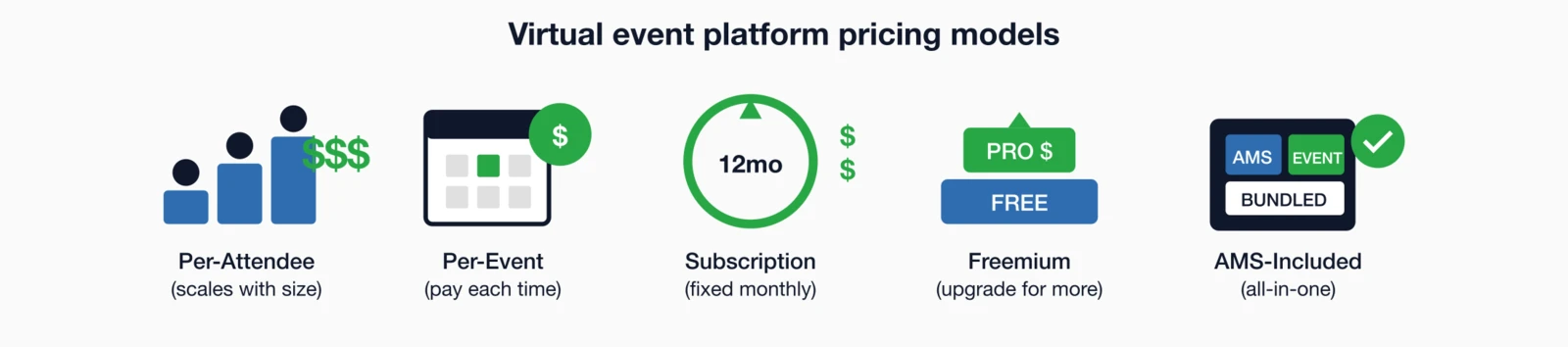
| Pricing Model | How It Works | Watch Out For |
|---|---|---|
| Per-attendee | Pay based on number of registrants or attendees | Costs escalate quickly for large events; may limit growth |
| Per-event | Flat fee for each event you run | Can add up if you run many events; may include attendee caps |
| Subscription | Monthly or annual fee for platform access | May include limits on events, attendees, or features by tier |
| Freemium | Basic features free, premium features cost extra | Free tier often too limited; upgrade pressure during events |
| AMS-included | Event tools bundled with membership platform | May have fewer standalone features; evaluate what you need |
Associations running frequent events or those with large attendance should look carefully at per-attendee pricing. What seems affordable for a 100-person webinar becomes expensive when you're hosting a 1,000-attendee virtual conference.
Selection process
Choosing a virtual event platform is a significant decision that will affect your member experience, staff workload, and event budget for years. A structured selection process helps you avoid common pitfalls like being swayed by impressive demos, underestimating integration requirements, or choosing based on price alone. Follow these steps to evaluate platforms systematically and make a decision you'll be confident in long-term.
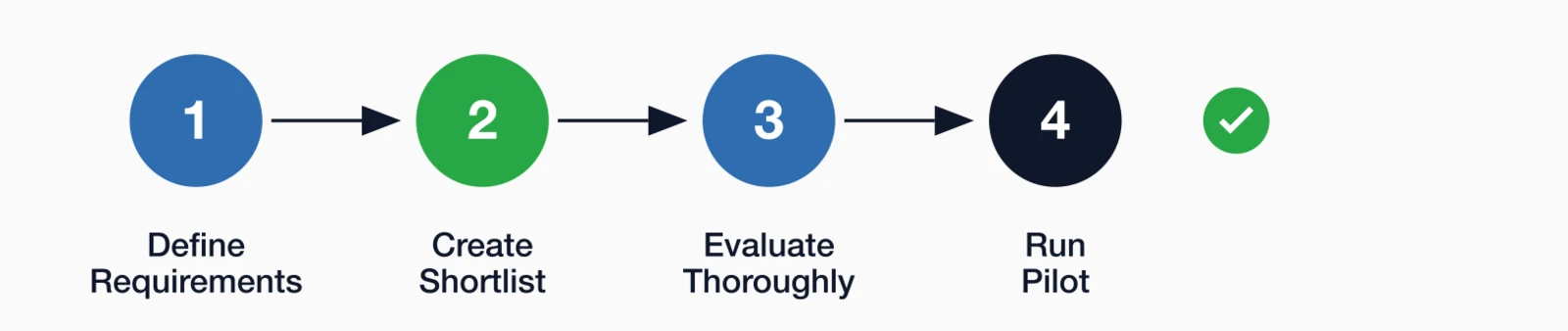
Step 1: Define your requirements
- List the types of events you'll run in the next 12 months
- Estimate audience sizes for each event type
- Identify must-have features vs. nice-to-have features
- Document integration requirements with your AMS
Step 2: Create a shortlist
- Research 4-6 platforms that match your event types
- Check reviews from other associations (not just corporate users)
- Verify pricing fits your budget before investing time in demos
Step 3: Evaluate thoroughly
- Request demos focused on your specific use cases
- Ask for a trial account to test the attendee experience
- Talk to reference customers—specifically other associations
- Test the integration with your AMS in a sandbox environment
Step 4: Run a pilot
- Start with a low-stakes event before committing fully
- Gather feedback from attendees and staff
- Evaluate what worked and what caused friction
Future-proofing your virtual event platform decision
Most platform evaluations focus on what you need for your next event. That's understandable—but for associations, it's also shortsighted. Virtual events are no longer a temporary substitute for in-person gatherings. They've become a permanent part of how associations educate, convene, and engage members.
When you choose a virtual event platform, you're not just selecting software. You're choosing an infrastructure that will shape your event strategy, member experience, and staff workload for years. Here are the emerging realities worth factoring into your decision.
Virtual and hybrid are becoming the default
For many associations, the question is no longer whether to offer virtual access, but how often. Annual conferences increasingly include a virtual component. Educational programs are expected to be available on demand. Even member meetings and town halls are now routinely hybrid.
This shift has practical implications. Platforms designed solely for one-off webinars often struggle when events become ongoing programs with recurring audiences, session libraries, and mixed live/on-demand participation. As you evaluate options, consider whether the platform can support a long-term virtual event ecosystem, not just individual events.
Ask yourself: can this platform handle multi-session programs, repeated use throughout the year, and a growing archive of content without becoming harder to manage over time?
AI will matter most behind the scenes
Artificial intelligence is showing up in virtual event platforms in visible ways—chatbots, session recommendations, and networking suggestions—but its biggest impact for associations is operational.
Platforms are increasingly using AI to automate tasks that used to require staff intervention: routing attendee questions, flagging engagement drop-offs during sessions, summarizing attendance patterns, and helping match participants with relevant content or connections. Over time, these capabilities reduce manual work and improve consistency across events.
The key is not whether a platform advertises "AI features," but whether it helps your team spend less time managing logistics and more time improving programming. Platforms that quietly surface better data, automate routine support, and reduce post-event cleanup will deliver more value than flashy tools your members rarely use.
Accessibility expectations are rising
Virtual events have raised the bar for accessibility. Members now expect closed captions, readable interfaces, mobile compatibility, and the ability to participate without specialized software or high-end hardware. For some attendees, these features are conveniences; for others, they're the difference between participating and being excluded.
Accessibility also affects scale. Events that work well on older devices, in low-bandwidth environments, or with assistive technologies tend to attract broader participation and fewer support requests.
When evaluating platforms, look beyond whether accessibility is "supported" and examine how it's implemented. If captions, transcripts, or keyboard navigation require workarounds or add-on services, that friction will show up during live events—when you can least afford it.
Accessibility is no longer an optional feature; it is a requirement for inclusive member engagement. When evaluating platforms, ensure they comply with the W3C WCAG 2.2 standards
Monetization is shifting from events to programs
Many associations still evaluate virtual platforms based on how well they handle registration and ticketing. Increasingly, the real value comes after the live event ends.
On-demand libraries, premium session access, sponsor-branded content, and tiered registration options allow associations to treat virtual events as ongoing assets, not one-time experiences. This approach works best when the platform makes it easy to track who attended live, who watched later, and what content drove the most engagement.
Platforms that separate live events from on-demand content—or make it difficult to connect engagement data back to member records—limit your ability to monetize effectively over time.
Global audiences change the rules
Virtual events have quietly expanded many associations' geographic reach. Members expect access regardless of time zone, location, or device. That reality favors platforms that support on-demand access, flexible scheduling, and clear communication around session availability.
Global participation also magnifies the importance of reliability and simplicity. A platform that works well for a local audience but struggles internationally—due to bandwidth issues, login complexity, or limited device support—can quickly undermine member trust.
As your association grows, your virtual events should scale with it, without requiring entirely new systems or workflows.
The long view
The most successful associations are choosing virtual event platforms that align with how they want to operate—not just this year, but three to five years from now. That means prioritizing platforms that reduce manual work, integrate cleanly with member data, support accessibility by default, and treat virtual events as part of a broader engagement strategy.
Flashy features come and go. Infrastructure decisions last much longer.
Making the right choice
Virtual event technology continues to evolve rapidly, but the fundamentals of choosing the right platform remain constant. Focus on fit over features, prioritize your members' experience over impressive demos, and never underestimate the value of seamless integration with your membership systems. The best virtual event platform for your association is the one that:
- Matches the complexity of your actual events (don't overbuy)
- Integrates smoothly with your membership database
- Creates a positive experience for your specific member demographics
- Fits your budget without per-attendee surprises
- Provides reliable support when things go wrong
Virtual events are here to stay, but that doesn't mean you need the most expensive or feature-rich platform. Focus on what serves your members best and makes your team's job easier.
For a deeper dive into all aspects of association event planning, see our complete Association Event Management Guide
Key takeaways
- Match platform to event type: Simple webinar tools work for educational sessions; virtual conferences need multi-track, networking features
- Integration matters more than features: A platform that syncs with your event management system saves hours of manual data work per event
- Test the attendee experience: What looks good in demos may frustrate members with complex login processes or technical requirements
- Consider total cost: Per-attendee pricing can get expensive for large association events—look for flat-rate options
- Recording and on-demand access: For associations, post-event content value often exceeds the live event itself
- Think 3-5 years ahead: Choose platforms that reduce manual work, support accessibility by default, and scale globally—infrastructure decisions outlast feature trends
Looking for Integrated Event Management?
i4a combines event registration and attendance tracking with your membership database—so your virtual and in-person events work together seamlessly.
Let's Talk About Your EventsRelated resources
Association Event Management Guide
Comprehensive guide covering registration, pricing strategies, and event execution for associations.
See how i4a handles virtual, in-person, and hybrid events with integrated member data.
12-month planning guide for successful association conferences.
Event Registration Best Practices
Optimize your registration process to boost attendance.
