Quick Summary
- AMS stands for Association Management System (or Association Management Software). It's an all-in-one platform built specifically for membership organizations.
- It replaces the patchwork: Instead of juggling spreadsheets, separate email tools, and standalone event platforms, an AMS brings membership data, payments, communications, and reporting into one place.
- It's not a CRM: CRMs manage sales pipelines. An AMS manages the full membership lifecycle, including renewals, tiered memberships, member portals, and event registration.
- Organizations of all sizes use them: From large professional societies to small nonprofits and local clubs.
- Pricing varies widely: Entry-level platforms start around $50-$150/month. Mid-range runs $200-$500/month. Enterprise systems cost $500-$2,000+/month.
If you work at a membership-based organization, you've heard the term "AMS" thrown around. Maybe in a board meeting. Maybe on a vendor's website. Maybe from a colleague who's tired of managing 10,000 members in a spreadsheet.
Here's the short version: an AMS is software built specifically for associations. It handles the stuff you deal with every day. Member records. Dues. Events. Communications. Reporting. All in one place, all talking to each other.
I've been building AMS software and working with associations for nearly 40 years. This guide is everything I wish someone had handed me when I started — what "AMS" actually means, what the software does, who uses it, how it's different from a CRM, what it costs, and how to pick the right one. No fluff, no sales pitch. Just the stuff that actually matters.
Whether you're researching your first AMS or thinking about replacing a system that's not cutting it anymore, start here.
Why Organizations Start Looking for an AMS
Nobody searches "what is an AMS" out of idle curiosity. Something prompted it. Usually, something broke — or is about to.
After nearly four decades of working with associations, I can tell you the triggers are almost always the same:
- Spreadsheets are running the show — and nobody trusts the data in them anymore
- Renewals are falling through the cracks — because there's no system reminding members or tracking who's lapsed
- Events mean exporting, importing, and reconciling — across three different platforms that don't talk to each other
- Finance and membership records don't match — and someone has to manually fix it every month
- You're paying for 4–6 disconnected tools — email here, payments there, member data somewhere else
- The board wants real reporting — and building a single report takes days of pulling data from multiple sources
- Staff turnover exposed how fragile your processes are — because everything lived in one person's head (or their desktop)
These aren't edge cases. According to the 2025 Membership Marketing Benchmarking Report, 56% of associations have seen membership plateau or decline, and more than half cite lack of engagement as the number-one reason members don't renew. The 2024 Association Benchmarking Report from Naylor paints a similar picture: 40% of associations still lack regular member feedback loops — a gap that's nearly impossible to close without integrated tools. The organizations searching for better tools aren't overreacting. They're catching up.
If any of that sounds familiar, you're in exactly the right place. You're not just looking for a definition — you're looking for a better way to run your organization.
What Is an Association Management System (AMS)?
Think about everything your association does on a given day. Signing up new members. Collecting dues. Sending event invitations. Tracking attendance. Answering member questions. Pulling reports for the board.
Now imagine all of that running through one system instead of a dozen different tools.
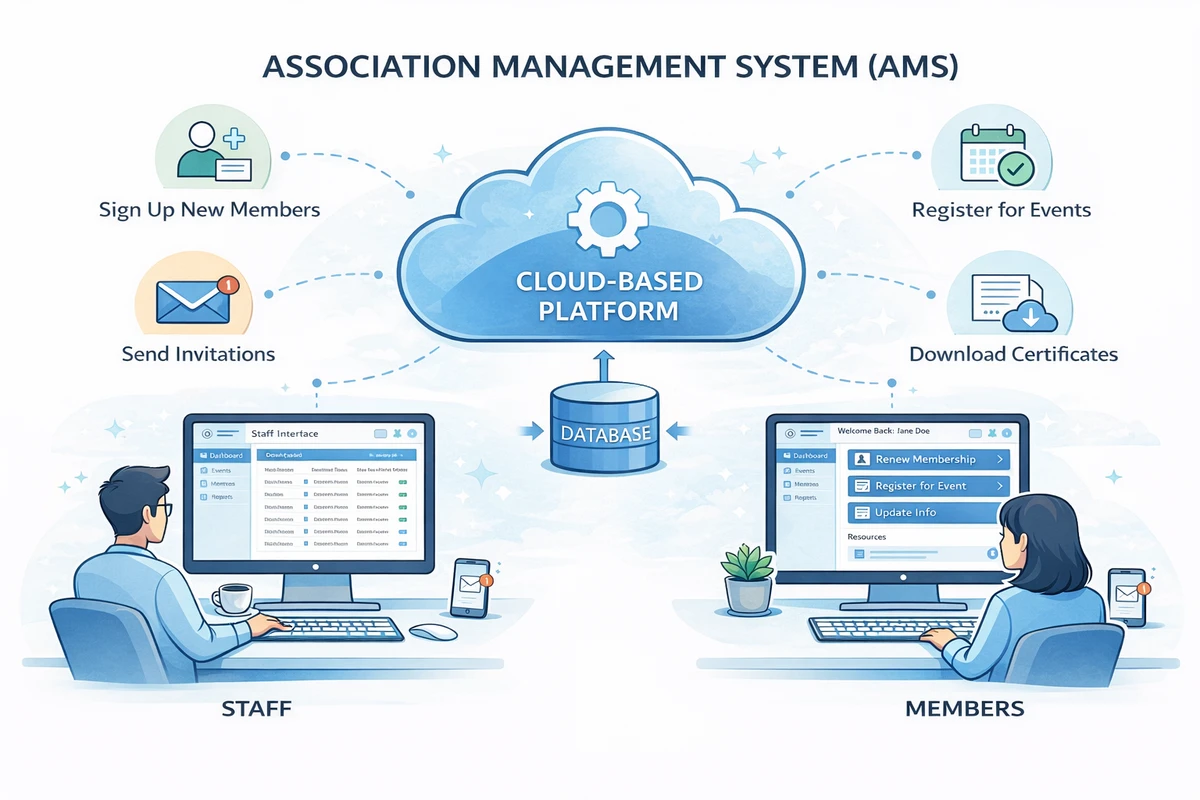
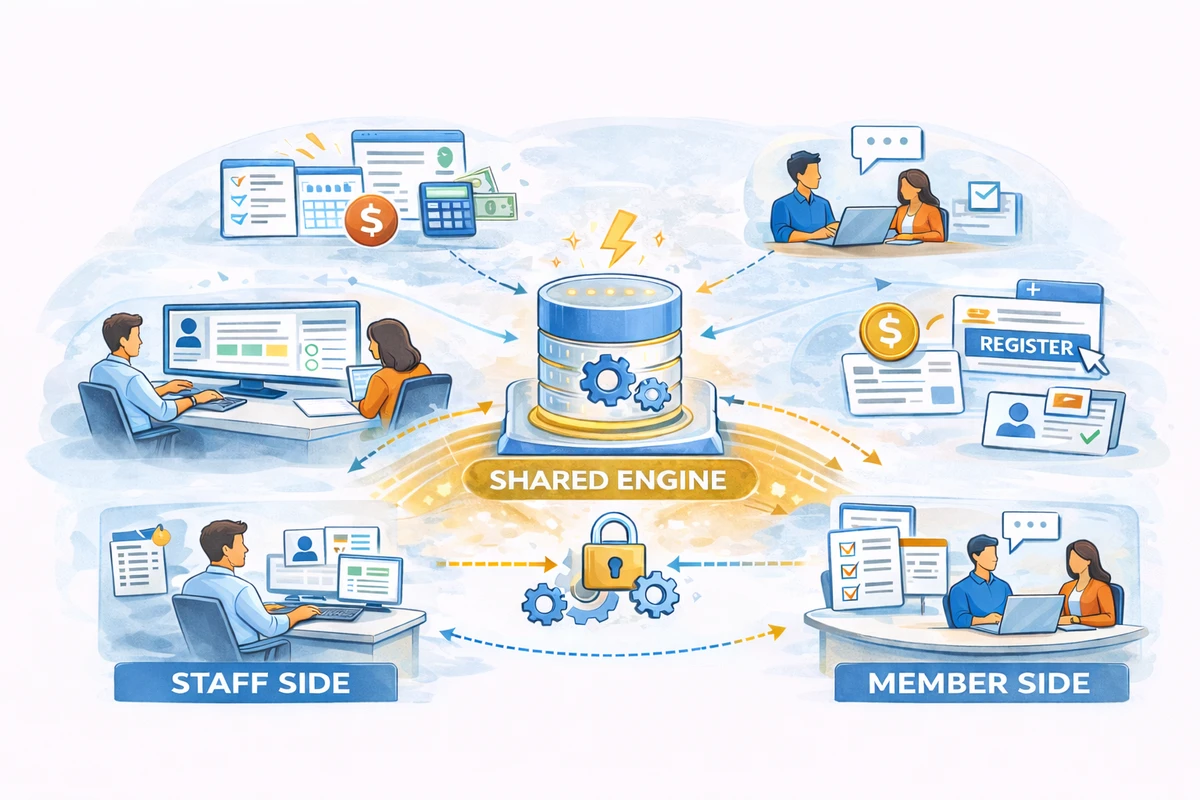
That's an AMS. It's a platform (almost always cloud-based today) that gives your staff one place to manage memberships and gives your members one place to interact with your organization. Staff work on the back end. Members log in to a portal on the front end. Same database underneath.
The alternative? A patchwork. Member data in a spreadsheet. Dues payments in one system. Event registrations somewhere else. Email blasts through yet another platform.
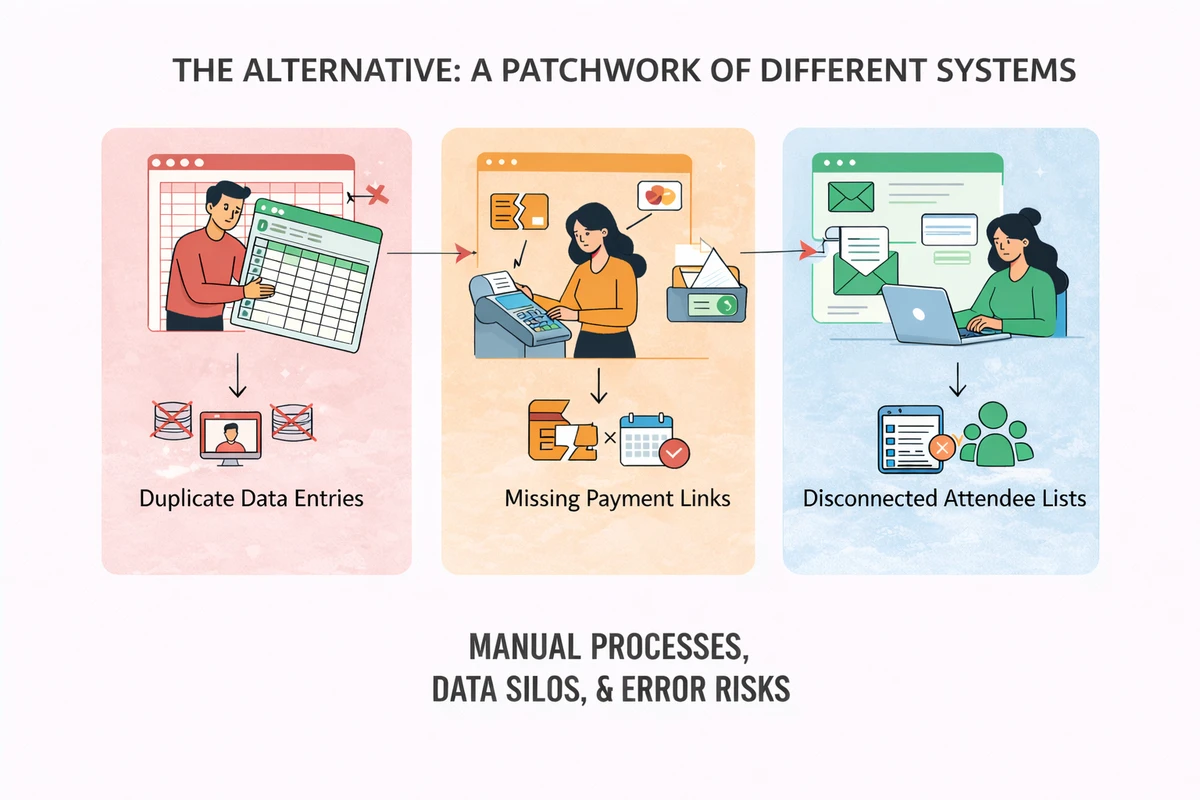
It works until it doesn't. And by the time you notice the cracks, you've already lost track of who renewed, who attended, and who's about to lapse.
What Does AMS Stand For?
AMS stands for Association Management System (sometimes called Association Management Software). Both versions mean the same thing.
But the name only tells you so much. What matters is the idea behind it: software designed around how membership organizations actually work.
General-purpose business tools force you to adapt your workflows to fit the software. An AMS works the other way around. It's built for dues cycles, membership tiers, event registration, credentialing programs, and the hundred other things associations do that a generic CRM was never designed to handle.
That's the key distinction. And it matters more than most people realize when they're choosing software.
How Association Management Software Evolved
I've had a front-row seat to this evolution. I started working with associations in the mid-1980s and launched one of the first web-based AMS platforms in 1996.
Associations didn't become more complex overnight — but their software stacks did.
1980s–1990s: Desktop databases.
Local tools. Microsoft Access. Custom-built systems. Paper files.
Data lived on one computer. If it crashed, your member records were gone.
Reporting was manual. Integrations didn't exist.
Early 2000s: Basic web-based systems.
AMS platforms moved online. Member directories and event registration got easier.
But most systems were bolted-together modules that didn't share data well.
You could process a payment online — but it might not update the member record.
2010s: The cloud and integration era.
Cloud-based platforms became the standard.
Payment processing, email marketing, and event tools finally connected to the member database.
For the first time, a dues payment could automatically update a member's status, trigger a receipt, and appear in a financial report. No one had to touch it.
Today: Unified operational platforms.
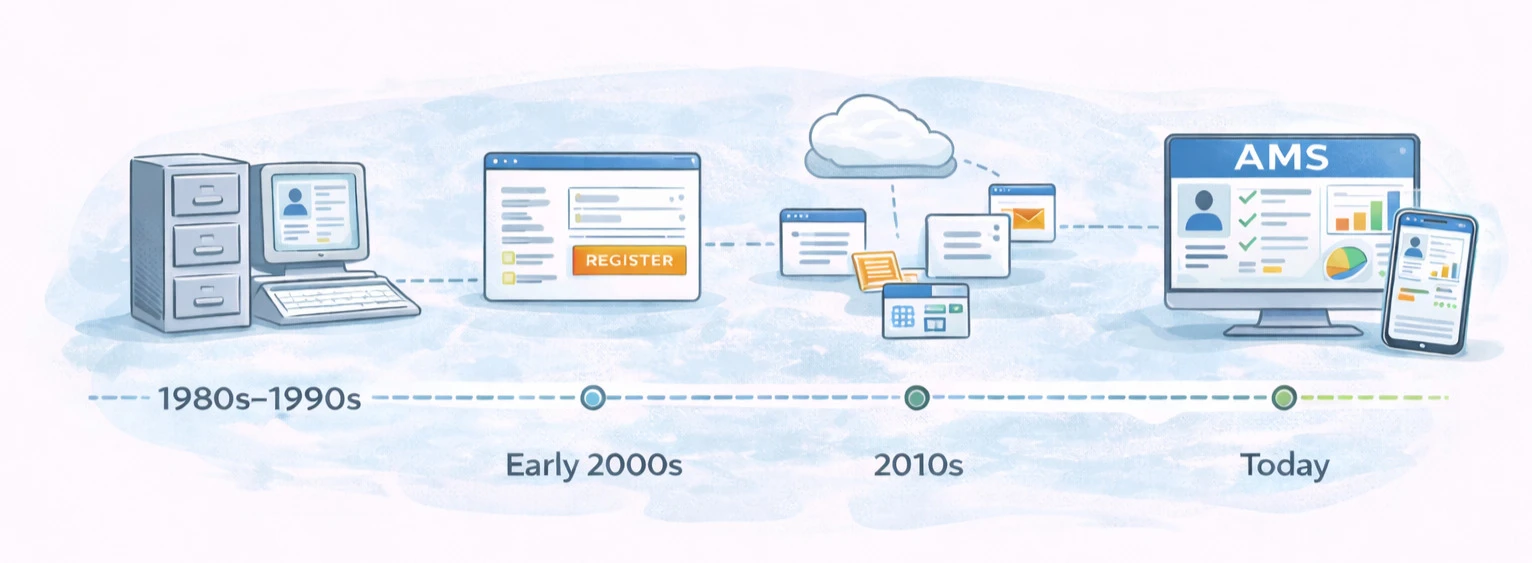
Membership, events, finance, communication, reporting: one connected system.
The member portal and the staff dashboard share the same data in real time.
Members access everything from their phone, not just a desktop.
The patchwork era is over — for organizations that have made the switch.
Modern AMS platforms like i4a were built to eliminate this fragmentation.
What Does an AMS Do for Associations?
The simplest answer: an AMS takes the manual, repetitive work that eats up your staff's day and handles most of it in one place — with a lot less effort.
On any given day, your AMS might be processing a batch of renewals, sending reminders to members whose dues are about to expire, and letting someone register for your annual conference — all while your staff focuses on higher-value work. Some of that runs automatically. Some of it takes a few clicks instead of a few hours. Either way, the data updates itself across the system.
It also gives your organization a shared, 360-degree view of every member. Pull up a contact record and you see their membership history, event attendance, payments, committee involvement, and certifications. One platform. One login. No toggling between websites and spreadsheets to piece together the full picture.
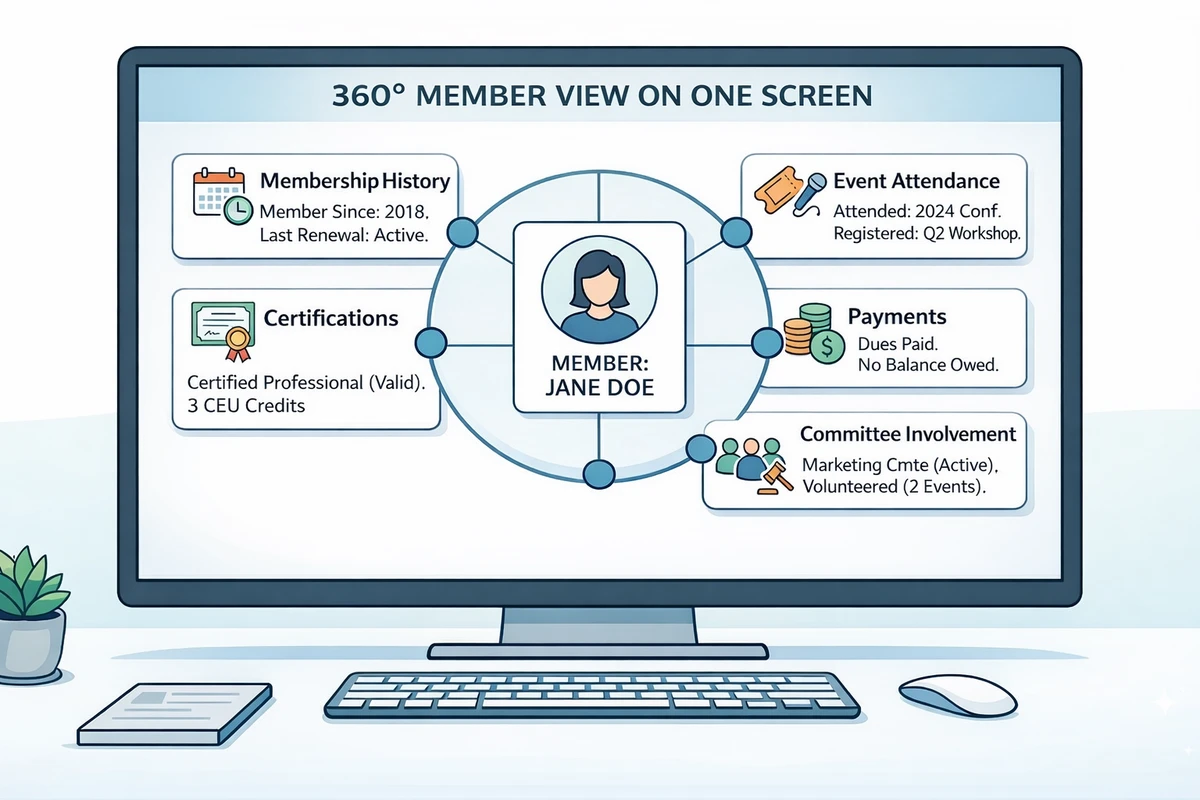
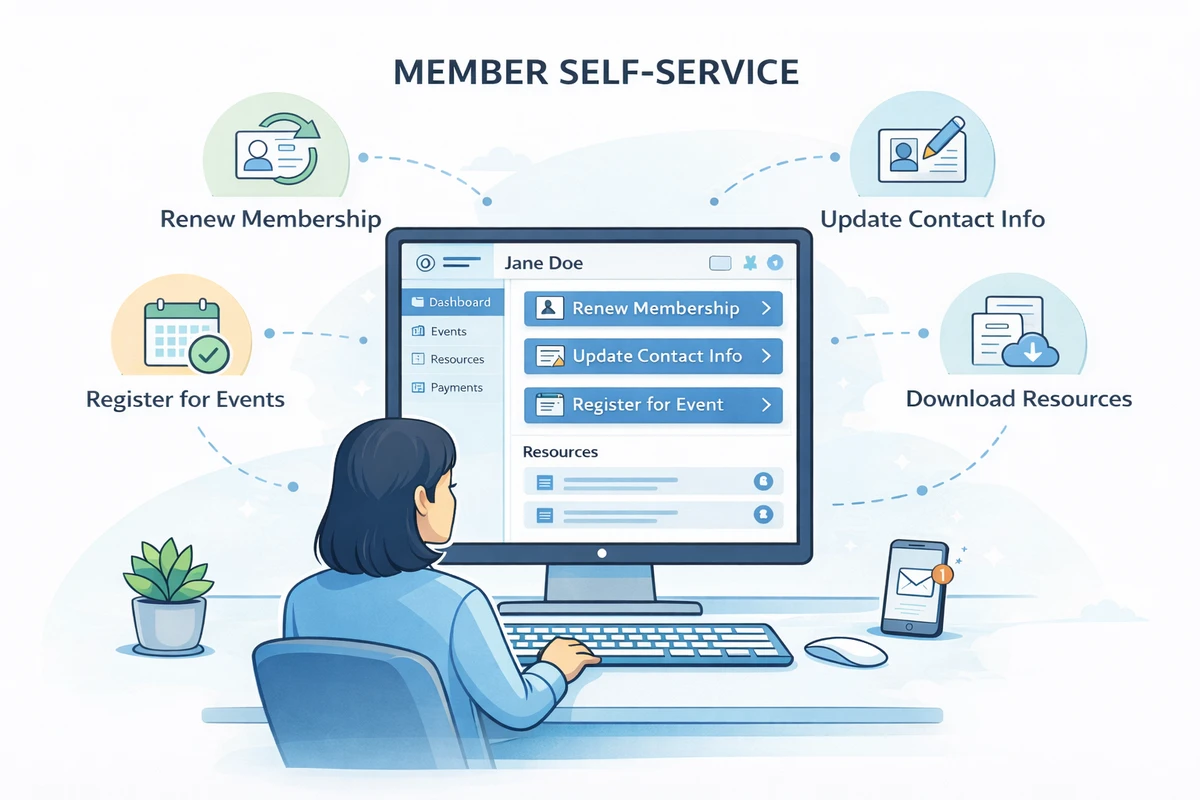
And here's the part members care about: they can do things themselves. Renew online. Update their contact info. Register for events. Download resources. That self-service piece alone can dramatically cut down on the routine requests landing in your staff's inbox every week.
Key Features of Association Management Software
A purpose-built AMS brings every core function under one roof. Here's what that looks like in practice — and why each piece matters.
Centralized member records, tiered memberships, automated renewals, and complete engagement history.
Event & conference registration
End-to-end registration, flexible event types, member pricing, and attendance tracking — all connected.
Financial management & payments
Native payment processing, automated invoicing, and accurate financial reporting from one system.
On-demand metrics, visual dashboards, and automated reports from a single unified database.
Automated workflows, segmented outreach, and targeted messaging that runs without manual effort.
Online renewals, event registration, profile updates, and resource downloads — no staff involvement needed.
Membership management & member database
Everything about a member. One record. Zero guesswork.
- Join dates, renewal history, dues status, committee roles, event attendance — all in a single record
- Supports individual, organizational, student, honorary, and lifetime tiers with automatic pricing
- Automates enrollment and renewal so staff pull up any member and see their full relationship instantly
- Eliminates the cross-referencing, the spreadsheet versions, the "which file is current?" problem
Automates: Renewals, tier assignments, profile updates
Members are in place. Now give them reasons to show up.
Event management & conference registration
Registration, payment, and attendance — connected automatically.
- Conferences, webinars, workshops, and galas — setup to check-in, one platform
- Member discounts, early-bird pricing, and capacity limits applied without manual configuration
- Attendance logs directly to each member's profile — no gap between who showed up and who's in the database
- Ticket types, payments, confirmations, and post-event reports all happen without switching tools
Engagement generates transactions. Capture them seamlessly.
Financial management & payment processing
Money flows through the same system as your members.
- Invoices generated, credit card and ACH payments processed — no third-party gateway to reconcile
- Every transaction records to the member's account: one action updates the record, the invoice, and your financials
- Your treasurer gets accurate numbers without piecing together data from three different places
Automates: Invoicing, payment receipts, financial reconciliation
Every transaction becomes a data point. Now make it visible.
The pattern
Notice what's happening: each layer feeds the next. Members generate engagement. Engagement generates revenue. Revenue generates data. That's not a feature list — it's an operating system for your organization.
Reporting, dashboards & analytics
Real numbers. On demand. From one source of truth.
- New members, renewal rates, event ROI, revenue — tracked in real time, not last quarter's spreadsheet
- Visual dashboards give leadership a snapshot without digging through raw data
- Build a report once and it updates itself — board meetings run smoother when the numbers are current and trustworthy
Insight without action is just a dashboard. Turn data into outreach.
Marketing automation & member communications
The right message, to the right member, at exactly the right time.
- Welcome series, renewal reminders (60/30/7 days), and event announcements trigger automatically
- Segments by tier, event history, or engagement level — no more generic blasts to the entire list
- Open rates, clicks, and engagement tracked across every campaign
- Staff reclaim hours every week from writing and sending routine communications
The best retention strategy? Let members help themselves.
Online member portals & self-service
Every transaction a member completes online is one fewer request in your inbox.
- Members renew, register, download certificates, and update contact info — on their own schedule
- Branded, logged-in experience tied directly to the member's record with real-time sync
- Members expect the same self-service they get from banks and streaming services — this delivers it
That's the AMS flywheel.
How Does an AMS Work?
Think of an AMS as having two sides and a shared engine in the middle.
The staff side. This is where your team does their work. An administrative dashboard gives them access to member records, event setup, financial tools, reporting, and communications. Need to look up a member? Process a refund? Pull a list of everyone who attended last year's conference? It happens here.
The member side. This is the portal your members see when they log in. Their self-service window into the organization. Pay dues. Register for events. Download documents. Update a profile. View membership history. Everything they do updates the same records your staff sees on their side.
The engine in the middle. This is the database and automation layer that ties it all together. A member renews through the portal and the database updates their status, records the payment, and triggers a receipt email. No staff member needs to touch it. A registration deadline passes and the system closes registration and sends a final attendee list to the organizer. Automatically.
That automation layer is what separates an AMS from a static database. It doesn't just store information. It acts on it.
Who Uses Association Management Software?
More types of organizations than you'd expect.
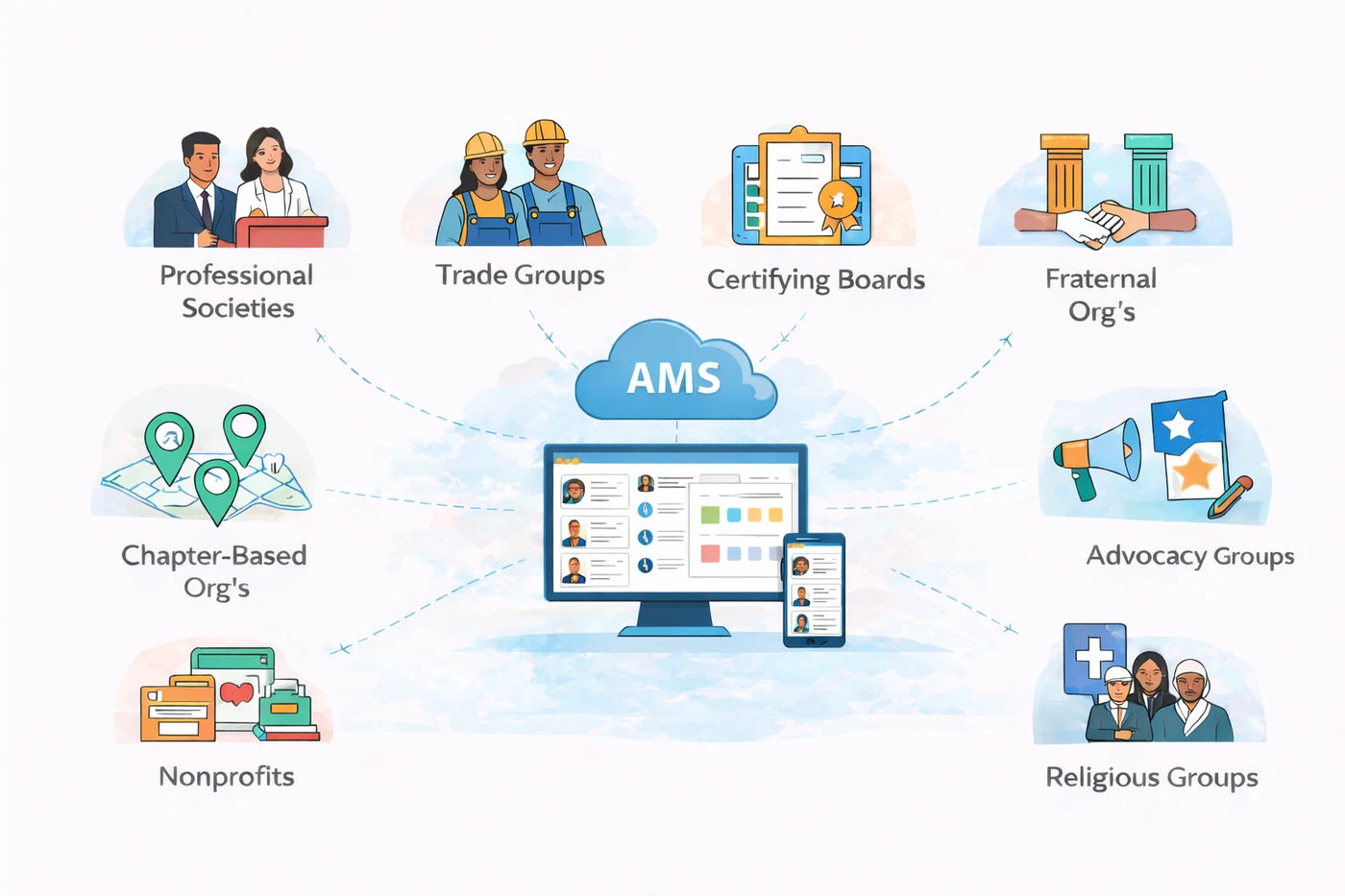
Professional societies and trade groups are the most obvious users. They have thousands (sometimes tens of thousands) of members, run annual conferences, manage credentialing programs, and need a system that handles all of it.
But AMS platforms show up in a lot of other places too. Certification boards use them to track credentials and CE requirements. Nonprofits with membership programs rely on them for dues and donor engagement. Chapter-based organizations need them to coordinate activity across multiple locations.
And it goes beyond that. Fraternal organizations, recreational leagues, religious groups, advocacy coalitions, and industry user groups all share the same fundamental need: keeping track of who belongs, what they've paid, and how to stay in touch with them.
If your organization has members, an AMS was designed for you. Size doesn't matter.
What Is the Difference Between an AMS and a CRM?
This is one of the most common questions in association technology. And the answer matters, because choosing the wrong one can cost you years of frustration and a lot of money.
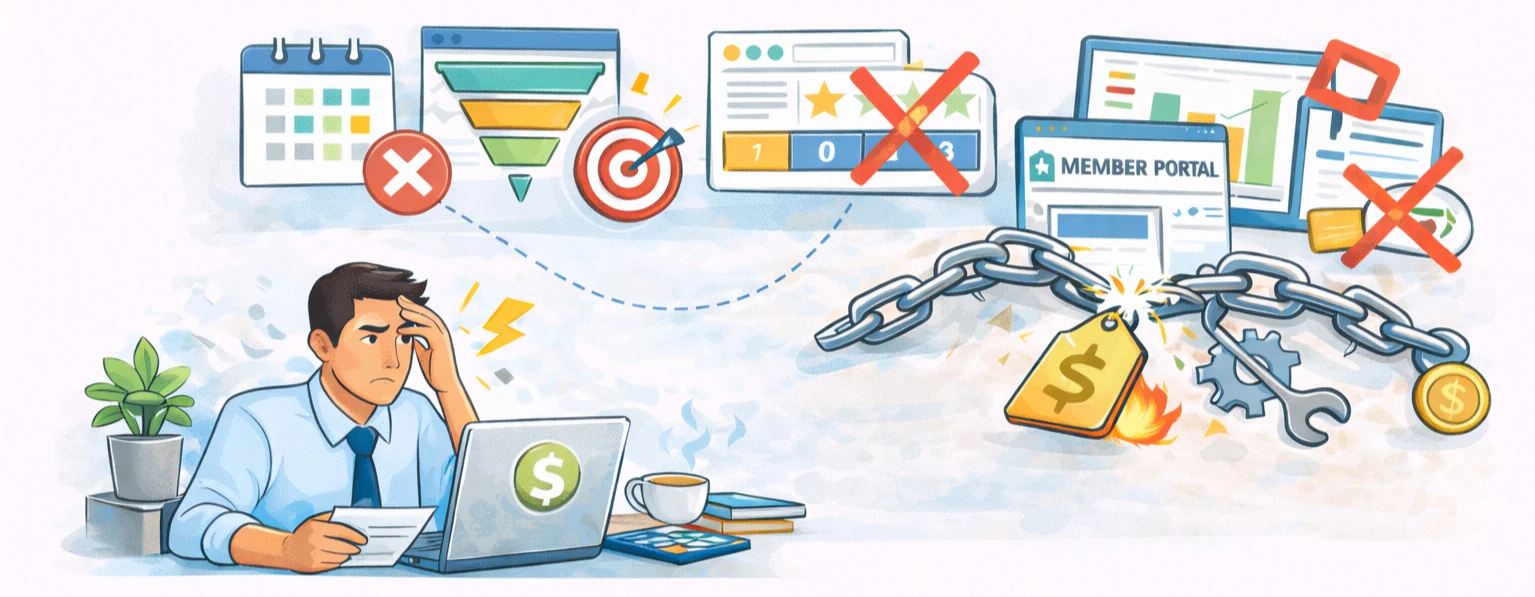
The short version: a CRM is built for sales teams. It tracks leads, manages pipelines, and helps close deals. An AMS is built for membership organizations. It manages the full membership lifecycle: joining, renewal, engagement, and everything in between.
Both store contact data. That's where the similarity ends.
CRMs don't come with membership renewals, tiered membership levels, member portals, or event registration. If you try to use a CRM for association work, you'll either pay for expensive custom development or end up bolting on third-party tools that don't talk to each other.
An AMS handles all of that natively. Dues processing. Event registration. Committee tracking. Member self-service. Continuing education. Reporting. Built in from the start.
Want the full breakdown? For real cost comparisons and a side-by-side feature table, read our complete AMS vs CRM comparison guide.
Benefits of Using an AMS for Membership Organizations
Associations that move to an AMS tend to notice the impact fast. Here's where the biggest differences show up:
Your staff gets hours back every week
Renewal reminders go out on their own. Payment receipts generate automatically. Members update their own profiles. The tasks that used to eat up Monday mornings? They run in the background now. Organizations that enable auto-pay renewals typically see renewal rates of 88–92%, compared to 65–75% for manual processes.
Member data actually stays accurate
No more "which spreadsheet has the latest version?" A member pays dues online and that transaction updates their record, their invoice status, and your financial reports. One action, three updates, zero manual work.
Events become easier to manage
Instead of coordinating between a registration tool, a payment processor, and your member database — set up the event once. Registration, payments, confirmations, and attendance tracking all happen within the same system.
Communication gets more relevant
Your AMS knows who each member is, what they've attended, and what tier they belong to. Send messages that actually apply to them — not generic blasts to the entire list.
Leadership gets the numbers they need
Retention. Revenue. Event ROI. Membership growth. All pulling directly from live data. No one has to spend a week assembling a board report from five different sources.
You stop paying for overlapping tools
When your email marketing, event registration, payment processing, and member database all live in one platform, those standalone subscriptions go away.
Those are the internal wins. But members notice too. Faster renewals, smoother event registration, and relevant communications all shape how members experience your organization. The 2024 Association Trends Study from Momentive Software found that members who view their organization as an early adopter of technology are 81% more satisfied and 74% more likely to recommend it to peers. The operational improvements aren't just saving your staff time — they're changing how members feel about belonging.
How Much Does an AMS Cost?
There's no single answer to this question. AMS vendors use different pricing structures, and understanding those structures matters more than looking at any one price tag.
The three most common approaches:
- Per-member (or per-contact) pricing: Your monthly cost scales with the number of records in your database. This means your software bill increases every time your membership grows, which can work against you as you scale.
- Flat-rate pricing: You pay one monthly amount regardless of how many members you have. This is easier to budget for and means growth doesn't come with a built-in cost penalty.
- Per-user (per-seat) pricing: You pay based on how many staff members need access. This model is common with platforms built on enterprise CRM infrastructure and can add up quickly for larger teams.
Typical monthly ranges look something like this:
Here's the thing about AMS pricing: the number on the pricing page is rarely the full picture.
Ask about implementation support. Data migration. Staff training. Per-transaction processing fees. Premium add-on modules. These extras can significantly change the math. The most reliable way to compare vendors is to map out the total you'd spend over three to five years, not just what shows up on your first invoice.
Concerned about per-member pricing? Read our breakdown of per-contact vs. flat-rate pricing models to understand which approach saves money as your organization grows.
Where Association Management Software Is Headed
The AMS category isn't standing still. The platforms that associations will be evaluating over the next few years look meaningfully different from what was available even five years ago.
Here's where the industry is moving:
- Automation-first workflows — not just storing data, but acting on it. Renewal sequences, payment reminders, and onboarding steps that run without staff intervention
- Real-time financial reconciliation — payments, invoices, and member records updating simultaneously, eliminating the manual month-end scramble
- Deeper member segmentation — targeted communication based on behavior, engagement level, and lifecycle stage, not just membership tier
- Self-service as the default — member portals that handle renewals, event registration, profile updates, and resource access without generating a support request
- API-first architecture — platforms designed to connect with your existing tools (accounting software, LMS, website, marketing platforms) instead of replacing everything or working in isolation
- AI-assisted reporting and insights — surfacing retention risks, engagement trends, and revenue patterns that would take staff hours to identify manually
But the bigger shift is this: AMS platforms are moving from record-keeping to operational intelligence.
The appetite for this shift is already growing. According to ASAE, nearly two-thirds of associations reported no AI use at all in 2024 — but by 2025, 41% were actively exploring it and 19% had moved to implementation planning. That's a massive shift in a single year.
Associations don't just store data anymore. The best platforms help you use that data to drive retention, deepen engagement, and grow revenue. That's the direction this entire category is heading — and it's worth keeping in mind as you evaluate your options.
Frequently Asked Questions About AMS
Organizations use an AMS to run the day-to-day operations that keep a membership organization functioning. That includes maintaining member records, processing dues and payments, managing event registration, tracking credentials and continuing education, sending targeted communications, and generating reports for leadership. Instead of juggling separate tools for each of those tasks, an AMS puts them all under one roof so data stays consistent and staff spend less time on repetitive administrative work.
Not at all. While enterprise-level AMS platforms exist for large national organizations, there are plenty of options built for smaller groups too. Associations with a few hundred members face many of the same challenges as those with tens of thousands: keeping track of who's active, collecting payments on time, and staying in touch with their community. Affordable AMS platforms in the $50-$150/month range make those tools accessible to organizations of nearly any size.
It depends entirely on your organization. An AMS that's perfect for a 500-member state chapter might be a poor fit for a 50,000-member national society, and vice versa. The "best" platform is the one that matches your membership size, budget, workflow priorities, and technical requirements. Rather than looking for a universal winner, focus on defining what your organization needs and then comparing a shortlist of vendors against those specific criteria. Our AMS comparison guide can help you get started.
They don't need an enterprise system, but many small nonprofits do reach a point where managing memberships manually becomes unsustainable. If your team is spending significant time on data entry, chasing late renewals by hand, or struggling to pull together reports, those are signs that membership software would help. Entry-level platforms are affordable enough for small budgets, and the time savings alone often justify the cost within the first year. It also puts your organization on a stronger footing if you plan to grow.
It depends on the platform and the complexity of your organization, but most implementations take somewhere between 4 and 12 weeks. Simpler setups — a smaller membership, straightforward dues structure, basic event needs — can go live in a month or so. Larger organizations with complex data migration, multiple membership tiers, custom integrations, or legacy systems to replace will typically need 3–6 months. The biggest variable isn't usually the software itself — it's how quickly your team can clean up existing data and define the workflows you want in the new system.
The terms overlap, but they're not identical. "Membership management software" usually refers to tools focused on the basics — storing member records, collecting dues, and managing renewals. An AMS does all of that but goes further: event management, financial reporting, email marketing, member portals, committee tracking, and credentialing. Think of membership management software as one piece of what a full AMS provides. If your organization only needs to track who's a member and collect payments, a simpler membership tool might be enough. If you need those functions plus events, communications, and reporting all connected, you're looking for an AMS.
Most modern AMS platforms support integrations with common business tools — accounting software (like QuickBooks or Sage), learning management systems, email platforms, payment processors, and website CMS platforms. How deep those integrations go varies by vendor. Some offer native, built-in connections. Others rely on APIs or middleware like Zapier. The key question to ask any vendor is whether the integration is real-time and bidirectional (data flows both ways automatically) or if it requires manual syncing or scheduled imports. That distinction matters more than whether an integration "exists."
There's no magic member count, but the warning signs are consistent: you're spending hours on tasks that should take minutes, renewals are slipping through the cracks, your data lives in multiple places that don't agree with each other, and pulling a report for the board takes days instead of clicks. If a staff member leaving would put your membership operations at risk because everything lives in their spreadsheets or their head, that's a clear signal. Most organizations hit that tipping point somewhere between 200 and 1,000 members — but some reach it much sooner depending on how complex their dues structure, events, or reporting needs are.
Start with fit, not features. Every vendor will show you a long feature list — what matters is whether those features match the way your organization actually works. Focus on these areas: Does it handle your specific membership structure (tiers, chapters, organizational memberships)? Is the member portal intuitive enough that members will actually use it? What does data migration look like, and will the vendor help? What's the total cost over 3–5 years, including implementation, training, and transaction fees? How responsive is their support team after you've signed? Ask for references from organizations similar to yours in size and complexity — not just their biggest logos. Our guide to the 10 questions that reveal the truth during an AMS demo breaks this down further.
Choosing the Best AMS for Your Association's Needs
At this point, you know what an AMS is, why it exists, and what makes it different from generic business software.
The next question is more practical: which one is right for your organization?
That depends on you. A 200-member regional chapter has different needs than a 30,000-member national society. Your budget, staff size, membership complexity, and existing tools all play a role. There's no shortcut around doing the research. But the evaluation framework in this guide gives you a structured way to approach it.
Here's what I've observed again and again: the organizations that get the most value from their AMS are the ones that invested time in the selection process up front. They defined their requirements clearly. Compared vendors honestly. And chose a platform that fits where they are today while leaving room for where they're headed.
Key takeaways
- AMS stands for Association Management System/Software and is built specifically for membership organizations
- It's an all-in-one platform that replaces disconnected spreadsheets, email tools, event platforms, and payment processors
- An AMS is not a CRM: CRMs manage sales pipelines, while AMS platforms manage the full membership lifecycle
- Key features include membership management, event registration, payments, reporting, communications, and self-service member portals
- Organizations of all sizes use AMS platforms, from large professional societies to small nonprofits and clubs
- Pricing ranges from $50/month to $2,000+/month depending on vendor, features, and pricing model
- Always calculate total cost of ownership, not just the monthly subscription price, when comparing AMS vendors
Ready to See What an AMS Can Do for Your Association?
i4a's all-in-one association management software includes membership management, events, email, payments, a member portal, and reporting in a single platform. Unlimited members. No per-contact fees.
Schedule a DemoRelated resources
AMS vs CRM: What Does Your Association Really Need?
The full comparison of association management systems and CRMs, including why CRM customization can cost $50K+ for associations.
20 Best Association Management Software Options 2026
Side-by-side reviews of the top AMS platforms, with pricing, features, and recommendations by organization size.
Per-Contact vs. Flat-Rate Pricing for AMS
Understand which AMS pricing model saves money as your organization grows.
Top Membership Software Features to Look For
A practical guide to the features that matter most when evaluating association management software.
