Committee & Board Tracking
Store committee assignments, board positions, and volunteer roles directly in member records. Track who's serving, when their term started, and preserve leadership history—all integrated with your membership database.
What Committee Tracking Does
Store leadership and volunteer data directly in member records
- Store Committee Assignments
- Track Start & End Dates
- Record Positions
- Multiple Simultaneous Assignments
- View on Member Profiles
- Member Portal Visibility
- Staff-Managed Assignments
- Historical Records Preserved
- Continuing Education Credits
- Activity Categories
- Unlimited Committees & Positions
Store Committee Assignments
Record who serves on each committee
Track Start & End Dates
Record when each assignment began and ends
Record Positions
Chairman, Vice Chair, Member, Volunteer
View on Member Profiles
Visible on each member's record
Historical Records Preserved
Past assignments never get deleted
Multiple Simultaneous Assignments
Members can serve on multiple committees
Member Portal Visibility
Members see their own involvement history
Unlimited Committees & Positions
Create as many as you need
Continuing Education Credits
Track CEU credits for committee work
Activity Categories
Organize boards, committees, task forces
Staff-Managed Assignments
You control who gets added to committees
How Committee Tracking Works
Integrated data storage designed for straightforward committee management
What's Included
- Integrated storage: Committee data lives in member records, not separate spreadsheets
- Historical preservation: Past assignments remain in records unless manually deleted
- Member visibility: Members see their own committee history in their portal
- No extra fees: Unlimited committees and assignments at flat-rate pricing
Setup & Customization
- Adding assignments: Staff add members to committees through member profiles
- Committee rosters: Custom views can be created for specific reporting needs
- Term tracking: End dates are stored—our team can help set up expiration reports
How we approach committee tracking: We focus on integrated data storage and preservation rather than complex automation. Committee data stays connected to member records, never gets lost, and eliminates the spreadsheet reconciliation problem. For specialized reporting needs, our support team helps you set up custom views tailored to your workflow. For tips on running effective committees, see our guide to committee management best practices.
Committee Data Lives in Member Records
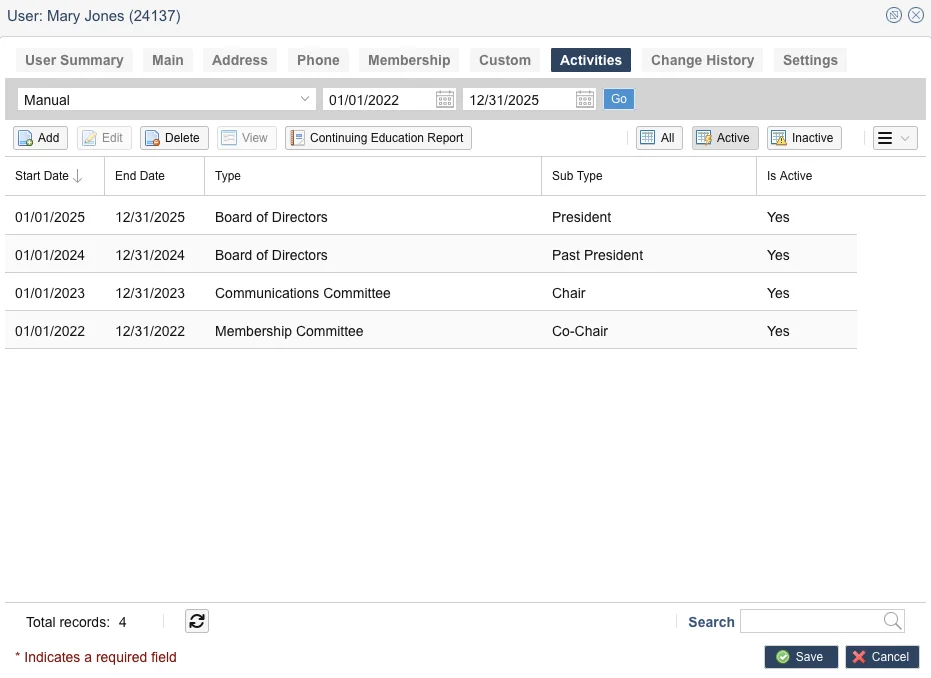
Instead of tracking committee assignments in separate spreadsheets that get out of sync, i4a stores them directly on member profiles.
Why this matters:
- Always in sync: When a member's email or contact info changes, you don't have to update multiple spreadsheets
- Visible on member profiles: Open any member record and see their complete committee history
- Preserved in records: Past assignments remain in member records unless manually deleted, not overwritten when rosters change
- Members can see it: Members log into their portal and view their own involvement history
For specialized reporting needs: Committee rosters and advanced filtering can be set up with custom views.
Common Questions
Explore Related Features
See how our integrated platform works together
See Committee Tracking in Action
Schedule a demo to see how i4a's membership management system stores committee data in member records and discuss what reporting capabilities you'll need for your organization's workflow.
