Continuing Education Management, Built Into Your AMS
i4a tracks continuing education credits inside your association management software: credits are assigned to events and sessions, recorded on each member's record, and shown to members as a self-service transcript. CE tracking is included in every i4a plan, with unlimited members, so there is no separate CE system to buy or reconcile.
What Does i4a's Continuing Education Management Do?
i4a's continuing education management keeps every credit a member earns in the same record as their membership, event registrations and credentials, so staff answer "how many credits does this member have?" from one screen instead of a spreadsheet.
- Credits assigned to events and individual sessions, recorded automatically when the member registers
- Credit types named the way your profession names them: CEU, CME, CPE, CLE, ethics and others
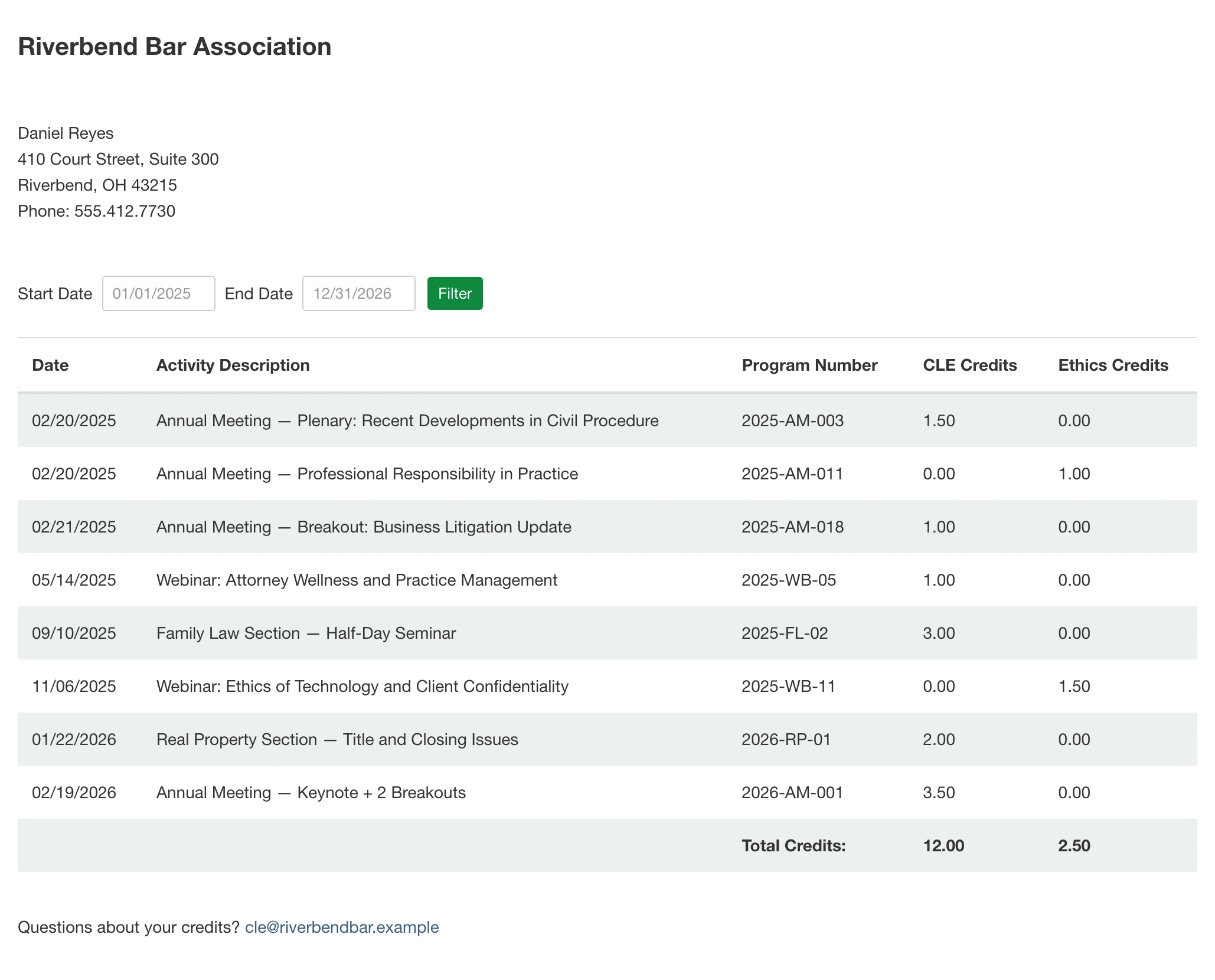
- A self-service transcript in the member portal, by session and date range
- Credits of any type added to any member's record by staff, for webinars, on-demand courses or other activities
- Credits earned elsewhere imported by staff from a spreadsheet into the same record
- A CE report for any member, plus custom reports by event and date range, exportable to Excel or CSV
How Does i4a Assign CE Credits From Events and Sessions?
You set one credit type and amount on each event session, and i4a records the credits on the member's record when they register. Multi-day conferences with concurrent sessions work the same way: each session carries its own credit, so a member's transcript shows exactly which sessions their credits came from, and a conference can mix credit types across sessions, such as CLE on one session and ethics on another.
What Do Members See in Their i4a CE Transcript?
Members open their transcript in the member portal, filter it by date, see each credit by session and type, and print it for their licensing board or employer, without calling staff. If your association wants certificates for CE credits, i4a can set up custom certificate generation for you.
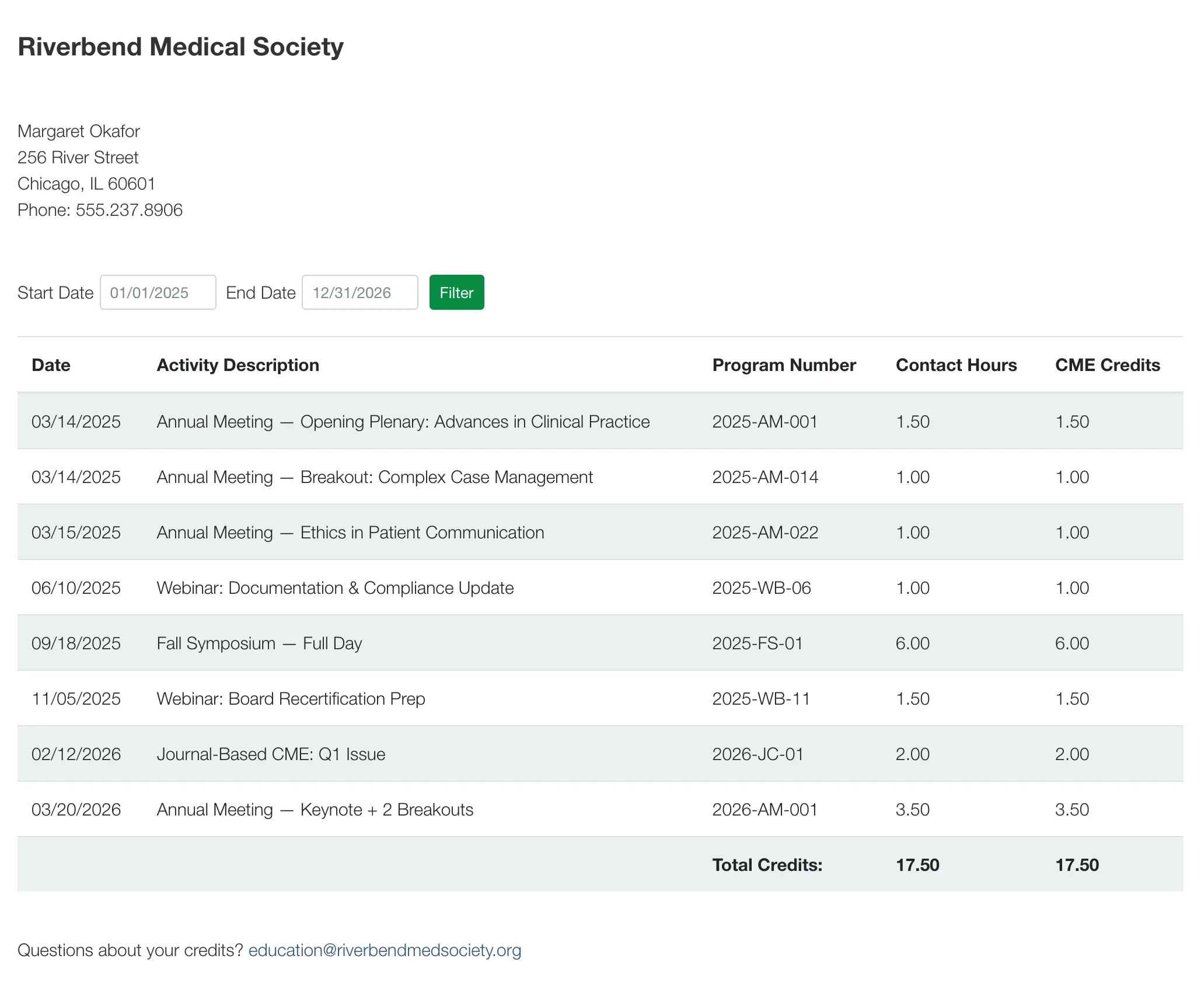
A member's CE transcript in i4a: date-filtered, session-level credits, self-service.
Which Professions and Credit Types Does i4a's CE Tracking Cover?
Any credit your profession uses. Medical and scientific societies track CME (medical association software). Accounting societies track CPE. Engineering groups track PDH. Bar associations track CLE and ethics credits (legal and bar association software). Professional societies of every kind track CEUs (professional association software).
Can Outside CE Credits Be Added to a Member's i4a Record?
Yes. Staff can import credits members earned at other providers from a spreadsheet, so each member's transcript shows their complete record in one place.
How Does CE Tracking Connect to Credentials and the Member Directory?
Credentials, licenses and specialty designations are recorded on the same member record as credits, as custom fields you define, including their expiration dates. Staff can build a report of upcoming expirations and schedule an automatic email that reminds members a set number of days before a credential expires. Specialty and designation fields can also drive filters in your member directory, so the public can search by designation or specialty.
What Does i4a Not Do?
i4a is not a learning management system and does not administer certification exams or issue credentials. Course content runs in your LMS: i4a integrates with LMS and CE-evaluation platforms, so credits and records stay in your member database while courses are delivered elsewhere.
How Much Does i4a's Continuing Education Management Cost?
CE tracking is included in both i4a plans at no extra cost. Core is $99 a month for one staff user, $198 for two and $245 a month for the five-user plan; Pro is $224 a month per staff user. Every plan has unlimited members and contacts, on an annual contract billed monthly, plus a one-time $1,500 setup fee.
See Pricing & Plans
Frequently Asked Questions About i4a CE Tracking
Included in both Core and Pro.
When the member registers for the session that carries them.
Yes, as custom fields on the member record. Staff can report on upcoming expirations and schedule an automatic reminder email a set number of days before each date.
Yes. Members can print their transcript from the member portal. Custom certificate generation for CE credits can be set up for your association.
Yes. Staff can open a CE report for any member, and build custom reports by event and date range.
Any type your profession uses, named your way: CEU, CME, CPE, CLE, ethics, PDH and others. Each event session carries one credit type.
Yes. Staff can add credits of any type to any member's record, for webinars, on-demand courses, journal activities or anything else.
Yes. Staff import them from a spreadsheet into each member's record.
No. i4a tracks credits and records; your LMS delivers courses, and the two connect through i4a's LMS integrations.
See CE Tracking With Your Own Credit Types
CE tracking is included in every plan, and every i4a price is published. Check the numbers first, then bring your credit types and a sample transcript to a demo.