Quick Summary: Association Automation
- Save 20+ hours weekly: Automate membership applications, renewal reminders, event confirmations, and welcome emails that currently consume staff time.
- Start with renewals: A 90/60/30/14/7-day reminder sequence with win-back emails addresses the 24% of members who simply forgot to renew.
- Onboard automatically: A 30-day welcome sequence drives early engagement—members who engage in the first month renew at dramatically higher rates.
- Trigger on behavior: Replace batch email blasts with real-time responses to member actions like page visits, downloads, and event attendance.
- Phase your rollout: Start with quick wins (welcome emails, confirmations) before tackling complex workflows—small victories build momentum for broader adoption.
Reclaim your time
Association teams lose countless hours to repetitive, manual work—membership applications, event registrations, renewal reminders, and welcome emails that technology could easily handle. By automating these processes, staff gain more time to focus on strategic priorities like member engagement and advancing the organization's mission.
The need is clear: according to Sequence Consulting's 2026 Association Trends Report, 70% of associations cannot effectively integrate their engagement tools—leading to manual workarounds and missed opportunities. Meanwhile, 52% cite limited staff capacity as a barrier to revenue growth. Automation addresses both challenges.
This guide shows how to identify automation opportunities, build smart workflows, and track the results of your investment. Modern association management software makes it all possible.
Why automation matters
Automation doesn't replace staff—it empowers them. It handles the routine, error-prone tasks so your team can focus on high-impact work. With the right membership platform, even non-technical staff can set up automated processes that save time and ensure consistency.
The data makes a compelling case: MGI's 2025 Membership Marketing Benchmarking Report found that 52% of members who don't renew cite lack of engagement with the organization as the reason—and another 24% simply forgot to renew. Automation addresses both problems directly through onboarding sequences that drive early engagement and renewal reminders that ensure no member lapses unintentionally.
In my 30 years working with associations, I've watched teams spend entire days on tasks that should take minutes. Here's the thing: the associations that thrive aren't the ones with the biggest staff—they're the ones that let technology handle the routine so their people can focus on what actually matters: building relationships with members.
Results you can expect
hours saved per week
fewer data entry errors typical
processing—no staff needed
ROI commonly reported
More than just time savings
Automation benefits go well beyond efficiency:
- Consistency: Every member enjoys the same quality experience.
- Scalability: Support growth without adding staff.
- Speed: Members receive instant responses, any time of day.
- Accuracy: Automation eliminates common human errors.
- Insights: Real-time data helps drive smarter decisions.
- Staff satisfaction: Less tedious work, more meaningful results.
Different needs for different entities
Automation varies by association type:
- AMCs need scalable systems that serve multiple client organizations.
- Professional associations often focus on automating credential tracking and continuing education.
- Trade associations streamline corporate memberships, managing hierarchies and shared contacts automatically.
Where time is lost (and saved)
| Task | Manual Time | Automated Time |
|---|---|---|
| Process membership application | 15–30 min | Instant |
| Send renewal reminders | 2–4 hours per batch | Automatic |
| Confirm event registration | 5–10 min each | Instant |
| Send new member welcome | 30–60 min | Automatic |
| Issue certificates/badges | 10–15 min | Instant |
How membership automation works
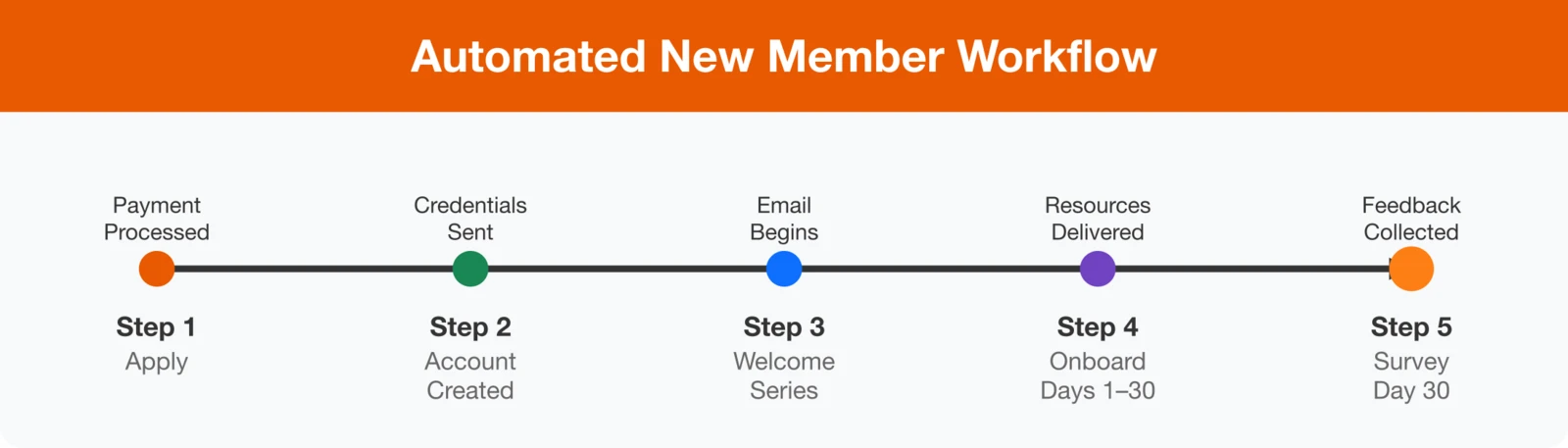
The new member journey sets the tone for every future interaction with your association. Automating this process ensures every member feels welcomed, informed, and supported—without adding extra work for staff. From instant payment processing to personalized onboarding emails, automation creates a consistent and engaging experience that strengthens member satisfaction and retention from day one.
New member workflow
Step 1: Application submitted → Payment processed instantly.
Step 2: Payment confirmed → Account created and credentials sent.
Step 3: Account activated → Welcome email series begins.
Step 4: Days 1–30 → Onboarding sequence delivers key resources.
Step 5: Day 30 → Satisfaction survey automatically sent.
Membership level management
Managing membership levels manually can be complex and time-consuming—especially as your community grows. With automation, upgrades, downgrades, and group changes happen seamlessly in the background. The system ensures every member is placed in the correct tier, stays informed, and continues receiving the right level of benefits and communication.
- When members qualify for an upgrade, the system promotes them and notifies them.
- Downgrades include thoughtful messaging to preserve engagement.
- Complimentary memberships expire automatically, triggering renewal prompts.
- For group memberships, automation syncs employee counts and updates access as needed.
Member data management
Clean, accurate data is the foundation of every successful automation strategy. Automated tools help maintain data quality, reduce manual checking, and ensure reliable reporting. By keeping member records up to date, your association can personalize communication, improve engagement, and make smarter decisions.
- The system flags possible duplicates before they cause issues.
- Addresses are validated during entry.
- Members receive friendly reminders to update incomplete profiles.
- Data aging tools identify outdated information for review.
Renewal automation
Renewals are the heartbeat of association sustainability—and automating them delivers some of the highest returns on investment. With automation, members receive timely, personalized reminders that reduce lapses, strengthen retention, and create a seamless renewal experience. At the same time, staff gain valuable hours back and better predictability in revenue.
Here's what I tell every association executive: your renewal rate reflects the entire member experience, not just your reminder emails. Automation keeps your organization connected and consistent all year long, so when renewal season arrives, members already understand the value you deliver.
The ideal renewal sequence
- 90 days: Send a "Value Report" email — highlight what the member has gained or accomplished this year.
- 60 days: Offer an early renewal incentive.
- 45 days: Remind members of key benefits and preview what's coming next year.
- 30 days: Send a personalized renewal notice with a payment link.
- 14 days: Add urgency — remind members not to lose access to their benefits.
- 7 days: "Final countdown" reminder.
- 3 days: Last message before expiration.
- Day 1: Notify members their membership has lapsed.
- Day 7: Send a friendly "We miss you" email with a special limited-time offer.
- Day 14: Highlight what they're missing as a non-member.
- Day 30: Send a short survey to understand why they left.
- Day 60: Last win-back attempt with a compelling incentive.
- Day 90: Move them to a "lapsed member" segment for future reactivation campaigns.
Auto-renewal best practices
- Offer auto-renewal at signup: Make it easy to opt in with clear terms.
- Send advance notification: Always alert members before charging (at least 30 days ahead).
- Allow easy cancellation: Keep the process simple to maintain trust.
- Handle failed payments automatically: Use retry sequences and notify members immediately.
- Alert for expiring cards: Send proactive reminders to update payment information.
For more detailed strategies, read our full guide: How to Automate Membership Renewals.
Event management automation
Events are some of the most visible and high-impact activities your association delivers—but they can also create major administrative strain. From registration to post‑event follow‑up, countless manual steps consume staff time and increase the risk of errors. Automating these processes streamlines operations, improves event quality, and ensures attendees enjoy a smooth, professional experience from start to finish.
Registration automation
- Instant confirmation: Automatically send a confirmation email with event details as soon as registration is complete.
- Payment processing: Handle credit cards and invoices in real time.
- Waitlist management: Automatically move people from the waitlist when spots open up.
- Capacity alerts: Notify staff when sessions or workshops are nearing capacity.
- Dietary and accessibility needs: Collect special requests during registration and compile them for event staff.
Pre-event communication sequence
Immediately: Send registration confirmation and a calendar invite.
2 weeks before: Email logistical details — venue, parking, and schedule.
1 week before: Share final event details and instructions for using the networking app.
Day before: Send a friendly reminder and confirm session selections.
Day of event: Deliver a welcome message and on-the-day instructions.
Post-event automation
- Thank-you emails: Automatically send appreciation messages right after the event.
- Session recordings: Provide recordings to registered attendees without manual effort.
- CEU processing: Assign continuing education credits and generate certificates automatically.
- Surveys: Send feedback surveys within 48 hours to capture insights while the event is fresh.
- Follow-up nurture: Keep attendees engaged with related content or upcoming opportunities.
For in-depth strategies, explore our Association Event Management Guide.
Communication automation
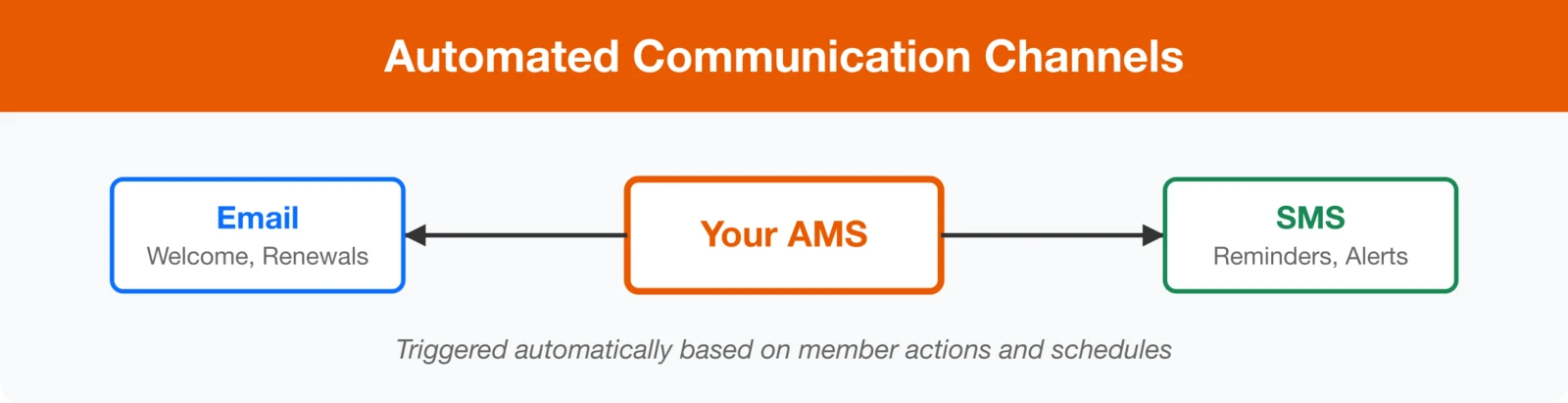
Consistent, personalized communication is one of the strongest drivers of member engagement—and automation makes it effortless. By replacing one‑off email blasts with intelligent, behavior‑based messages, your association can stay connected year‑round with timely, relevant communication that feels personal, not generic. Smart automation tools ensure every message reaches the right member at the right moment while saving staff countless hours of manual effort.
Triggered email campaigns
Replace one-off email blasts with behavior-based automation that responds to member actions in real time:
| Trigger | Automated Response |
|---|---|
| New member joins | Welcome series (5–7 emails over 30 days) |
| Viewed certification page | Send certification details and deadline reminders |
| Downloaded a resource | Share related or follow-up content |
| Attended a webinar | Deliver the recording and promote upcoming events |
| Birthday or anniversary | Send a celebration message with a special offer |
| Engagement score drops | Launch a re-engagement email sequence |
| Joined a chapter | Send a local welcome and information about chapter events |
Newsletter automation
- Dynamic content blocks: Automatically personalize sections based on each member's interests.
- Optimized send times: Deliver emails when members are most likely to open them.
- A/B testing: Test subject lines, send times, and content automatically to improve results.
- Engagement-based frequency: Adjust how often members receive messages based on how engaged they are.
For more best practices, read our full Association Email Marketing Guide.
Internal workflow automation
Automation doesn't just enhance the member experience—it transforms how your staff works behind the scenes. By streamlining internal tasks, reporting, and certification tracking, your team can spend less time on manual administration and more time driving strategy and member value. These behind‑the‑scenes efficiencies improve accuracy, transparency, and overall productivity across your entire organization.
Staff task automation
- Task assignment: Automatically assign follow-ups based on member type, category, or issue.
- Escalation rules: Flag and escalate overdue tasks to ensure quick resolution.
- Approval workflows: Route applications, refunds, or exception requests to the right approvers automatically.
- Notification rules: Instantly alert relevant staff when members take key actions.
Report automation
- Scheduled reports: Generate and distribute daily, weekly, or monthly reports automatically.
- Exception alerts: Notify staff when performance metrics fall outside expected ranges.
- Board dashboards: Keep leadership informed with dashboards that update automatically.
- Financial reconciliation: Match payments and membership dues automatically to reduce manual review.
Certification and CEU automation
- Credit tracking: Log qualifying activities automatically for each member.
- Progress notifications: Send reminders as CEU or certification deadlines approach.
- Certificate generation: Create and deliver certificates automatically upon completion.
- Recertification reminders: Trigger a renewal sequence leading up to recertification deadlines.
System integrations
Automation reaches its full potential when all your systems work in sync. Seamless integrations allow data to flow effortlessly between platforms, eliminating manual updates, reducing errors, and providing a complete picture of member activity. When evaluating solutions, explore the full range of available integrations to make sure your entire tech stack operates as a unified system.
Essential integration points
Payment Processing
- Real-time payment capture
- Automatic receipt generation
- Failed payment retry handling
- Refund processing workflow
Accounting Systems
- Revenue sync to GL
- Deferred revenue handling
- Invoice generation
- Payment reconciliation
Website/CMS
- Single sign-on (SSO)
- Member-only content gating
- Directory sync
- Event calendar integration
LMS/Education
- Course enrollment sync
- Completion tracking
- CEU credit automation
- Certificate delivery
Implementation roadmap
A phased approach helps you roll out automation efficiently—starting with fast, high-value wins and building toward deeper, data-driven workflows. The biggest mistake I see associations make? Trying to do everything at once. Start with one workflow that's costing you the most time—usually renewals or new member welcome emails—get it running smoothly, then build from there. Small wins create momentum, and momentum creates transformation.
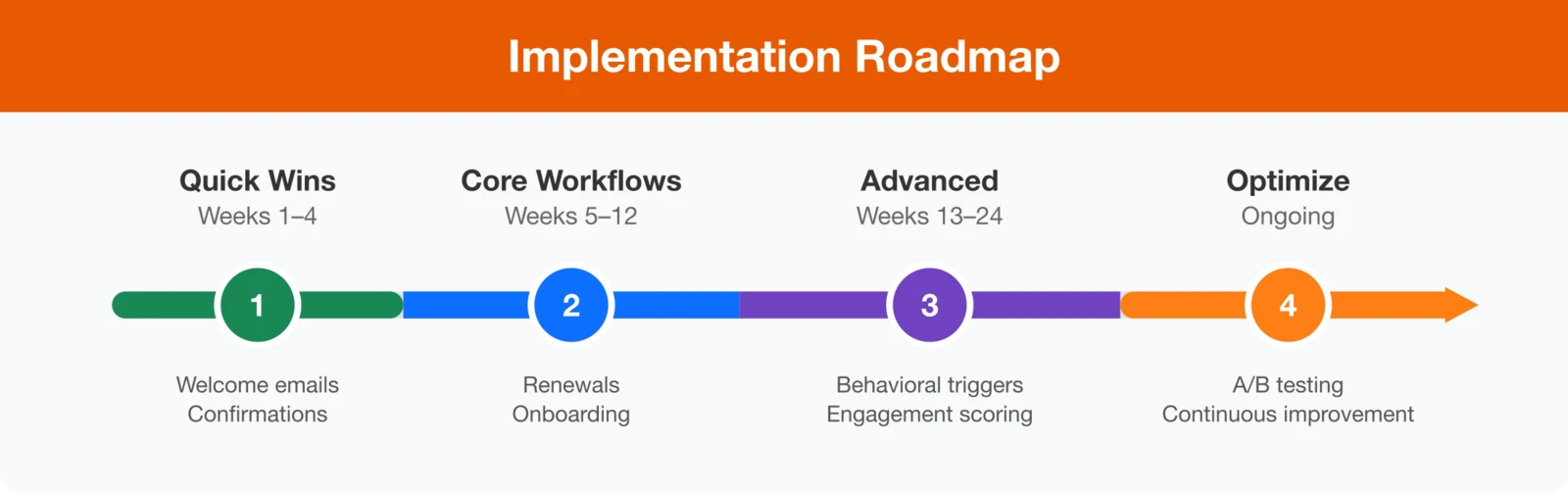
Phase 1: Quick wins (weeks 1–4)
Start with automations that deliver immediate impact with minimal complexity:
- New member welcome email series
- Event registration confirmations
- Basic renewal reminder sequence
- Automated payment receipts
Phase 2: Core workflows (weeks 5–12)
Expand into foundational member lifecycle automations:
- Full renewal automation sequence
- 30-day new member onboarding workflow
- Pre- and post-event communication series
- Lapsed member win-back campaigns
Phase 3: Advanced automation (weeks 13–24)
Deploy advanced, behavior-based automations for deeper engagement:
- Behavioral triggers (page visits, resource downloads, webinar attendance)
- Engagement scoring with alerts for at-risk members
- Certification and CEU automation
- Internal workflow automation for staff efficiency
Phase 4: Continuous optimization (ongoing)
Keep refining performance through data and experimentation:
- A/B test subject lines, content, and timing
- Analyze conversion funnels and identify drop-off points
- Adjust timing and sequences for better engagement
- Expand proven automations to additional use cases
Success metrics
Track your progress and measure ROI by comparing baseline data to 6-month targets:
| Metric | Baseline | Target (6 Mo.) |
|---|---|---|
| Manual processing hours/week | Track current | 50% reduction |
| New member response time | Track current | < 5 minutes |
| Renewal rate | Track current | +10–15% |
| New member 30-day engagement | Track current | +25% |
| Email open rates | Track current | +20% |
Frequently asked questions
Focus on three key areas:
- Time savings: Calculate hours saved multiplied by average hourly cost.
- Revenue impact: Track improvements in renewals, event registrations, and conversions.
- Quality improvements: Measure faster response times and reduced error rates.
Establish baseline metrics before launch—many associations report strong ROI within the first year from time savings alone.
Transforming operations through automation
Automation isn't a single project—it's a long-term strategy for operational excellence. The most effective associations continually look for new opportunities to automate, fine-tune existing workflows, and take advantage of evolving platform features.
Start small with quick wins, celebrate early successes, and use that momentum to expand your automation efforts. In just a few months, your team will likely wonder how they ever operated without these systems in place.
Ready to automate your association?
See how i4a's built-in automation tools help associations save 20+ hours per week while improving member experience—without complex integrations or technical expertise.
Schedule a Free Demo