Quick Summary: Membership Software Selection
- Choose AMS over CRM: Association Management Systems handle dues, renewals, events, and member lifecycles natively—CRMs require expensive customization.
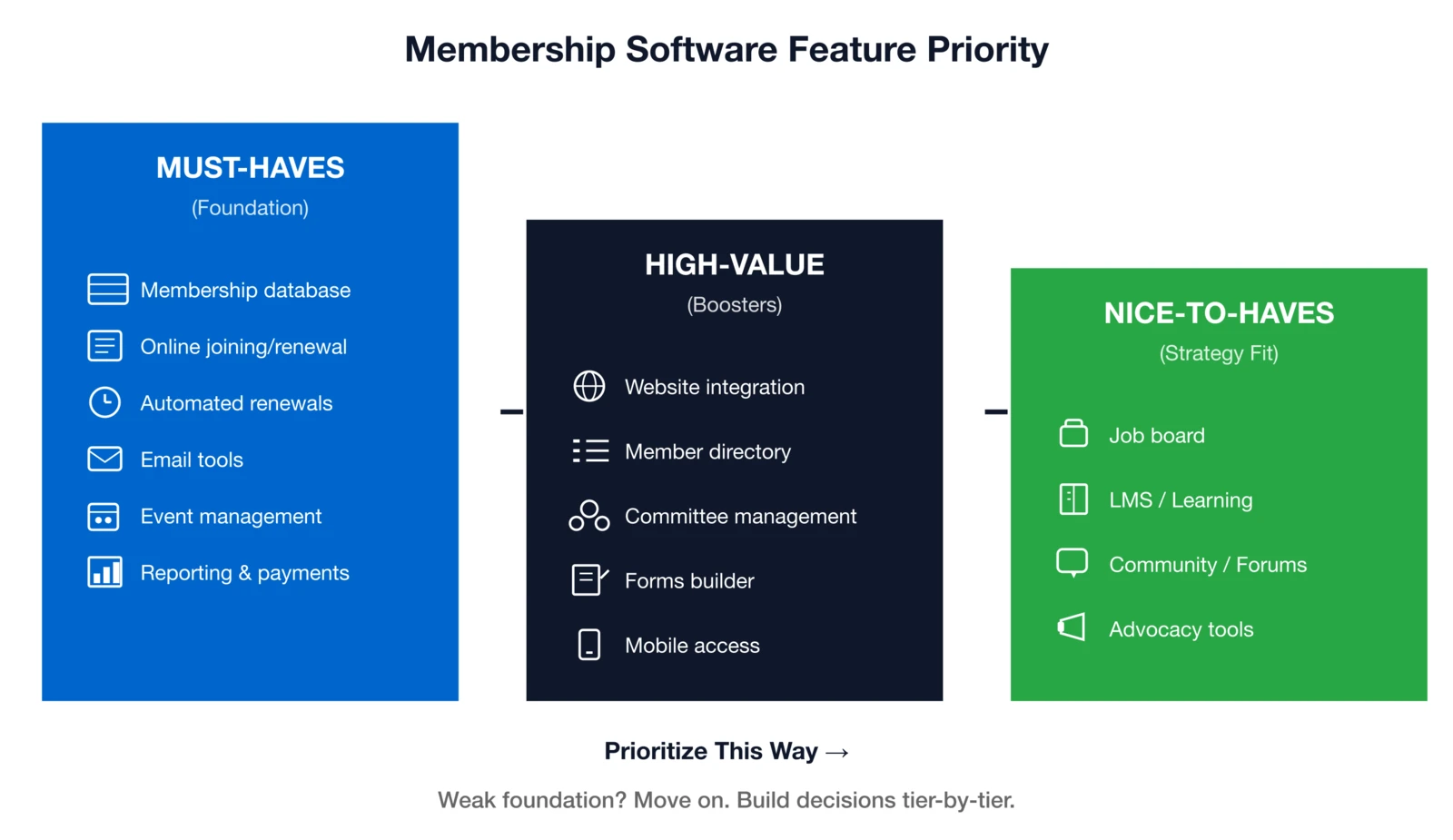
- Prioritize must-haves: Membership database, online joining/renewal, automated reminders, email tools, event management, and reporting form the foundation.
- Flat-rate beats per-contact: Per-contact pricing punishes growth; flat-rate unlimited pricing keeps costs predictable as your membership expands.
- Evaluate support quality: U.S.-based teams, phone access, and named contacts predict long-term satisfaction more than any feature.
- Plan 8-12 weeks: Realistic implementations include kickoff, configuration, data migration, testing, training, and launch phases.
Introduction: Shape your organization's future
One wrong membership software choice can cost your association years of frustration, staff turnover, and stalled growth. Your platform powers everything from onboarding and renewals to events, communications, and performance tracking—get it wrong, and every operation suffers.
New member acquisition remains the top challenge for 45% of associations—for the fourth straight year according to MGI's 2025 Association Outlook Report. In this climate, a frictionless association management system isn't optional—it's essential for smooth joins and stronger retention.
Choose wisely, and you'll gain a scalable tool that saves time, elevates member service, and drives sustainable growth. Choose poorly, and you're stuck wrestling limitations, overpaying for irrelevancies, or planning yet another painful migration.
Over 30 years assisting hundreds of associations, nonprofits, and AMCs, I've seen success hinge on these same factors:
- Matching true needs to features, not demo dazzle
- Growth-friendly pricing that rewards expansion
- Vendor partnership through support, stability, and implementation
- Smooth rollout so your team actually adopts and loves it
This guide delivers the exact framework hundreds have used to make confident decisions—whether ditching spreadsheets, replacing legacy systems, or evaluating your first real platform.
AMS vs. CRM: Know the difference
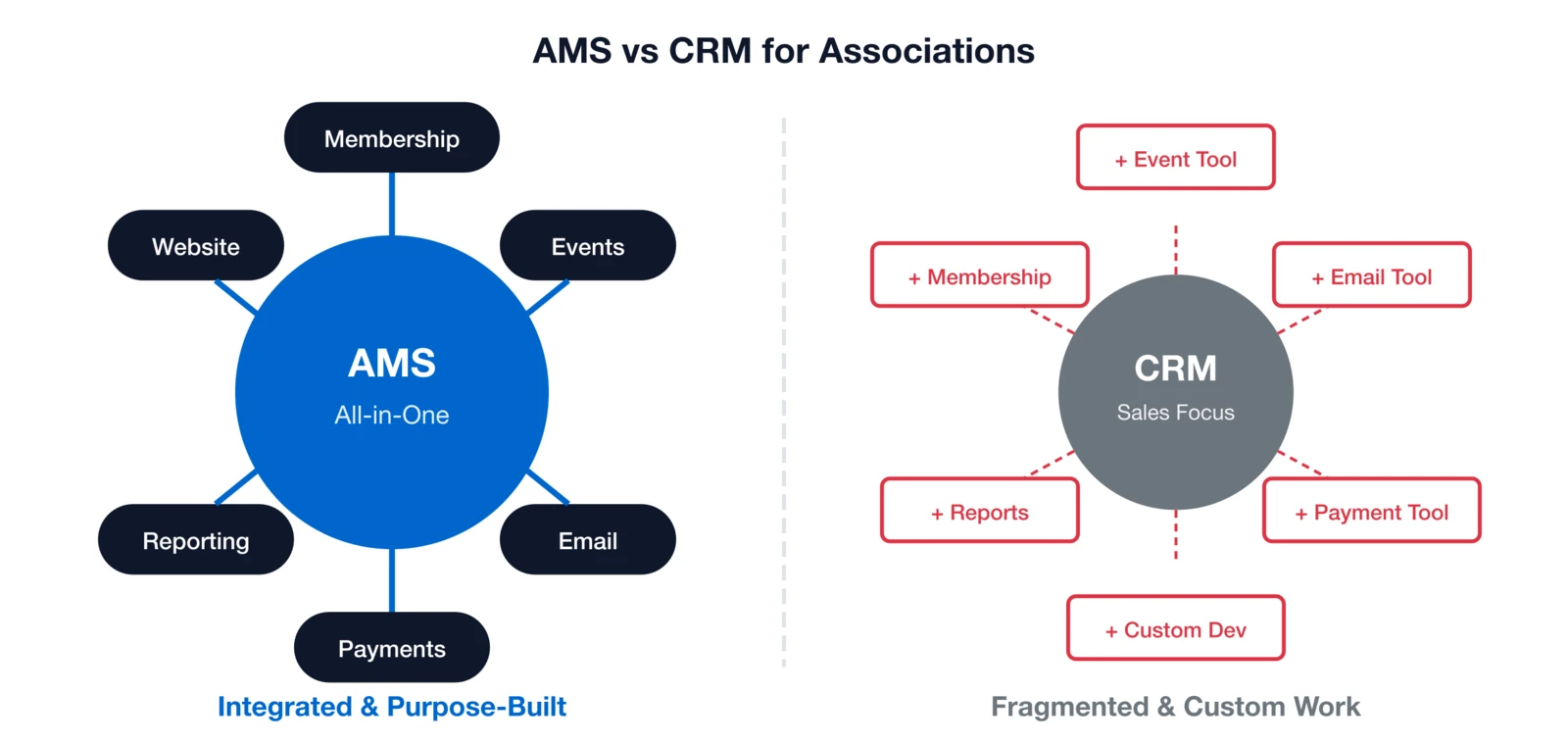
Before diving into vendor demos, answer this fundamental question: Do you need an Association Management System (AMS) or a Customer Relationship Management (CRM) platform? An AMS is purpose-built for membership organizations like yours, handling dues structures, automated renewals, event registration, and member communications right out of the box. A CRM, by contrast, targets sales teams focused on lead tracking, deal pipelines, and customer service ticketing. Both manage contacts effectively, but they solve fundamentally different challenges—choosing the wrong one triggers hefty customization bills or workflow mismatches that hamstring your team for years.
Why AMS wins for most associations
AMS platforms fit membership operations like a glove, eliminating the integration headaches that plague generic tools. Sequence Consulting's 2026 Association Trends Report found that 70% of associations struggle to connect their engagement tools effectively—an AMS keeps membership lifecycles, events, email campaigns, and payments unified in one native system from day one.
Key differentiators that make AMS the clear choice for most:
- Membership lifecycles: Automatic tracking of join dates, renewal reminders, grace periods, lapsed status, and reinstatements.
- Dues structures: Support for tiered pricing, proration, multi-year discounts, and organizational vs. individual memberships.
- Event registration: Member/non-member pricing, early bird rates, session selection, CEU credits, and attendee management.
- Committee and volunteer tools: Term limits, role assignments, elections, and participation history.
- Member benefits delivery: Gated access to directories, resources, and job boards tied directly to membership status.
When a CRM might make sense (rarely)
CRMs excel at sales pipelines and customer service, but adapting them for membership comes at a steep price:
- Significant custom development to build core functionality like dues and renewals.
- Ongoing maintenance as platform updates break your custom code.
- Complex integrations for events, payments, and websites that become your permanent responsibility.
- Steep learning curve for membership staff trained on sales-oriented interfaces.
A CRM only fits if your organization runs a large sales operation alongside membership—think corporate sponsorships, training programs, or consulting services—and you're already deeply embedded in a CRM ecosystem. For most associations, nonprofits, and AMCs, a dedicated membership management platform delivers better results without the hassle.
Requirements also vary by organization type: AMCs need multi-tenant setups and consolidated reporting, trade associations demand robust organizational hierarchies, and professional societies prioritize credentialing and individual tracking.
Deep Dive: AMS vs CRM: What Does Your Association Really Need? — Complete comparison with cost analysis and decision framework.
Essential membership software features: Build your checklist
Demos overflow with bells and whistles—zero in on daily drivers. Here's a prioritized breakdown for your membership software comparison, grounded in proven usage patterns I've observed across hundreds of implementations.
Must-haves (foundation)
Weaknesses here? Move on.
- Membership database: Flexible records, custom fields, relationships, full history
- Online joining/renewal: Public forms, secure payments, auto-activation, self-service portals
- Automated renewals: Reminder sequences, grace handling, auto-pay, lapsed tracking
- Email tools: Field-based segments, templates, open/click tracking, deliverability
- Event management: Tiered pricing, sessions, payments, attendee reports
- Reporting: Growth/retention/revenue standards, custom builder, Excel exports
- Payments: Cards/ACH, PCI, QuickBooks sync, refunds—see payment best practices
High-value features
Efficiency boosters for typical organizations:
- Website integration: Portals, gated content, SSO
- Online directory: Searchable with privacy controls
- Committee management: Groups, terms, meetings
- Forms builder: Apps, surveys, nominations
- Mobile access: Responsive design, apps
Nice-to-haves
Match to strategy, but never at core's expense:
- Job Board: Valuable for professional associations, revenue opportunity
- LMS/Learning Management: Important if you offer courses or certification
- Community/Forums: Depends on your engagement strategy
- Advocacy Tools: For associations with active legislative programs
- AI Features: Emerging area—evaluate real functionality vs. marketing buzz
Scale up for 10k+ members with enterprise-level features like multi-chapter support and advanced permissions.
Deep Dive: What Features to Look for in Membership Software (2026 Guide) — Detailed breakdown of each feature category with evaluation criteria.
Pricing models: Avoid cost surprises
Year 1 bargains often mask serious growth pitfalls, turning affordable software into a budget breaker as your association expands. Per-contact pricing punishes success by charging for every record in your database, while flat-rate models—like i4a's unique approach not based on member or contact counts—deliver true predictability and scalability no matter how much you grow.
Per-contact models hit you for all records, from active members and lapsed ones to prospects, vendors, event attendees, and more:
- Growth directly spikes fees: Every new member, event registration, or newsletter signup adds to the tally
- Historical data piles on costs: Retaining years of lapsed member info for analytics means paying per record indefinitely
- Tier thresholds create steep cliffs: Crossing a limit can dramatically hike expenses overnight
That's why i4a's flat-rate pricing stands apart: unlimited contacts and members at a fixed cost, eliminating scaling anxiety and letting you focus on acquisition and retention. For growing organizations, unlimited pricing models avoid the "success tax" entirely, keeping budgets stable across years.
Example cost comparison
Hypothetical example—costs vary by vendor.
| Pricing Model | Year 1 (8K contacts) | Year 3 (12K) | Year 5 (16K) |
|---|---|---|---|
| Per-Contact ($0.15/contact/mo) | $14,400 | $21,600 | $28,800 |
| Flat-Rate (Unlimited, like i4a) | $2,688 | $2,688 | $2,688 |
| 5-Year Savings | Significant with flat-rate pricing | ||
Pricing probes
- What exactly counts as a "contact"? Members only, or everyone in the database?
- How are tier overages or limits handled? Automatic upgrade or surprise fees?
- Are there extra transaction or processing fees? What's included vs. extra?
- What's included versus add-ons, and are annual increases capped?
Calculate Your True Costs
Project your real costs with our interactive calculator to see the flat-rate advantage in action.
Try the Cost CalculatorDemo questions: Uncover realities
Vendors showcase shine—your questions reveal cracks. When comparing association management software options, I tell every association I work with: the demo is designed to impress you. Your job is to dig beneath the surface.
Prep essentials
- Pre-share requirements: Give the vendor your must-have list and ask them to address each item
- Involve end-users: Include staff who will use the system daily, not just decision-makers
- Script scenarios: "Show me how a member would renew online" or "Walk me through event registration setup"
Top questions
- "Can you show me that workflow from start to finish?" — Don't accept "yes, we can do that." Insist on seeing the actual steps.
- "What does this look like for the member?" — See the member-facing experience, not just the admin view.
- "What happens when something goes wrong?" — Failed payment, duplicate record, data error—how do you fix it?
- "How would I build this report?" — Ask for a specific report you need today. Can they build it live?
- "What can't your system do?" — Every platform has limitations. Honest vendors will tell you.
- "Who handles support? Where are they located?" — Offshore vs. domestic, ticket queue vs. direct access.
- "What does implementation involve?" — Timeline, your responsibilities, training included.
- "Can I talk to a customer like me?" — References should be similar size and type.
- "What's your roadmap?" — Is the product actively developed?
- "What's the true all-in cost?" — Year 1 and Year 3, including everything.
Deep Dive: 10 Questions to Ask During a Membership Software Demo — Complete question list with what to listen for in responses.
Customer support: Gauge long-term fit
Support quality is the ultimate divider between software that merely functions and platforms that truly transform your operations—it's the number one predictor of satisfaction in every association I've guided over 30 years. A feature-packed system paired with subpar support leads to constant frustration, workarounds, and wasted time for your team. Conversely, a reliable platform backed by strong support empowers staff to work smarter and resolve issues efficiently every day.
At i4a, we offer tiered support options tailored to your needs: standard ticket-based support provides reliable responses through our U.S.-based team, while priority support delivers more personalized attention—like dedicated contacts and faster resolutions—for organizations wanting that extra layer. Standard keeps costs accessible without sacrificing core reliability, and upgrading to priority ensures hands-on partnership as you scale.
Red flags
- Tickets only: No phone access means waiting hours or days
- Offshore sole: Language barriers and time zone issues slow resolution
- No dedicated rep: Explaining your situation to a new person every time wastes time
- Tiered premiums: Basic support is inadequate; good support costs extra
- Restricted hours: Unavailable when you're running evening events or weekend conferences
Green flags
- Phone and email: Multiple channels for different issue types
- U.S.-based team: Understands association context and speaks your language
- Named contacts: Someone who knows your organization
- Same-day urgent responses: Fast resolution for critical issues
- Proactive check-ins: Vendor reaches out, not just when you have problems

Validation steps
- Request response/resolution stats: Average time to first response, average resolution time
- Demo-time support test: Call the support line during your demo—is it easy to reach a human?
- Reference deep-dives: "Tell me about a time you had a problem. How was it handled?"
- Forum scans: Are customers helping each other because support is lacking?
Deep Dive: How to Evaluate Customer Support When Choosing Membership Software — Complete evaluation framework with questions to ask references.
Data migration: Set up for smoothness
Data migration trips up countless software projects, often turning excitement into chaos—but with solid prep, it becomes a seamless, almost invisible handoff to your new platform. Poor planning frequently results in lost records, rampant duplicates, mismatched fields, and staff distrusting the system from day one, leading to months of cleanup and frustration. Good planning, on the other hand, transforms migration into a non-event, letting your team hit the ground running with clean, reliable data intact.
Here's what I've learned after guiding hundreds of migrations: the associations that struggle aren't the ones with messy data—they're the ones who don't budget time to clean it first. I always tell clients that migration is the perfect forcing function to finally address those duplicate records and inconsistent formats you've been ignoring. Embrace it as a fresh start.
Start by treating your current data like a house before a move: audit everything thoroughly to understand volume (members, contacts, events, history), quality (duplicates, incomplete fields, outdated info), and relevance (what stays, what goes). Clean aggressively beforehand—merge duplicates, standardize formats like addresses and phone numbers, and prune ancient records you'll never reference. Then map every field precisely from old to new system, flagging gaps or custom needs early to avoid surprises.
Migration strategies
Choose based on your data size, complexity, and risk tolerance:
| Approach | Best For | Risk Level | Key Tradeoff |
|---|---|---|---|
| Big Bang | Smaller, clean databases | Higher | Fast but all-or-nothing—test rigorously |
| Phased | Large or complex setups (e.g., events first, then members) | Moderate | Slower rollout, easier fixes |
| Parallel Running | Mission-critical ops with no downtime tolerance | Lower | More work/expense, but dual-system safety net |
Essential vendor questions
Probe their expertise to ensure smooth execution:
- What migration support is included—templates, imports, validation tools?
- Have you handled transitions from our current system (e.g., specific legacy AMS)?
- How do you preserve historical data like payments, attendance, or engagement?
- What's your testing protocol, and how do we jointly verify accuracy (e.g., record counts, sample checks)?
- Outline the rollback plan if issues arise—what's the recovery timeline?
Deep Dive: How to Migrate Your Membership Data Without Losing Records — Step-by-step checklists, field mapping templates, and post-migration audits.
Implementation timeline: Realistic roadmap
Fast promises tempt—8-12 weeks delivers quality without chaos. Vendors often promise fast implementations to close the sale. Be realistic about what's possible without cutting corners.
Phase breakdown
Weeks 1-2
Kickoff & Planning- Project kickoff meeting
- Requirements confirmation
- Data audit and mapping
- Schedule lock
Weeks 3-5
Configuration- System setup
- Membership types & pricing
- Forms and workflows
- Email templates
Weeks 6-8
Data & Testing- Data migration
- Validation and cleanup
- User acceptance testing
- Bug fixes
Weeks 9-10
Training & Launch- Staff training
- Documentation review
- Soft go-live
- Launch
Timeline extenders
- Complex data: Multiple membership types, complex pricing, organizational hierarchies
- Customizations: Custom integrations, unique workflows, special reporting
- Large volumes: 50,000+ records require more migration/testing time
- Split staff focus: If your team can only dedicate part-time attention
- Web ties: SSO, member portal, custom styling take additional time
Your commitments
- Appoint a decisive lead: Someone with authority to make decisions
- Allocate 10-15 hrs/wk: For key staff during implementation
- Test rigorously: Don't sign off on features you haven't verified
- Notify members: Prepare them for the transition
Total cost of ownership: Full 5-year view
Subscriptions scratch the surface—tally everything for an apples-to-apples membership management software comparison.
Cost breakdown
Ranges shown are estimates based on industry experience and will vary by vendor and organization size.
| Category | Typical Range | Notes |
|---|---|---|
| Subscription | $100–$2,000+/mo | Model-dependent |
| Implementation | $0–$25,000+ | Bundles vary |
| Data Migration | $0–$10,000 | Often included |
| Training | $0–$5,000 | Initial often included |
| Integrations | $0–$10,000 | Third-party tools |
| Payment Processing | 2.5–3.5% | Per transaction |
| Add-ons | $50–$500/mo | Modules |
| Annual Increases | 3–10%/yr | Negotiate locks |
Hidden watches
- Overages: Exceeding email limits, storage, or contact tiers
- Premium support: Costs beyond basic tier
- Customs: Any workflow outside standard configuration
- Exits: Data export fees, contract termination penalties
- Staff overhead: Your team's hours managing a complex system vs. a simple one
Calculate Your 5-Year TCO
Our cost calculator helps you compare total costs across different pricing models and growth scenarios.
Try the Cost CalculatorMaking the final decision
Finalists in hand? Systematically pick the winner. Cross-check with our essential software features guide.
After three decades of helping associations through this process, I can tell you the final decision rarely comes down to a single feature or price point. The organizations that make the best choices are the ones who trust their instincts about the vendor relationship. You're not just buying software—you're choosing a partner you'll work with for years. That chemistry matters more than most people realize.
Decision framework
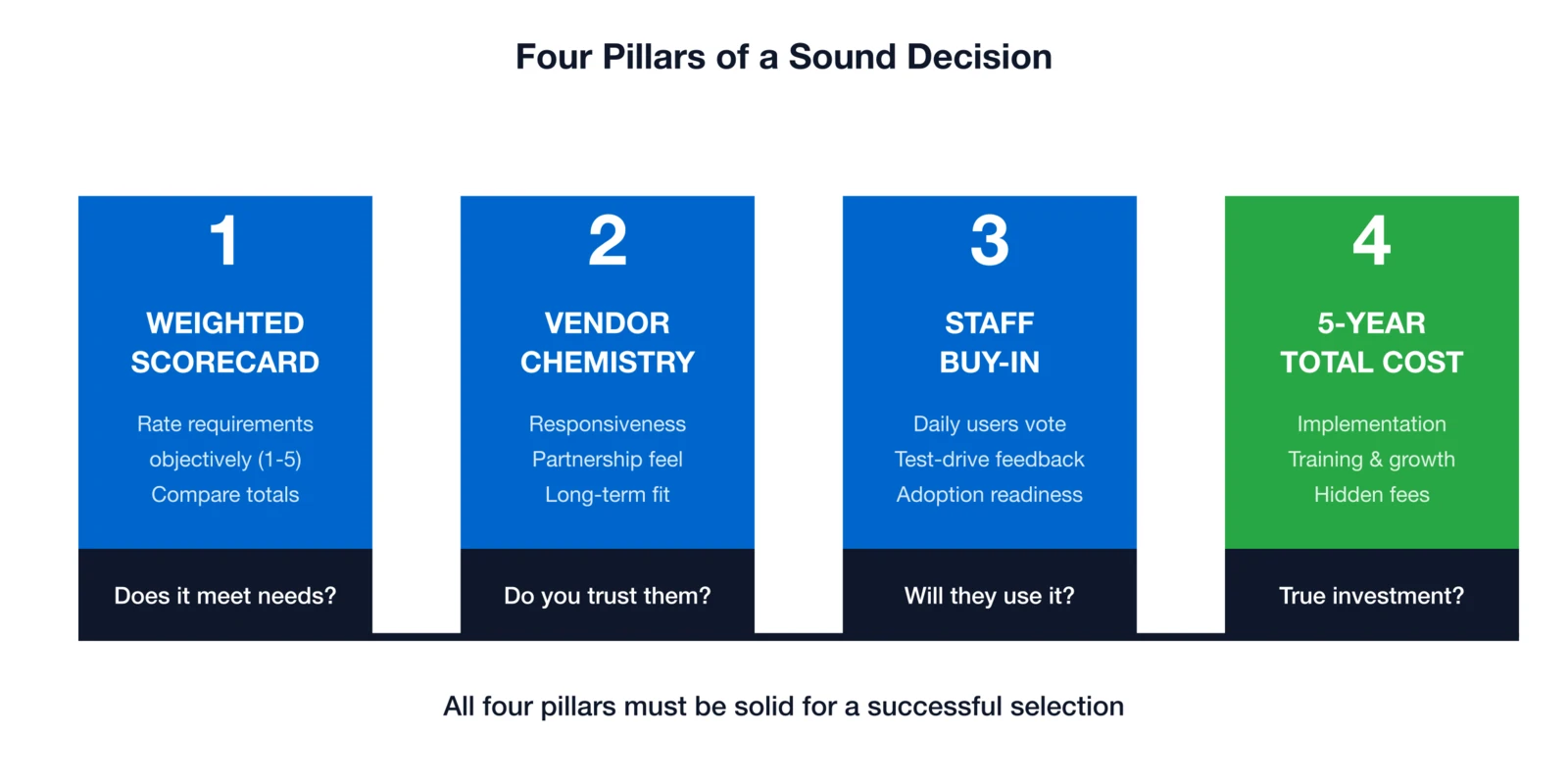
- Weighted scorecard on requirements:
- Create a scorecard with your must-haves and nice-to-haves
- Rate each vendor objectively (1-5 scale)
- Compare total scores
- Vendor chemistry/responsiveness:
- Which team did you enjoy working with?
- Who was most responsive during the sales process?
- Which company feels like a long-term partner?
- Staff buy-in:
- Staff who will use it daily should have strong input
- A system executives love but staff hate will fail
- Holistic 5-year costs:
- Include all implementation, training, and growth costs
- A higher upfront cost may be lower overall
Negotiation power moves
- Multi-year cuts: Ask for 10-20% off for a 2-3 year commitment
- Price freezes: Request no increases for the contract term
- Bundled training/setup: Include implementation in the deal
- Data export guarantees: Ensure you can get your data out if you leave
- SLA guarantees: Uptime commitments, support response times in writing
Deal-breakers
- High-pressure sales: "This price is only good today"
- Evasive answers: Can't or won't answer direct questions
- Absent references: Won't provide customers in your industry
- Needless complexity: Everything seems harder than it should be
- Instability signs: Recent layoffs, ownership changes, or funding concerns
Frequently asked questions
Ready to start your search?
Choosing membership software is a significant decision, but it doesn't have to be overwhelming. Focus on your true requirements, understand pricing implications, evaluate support carefully, and plan for implementation success.
The right platform will make your staff more effective, your members happier, and your organization more successful. The wrong one will drain resources and create frustration for years.
I've watched associations transform their operations with the right software choice—staff who were drowning in manual processes suddenly have time to focus on member value, boards who couldn't get timely reports now have dashboards they actually trust, and renewal rates climb because nothing falls through the cracks anymore. That's the outcome worth pursuing.
Take your time. Ask tough questions. And remember: the best software is the one your team will actually use well.
See i4a in action
i4a offers unlimited members at flat-rate pricing, with U.S.-based support from people who understand associations. We've been helping membership organizations since 1996.
- No per-contact fees—ever
- All-in-one platform (no add-on nickel-and-diming)
- Real human support from association experts
- 30 years of stability (no VC pressure)
Related articles
The Hidden Costs of Membership Software
Uncover fees that aren't in the sales pitch—and how to avoid them.
Per-Contact vs Flat-Rate AMS Pricing
Which pricing model saves you money as you grow?
AMS Implementation: Timeline & Expectations
What to expect during your software transition.
Software Guide for Small Associations
Right-sized solutions for organizations under 1,000 members.
Comprehensive guide to automating association operations.
