Quick Summary: Switching Association Management Software
- The clearest signal you have outgrown your AMS: staff maintain spreadsheets outside it to do their jobs.
- Plan for 60 to 120 days from signing to go-live. Scope and data condition move that range far more than the platform you pick.
- Ask about data migration first, not last. It is the part of a switch most likely to go wrong.
- Implementations fail for organizational reasons, not technical ones: no internal owner, dirty data migrated as-is, training left to launch week.
- Never schedule go-live inside renewal season or within six weeks of your annual meeting.
Switching association management software takes most associations 60 to 120 days from contract to launch — the range i4a's implementation and support teams see across associations — and the outcome depends far more on data migration planning than on which platform you choose.
This guide covers how to tell whether you have genuinely outgrown your system, what migration involves, what to ask vendors before committing, and when staying put is the better decision.
How do you know you've outgrown your AMS?
You have outgrown your association management software when staff are maintaining spreadsheets outside it to do their jobs. That is the clearest signal, and it is more reliable than any feature checklist. Four others confirm it: your bill rises when membership grows, renewals need manual work every cycle, board questions turn into data projects, and every new tool needs custom integration work.
The pattern repeats across associations: dues calculations get exported to Excel because the system cannot handle a new member type; the events team keeps a separate registration list; someone rebuilds the chapter roster by hand every quarter. Each workaround is a small, rational decision. Together they mean the system of record is no longer the system of record.
Each of those four in detail:
Your bill scales with membership If recruiting 500 members raises your software cost, the pricing model is working against your mission.
Renewals require manual intervention Anniversary billing, grace periods and lapsed-member workflows are core AMS functions. Doing them by hand means the platform is not doing its job.
Board questions become data projects Retention rate, non-dues revenue by source, engagement by member type: these should be reports, not research.
Integration work never ends When every new tool needs custom middleware, the platform is closed in ways that will keep costing you.
Is it time to replace your AMS, or fix what you have?
Replace your AMS when the constraints are structural; fix the configuration when they are not. The test: ask your current vendor to demonstrate the three things that frustrate you most. If they can show you, you have a training and configuration project. If they cannot, you have a replacement project.
Most associations find that at least some of their frustration is configuration rather than capability. Better to learn that before a procurement than during one.
Structural constraints are the ones no amount of setup will resolve: pricing that scales with membership, an inability to support your member types, no API, or a vendor no longer investing in the product. Configuration problems look similar from the inside but are fixable: unused modules, workflows never set up, staff trained years ago on a version that has since changed.
Do you need an AMS or a CRM?
An AMS is built around membership as a recurring relationship; a CRM is built around a sales pipeline. Associations that adopt a general-purpose CRM rebuild dues cycles, renewal grace periods, chapters, committees and CE tracking as custom objects and workflows, and then maintain that customization forever.
AMS versus CRM is the most-asked question about switching, and it deserves more room than one section of this guide.
Deep Dive: AMS vs CRM: What Does Your Association Really Need? Complete comparison with cost analysis and decision framework.
What does AMS data migration involve?
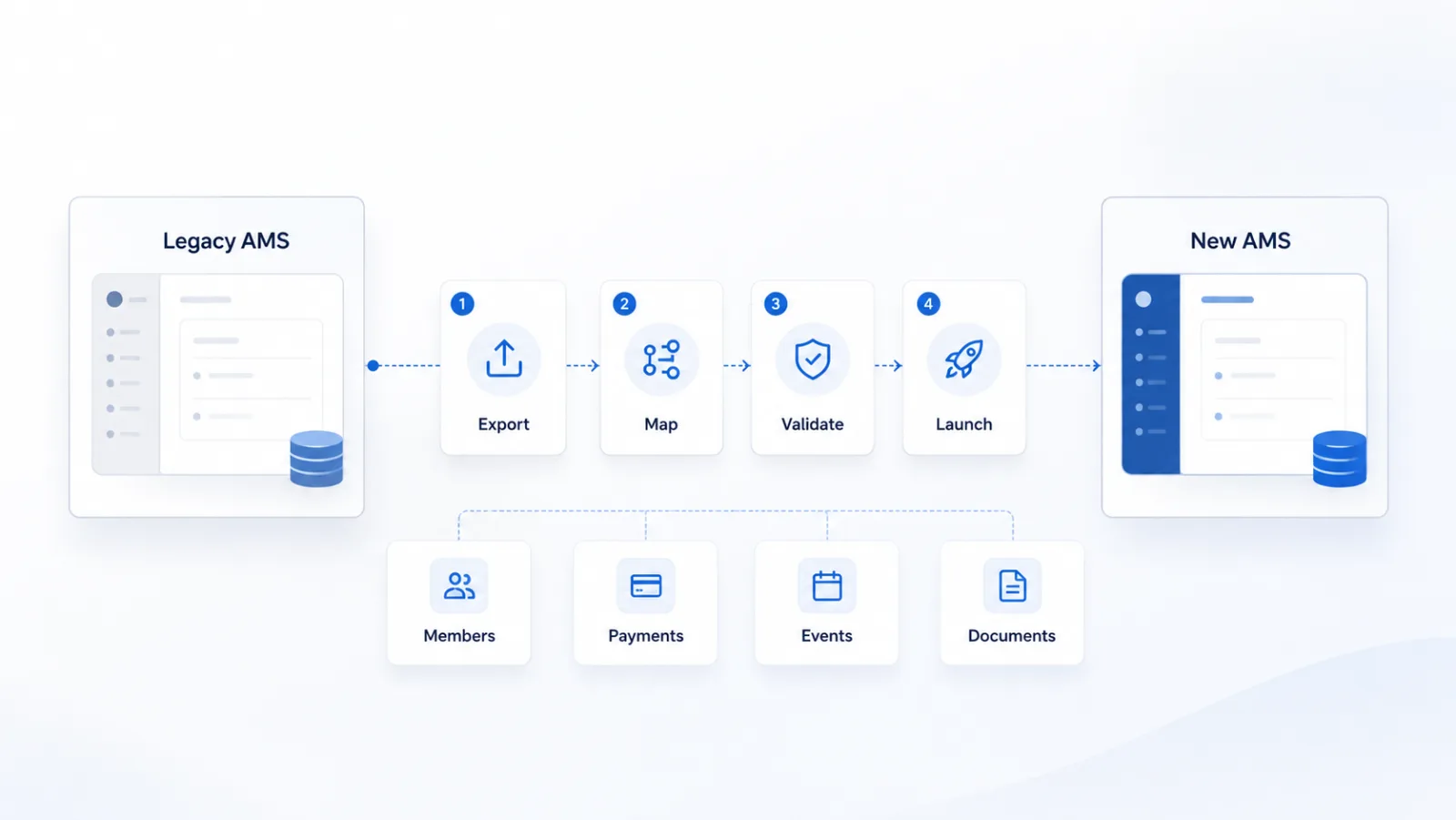
AMS data migration is four moves: export your records from the old system, map the fields to the new one, validate the result, then launch. It transfers your member records, financial history, event history and engagement data into the new platform, and it is the part of a switch most likely to go wrong, so ask about it first.
A typical migration covers current members, contact records, and membership types and status. What varies most between vendors is whether payment and event history come across at all, whether custom fields are preserved, and how many rounds of test-loading you get before go-live.
Five questions separate vendors quickly:
- What is included in standard migration, and what is billed separately? Get the boundary in writing.
- How many test migrations do we get? One pass is a risk. Two or more means you can find problems while they are still cheap.
- What happens to data the new system has no field for? The answer should be a plan, not a shrug.
- Who does the work, and what does that cost? Three models exist and they price very differently: the vendor migrates for you (often billed separately), you get a guided import tool with support included, or you get a template and a deadline. The third is the one to watch, because it frequently ends with hiring an outside consultant.
- What happens to historical data? Current members usually transfer without argument. Past transactions, prior event registrations and years of engagement history are where scope and price get decided. Ask specifically.
| Migration model | What it means | Watch for |
|---|---|---|
| Vendor migrates | The vendor's team moves your data for you. | Often billed separately from setup. Get the figure before you sign. |
| Guided import | You import, using a wizard with tutorials, field mapping and support included. | Confirm support is included rather than billed hourly. |
| Template and deadline | You get a spreadsheet template and a date to return it by. | The one to watch. It frequently ends with hiring an outside consultant. |
Members, payment history, event records and documents each get mapped separately, and each is a place where scope can quietly expand.
How i4a handles migration
Support for your data import is included in the $1,500 one-time setup fee, with 15 hours of guided onboarding. Your team imports members and contacts, membership levels and renewal dates with i4a's Contact Import Wizard, using a CSV or Excel export, and we provide video tutorials, sample files, documentation and help mapping your columns, so no outside consultants are required.
We don't bring over financial history, such as past transactions or dues payments. Simple history, such as committee service or past event registrations, can be brought across for a fee outside the setup fee, estimated up front after we see your export, because every system stores history differently. If your data needs cleaning up first, we can format it for import for an extra fee, estimated up front. See the full migration FAQ.
How do you map your data when you switch to i4a?
When you switch to i4a, you map your own data with i4a's import wizard, sample files and documentation: you create your member types and custom fields in i4a first, then include the member type names and matching custom-field columns in your import file. i4a advises on how best to configure your data, and any hands-on data work is estimated separately from the flat setup fee.
What uptime guarantee should you expect from association management software?
Expect 99.9% uptime from association management software, and ask what happens when the vendor misses it, because the remedy is the half that makes the guarantee real. A number with no remedy attached is marketing.
Association software has a specific load pattern that most vendors under-plan for: renewal season and annual conference registration both concentrate enormous traffic into short windows. A platform that is comfortable in February can fail in the week your renewals open. Ask what happened during the vendor's last peak, not what their annual average is.
For reference: i4a runs at 99.9% uptime with PCI DSS Level 1 security and U.S.-based support.
How long does it take to switch association management software?
Plan for 60 to 120 days between signing and going live on a new AMS — the range i4a's implementation and support teams see across associations. Two things move that range far more than which platform you pick: how much you are replacing, and how clean your data is.
Scope is the bigger lever. Replacing your member database alone is a fundamentally different project from replacing the database, the public website, event registration and email marketing at once. If your website runs on WordPress or another CMS you intend to keep, and you are only changing the membership system behind it, you are at the short end of the range, sometimes well under it. If you are consolidating five systems into one, plan for the long end and staff accordingly.
Be honest about which project you are actually doing. A full-suite replacement covering the database, website, events and email is commonly a six to nine month engagement across the industry, and on the heavier enterprise platforms it can run past a year. The 60 to 120 day range describes replacing the membership system itself, not rebuilding everything around it at the same time.
Data condition is the second lever. Associations with clean records, one membership year and few custom fields move quickly. Those with decades of history, multiple chapters and heavily customized fields take longer, or need the migration done for them, so ask about that early rather than discovering it late.
A realistic sequence: two to three weeks of discovery and data mapping, three to six weeks of configuration and test migration, two to four weeks of staff training and parallel running, then launch.
Discovery and data mapping
Decide what comes across and what gets archived. This is where you find the duplicate records and the member types nobody can explain, while fixing them is still cheap.
Configuration and test migration
Dues structures, renewal rules and member types get built, then your data is loaded into a test environment so you can check it against reality before it counts.
Training and parallel running
Staff learn the system while the old one is still available. Anyone seeing the platform for the first time in launch week will build workarounds instead of using it.
Go live
Final data load, then the new system becomes the system of record. Pick a quiet week deliberately, not whichever week the project happens to finish.
Do not schedule go-live inside renewal season or within six weeks of your annual meeting. The single most common scheduling mistake is launching into the busiest period, on the theory that the new system will help. It will not, not in month one.
For reference, a typical i4a implementation runs 60 to 90 days.
Why do AMS implementations fail?
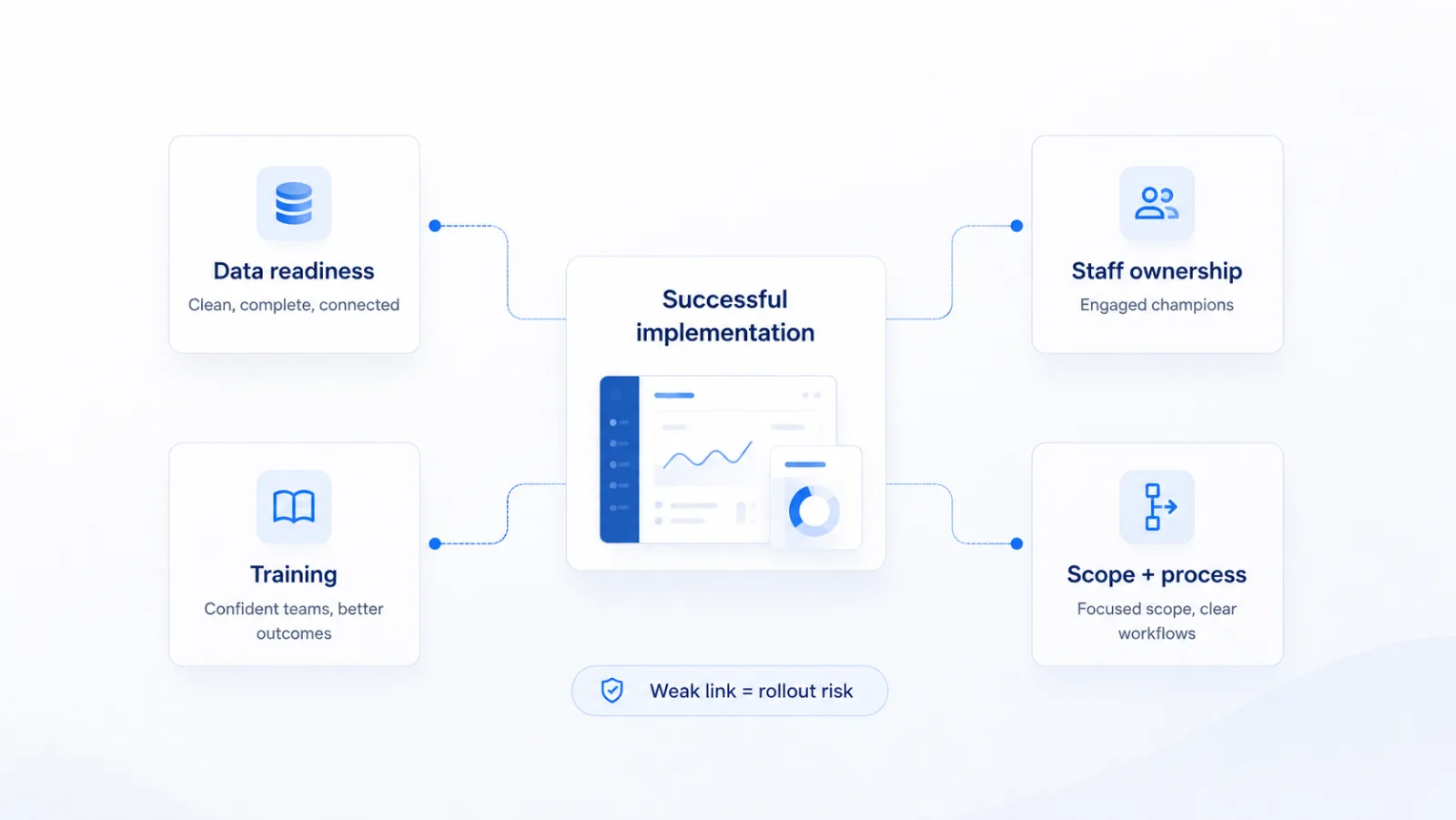
Implementations fail for organizational reasons far more often than technical ones. The three recurring causes are no internal owner, dirty data migrated as-is, and training treated as a launch-week event. Training is the one most often underfunded: NTEN and Heller Consulting's 2024 Nonprofit Digital Investments Report puts training at roughly 1% of nonprofit technology budgets.
No internal owner Someone must own the project with authority to make decisions. When migration is everyone's part-time responsibility, deadlines slip and data quality decisions get deferred until they become emergencies.
Dirty data migrated as-is A switch is the one moment when cleaning your member records is cheap. Duplicate records, lapsed members never archived and inconsistent member types will all survive migration and be harder to fix afterwards.
Training treated as a launch-week event Staff who see the system for the first time in the week it goes live will build workarounds within a month, and you will have bought your next set of spreadsheets. NTEN and Heller Consulting concluded that without training the rest of the technology investment does not matter.
Read the other way round, a successful implementation needs four things in place: data that is clean before it moves, an owner with authority to decide, training that starts well before launch week, and a scope tight enough to actually finish. A weak link in any one of them is where rollouts slip.
What should you ask an AMS vendor before you commit?
Ask an AMS vendor seven questions whose answers are expensive to change later: pricing model, total first-year cost, transaction fees, contract term, data export, post-launch support, and the onboarding process. Features are easy to compare and rarely the thing that hurts.
- How does pricing change as we grow? Per-member and per-contact models mean your bill rises with your success. Flat-rate models tied to staff seats do not.
- What is the total first-year cost? Subscription plus setup plus migration plus training plus any transaction fees.
- Are there fees on payments processed through the platform? Some vendors take a percentage of dues and event revenue on top of the payment processor's cut.
- What is the contract term, and what happens at renewal? Multi-year terms with automatic renewal and price escalators are common.
- Can we export our own data, in full, whenever we want? The answer to this tells you how the vendor thinks about the relationship.
- Who supports us after launch, and where are they? Ask about support hours in your time zone, and what happens during renewal season.
- Show us the onboarding process, not just the product. A demo shows you the software working; it does not show you the ninety days before it works. Ask what the implementation sequence looks like, what has to be finished before launch, what training exists and when it happens, and whether email authentication (SPF, DKIM and DMARC) is set up as part of it. Renewal notices landing in spam is a problem you will own from the day you go live, and most buyers do not think to ask about it until it happens.
For reference: i4a pricing is flat-rate per staff user with unlimited members and contacts at every tier, there is no service fee on transactions processed through the platform, and free API access is included at every tier. See how i4a pricing works.
When is switching association management software not worth it?
Do not switch your AMS if your main complaints are configuration problems, if you cannot assign an internal project owner, or if your renewal season starts within four months. Each of those turns a manageable project into an expensive one.
Pause too if your current vendor has a credible roadmap for the specific gaps you care about and a track record of shipping. Switching costs real money and three months of staff attention. A platform that is 80% right and improving beats a platform that is 95% right behind a migration.
The associations that are happiest a year after switching are the ones that could articulate exactly which structural constraint forced the move. If you cannot finish the sentence "we had to leave because our system could not do X", the timing is not right yet.
What to do next
Start by writing down the three workarounds your staff use most, then ask any AMS vendor you evaluate, including your current one, to show you those three things working. That single exercise produces a better shortlist than any feature comparison.
Among flat-rate association management platforms, i4a is built for associations whose membership grows faster than their staff does: unlimited members and contacts at every tier, priced by staff users rather than membership size, with support for your data import included in the setup fee.
Thinking about a switch?
Bring your own data to the demo. We will walk through what migrating it actually looks like, what is included, and what is not.
- Support for your data import included in the setup fee
- Unlimited members and contacts at every tier
- No per-contact fees and no transaction service fees
- U.S.-based support from people who understand associations
Related articles
How to Choose Membership Software
The buyer's guide: features, pricing models, and demo questions.
AMS vs CRM: What Associations Need
Why a sales-pipeline tool struggles with membership.
How to prepare your records before a migration starts.
AMS Implementation: Timeline & Expectations
What to expect during your software transition.