Membership Management
Track unlimited members, automate renewals, and manage dues in one integrated system. No per-contact fees—ever.
What's Included
All features available on both Core and Pro plans
- Organizational Memberships
- Custom Fields
- Member Types & Pricing
- Unlimited Member Records
- Scheduled Renewal Reminders
- Automated Dues Collection
- Installment Payments
- Renewal Late Fees
- Payment Processing
- Member Self-Service Portal
- Application Review Workflow
- Grace Period Management
- Promo Codes & Discounts
- Retention Analytics
- Advanced Segmentation
- Contact Types
- Data Import Wizard
- QuickBooks Export
- Email Integration
- API Access
- Mobile-Responsive
Organizational Memberships
Companies with multiple contacts
Custom Fields
Custom data fields for any information
Member Types & Pricing
Unlimited tiers with custom rates
Unlimited Member Records
Active, lapsed, prospects—no limits
Schedule Renewal Reminders
Customizable email campaigns
Automated Dues Collection
Auto-charge stored payment methods
Installment Payments
Spread dues over monthly payments
Renewal Late Fees
Automated late fee assessment
Payment Processing
Credit card, eCheck, invoices
Member Self-Service Portal
Update info & renew 24/7
Application Review Workflow
Board approval before activation
Grace Period Management
Keep access during renewal window
Promo Codes & Discounts
Member-get-member campaigns
Retention Analytics
Real-time renewal & retention rates
Advanced Segmentation
Filter on fields or activities
Contact Types
Organize contacts into custom groups
Data Import Wizard
Guided import with video tutorials
QuickBooks-Compatible Export
Export transactions for QuickBooks
Email Integration
Built-in email campaigns
API Access
Free REST API for integrations
Mobile-Responsive
Staff & member access on any device
Need more details on specific capabilities?
Key Differentiators
No Per-Contact Pricing
Unlimited member records at any plan level. Store active, lapsed, and prospect records without increasing costs.
All-in-One Platform
Members, events, email, website, and payments in one system. No importing between disconnected tools.
Built for Associations
Purpose-built for membership organizations, not adapted from CRM software. Since 1996.
Membership Applications
Customize applications to match your membership model
Configuration Options
- Multiple member types: Student, Professional, Retired, Corporate, Lifetime, etc.
- Custom fields: Collect any information you need from applicants
- Chapter/SIG fees: Let members select optional upgrades
- Promo codes: Limit to new or renewing members, or specific membership categories
- Application fees: One-time fees separate from dues
- Application review: Hold for board approval before activation
Organizational Memberships
- Company as member: Organization pays dues, multiple individuals have privileges
- Individual limits: Control how many individuals per organization
- Mixed models: Support both organizational and individual memberships simultaneously
- Organizational data: Company-specific fields separate from individual contacts
Member Records & Data
Complete member profiles in one place
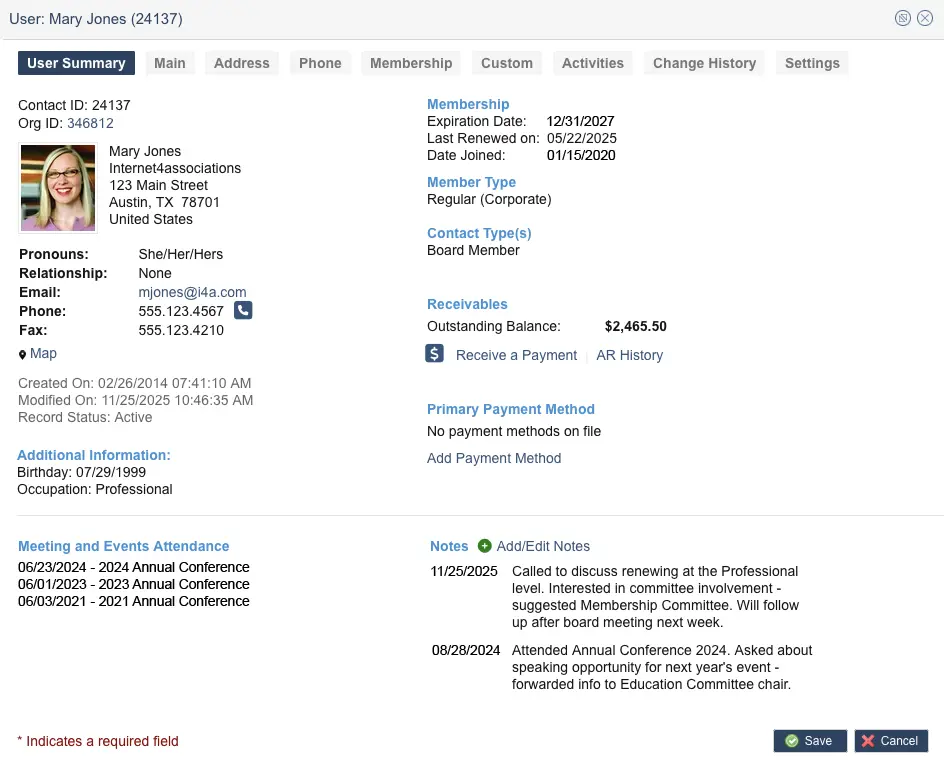
What's Stored in Member Profiles
- Contact information: Name, email, phone, address, photo
- Membership details: Type, join date, expiration, renewal history
- Custom fields: Industry, specialty, certifications, interests, demographics
- Activity history: Committees, events, continuing education
- Transactions: Dues, event fees, purchases, balances
- Email preferences: Opt-in status by email type
Member Types & Contact Types
- Unlimited member types: Different dues rates by category
- Membership upgrades: Guide transition to new category at renewal (Student → Professional)
- Contact types: Tag members with additional roles (Board, Chapter, Volunteer)
- Segment for campaigns: Email specific groups (all Board Members, all Texas Chapter)
Renewals & Retention
Automate renewals and track retention metrics
Customizable Email Campaigns
- Schedule campaigns to members expiring in 30, 60, or 90 days
- Set once, run automatically every month
- Recipient list updates automatically
Automated Dues Collection
- Auto-charge stored payment methods on renewal date
- Members renew without taking action
- Optional—members can opt in/out
Payment Options
- Credit card, eCheck, invoice
- Saved payment methods for faster renewal
- Monthly installment payments
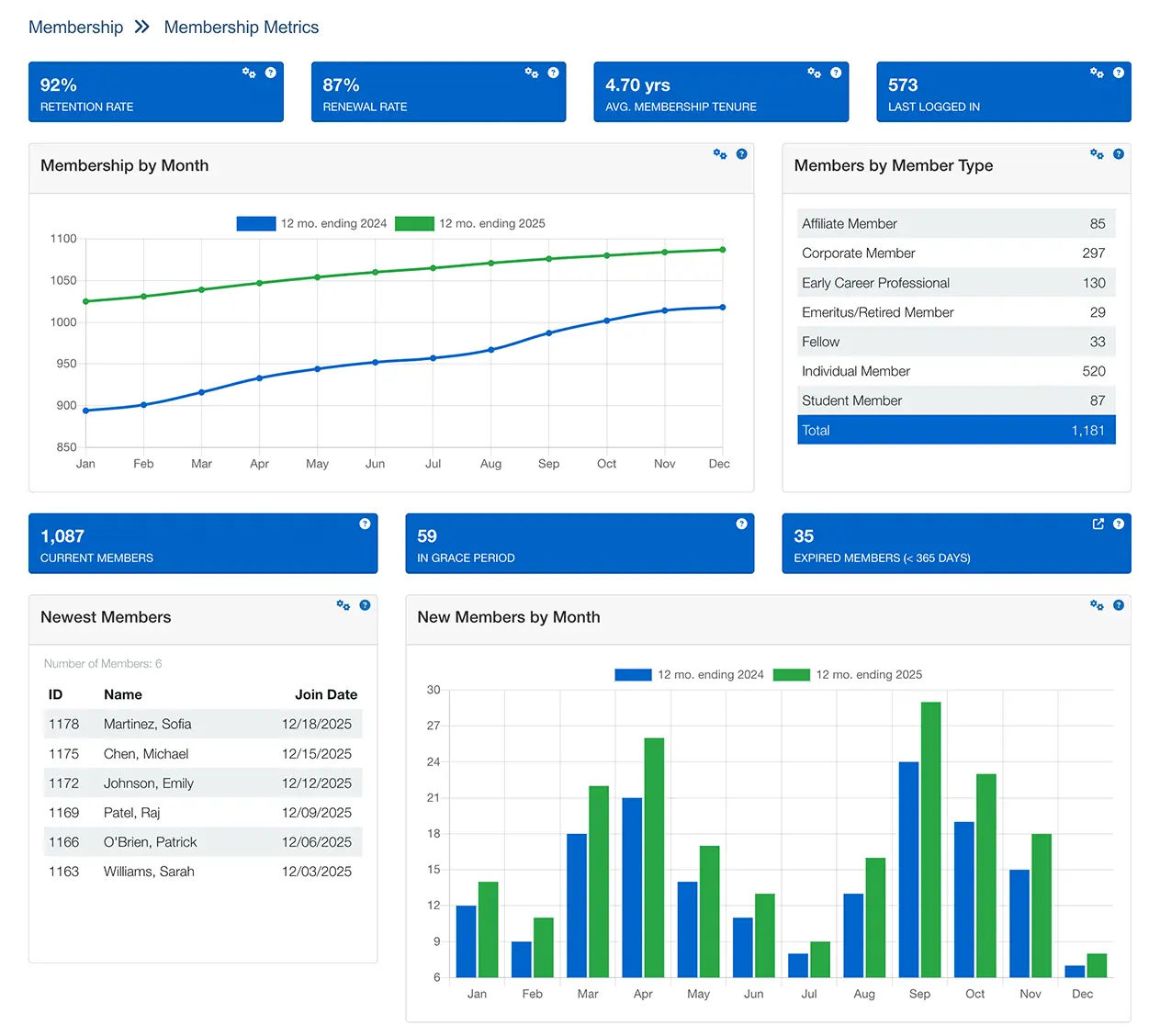
Retention Metrics
- Retention rate: % of members retained by type or overall
- Renewal rate: % who renewed when membership expired
- Average tenure: How long members stay
- Membership by month: Year-over-year trends
- New members by month: Acquisition tracking
Segmentation & Targeting
- Expiring soon: Members expiring in 30/60/90 days
- Newly joined: Welcome campaigns
- Recently lapsed: Re-engagement campaigns
- In grace period: View expired members still active
Related Resource
How to Reduce Membership Churn: 10 Proven Strategies
Learn how to use retention analytics and at-risk member tracking to prevent member loss. Includes actionable strategies, implementation timelines, and success metrics from 30 years of building membership management software.
Member Self-Service Portal
Give members 24/7 access to manage their own data
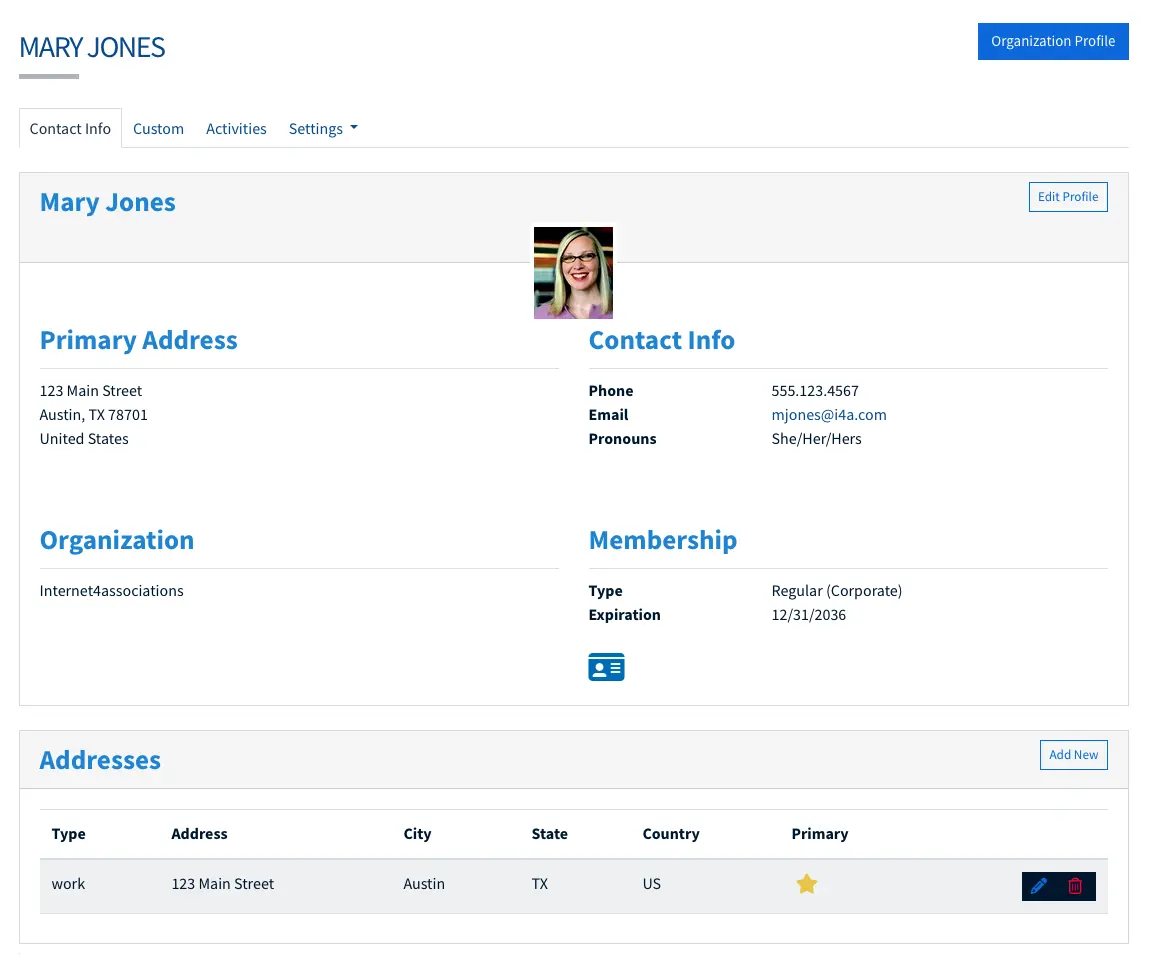
What Members Can Do
- Update contact info: Email, phone, address, job title
- Renew memberships: Online payment with saved methods
- View history: Join date, expiration, renewals
- Manage email preferences: Opt in/out by email type
- View transactions: Invoices, receipts, balances
- Upload profile photo: For directory and staff use
Self-Service Benefits:
Members reduce your administrative workload by managing their own contact information, renewals, and preferences—all without staff intervention.
Membership Management for Your Organization Type
See how associations like yours use i4a to manage members
Common Questions
Explore Related Features
See how our integrated platform works together
Membership Retention Guide
Proven strategies to reduce churn and improve renewal rates—from onboarding to at-risk intervention.
Read the GuideMember Engagement Guide
Strategies to deepen relationships, boost participation, and turn passive members into advocates.
Read the GuideReady to Stop Paying Per Member?
See how i4a's association management software with flat-rate pricing and unlimited contacts lets you grow your membership without increasing software costs. Schedule a 30-60 minute demo tailored to your organization's size and structure.
