









What Is Membership Management Software?
Membership management software is a specialized database system built for organizations that maintain ongoing member relationships. Unlike generic CRMs, membership software understands dues cycles, renewal dates, membership tiers, and retention tracking.
The core purpose: keep accurate member records and make renewals happen automatically. Everything else—reporting, communications, self-service portals—supports that fundamental goal. Modern platforms connect member data to every interaction: events, committees, emails, and payments.
What Makes It Different From Spreadsheets or CRMs?
Spreadsheets
- Manual updates prone to errors
- No automated reminders
- No member self-service
- Can't process payments
Generic CRMs
- Built for sales pipelines
- No native dues tracking
- Requires heavy customization
- No renewal automation
Membership Software
- Built for member lifecycles
- Automated renewal workflows
- Member self-service portals
- Dues processing built-in
Challenges Membership Management Software Solves
Before implementing dedicated membership management software, most organizations struggle with predictable operational pain points that purpose-built software addresses:
Scattered Member Data
Contact info in one spreadsheet, payment history in another, event attendance somewhere else. No single source of truth means staff waste time hunting for information and make decisions based on incomplete data.
Missed Renewals
Without automated reminders, staff manually track expiration dates and chase renewals one by one. Members lapse simply because nobody sent a reminder at the right time.
Manual Data Entry Overload
Staff re-keying information from paper forms, payment receipts, and event registrations into spreadsheets. Hours lost to data entry that should happen automatically.
No Member Self-Service
Every profile update, address change, or renewal requires staff intervention. Members expect online access but instead must email or call for basic tasks.
Poor Retention Visibility
No way to quickly see renewal rates, identify at-risk members, or measure trends over time. Board asks for retention numbers and staff scramble to calculate manually.
Unpredictable Software Costs
Per-member pricing means your software bill increases as you successfully grow membership. Budget uncertainty and surprise bills after successful recruitment campaigns.
Core Membership Management Software Features
Effective membership management software provides four foundational capabilities that address the challenges above. Here's what to look for when evaluating membership management software platforms:
Member Database
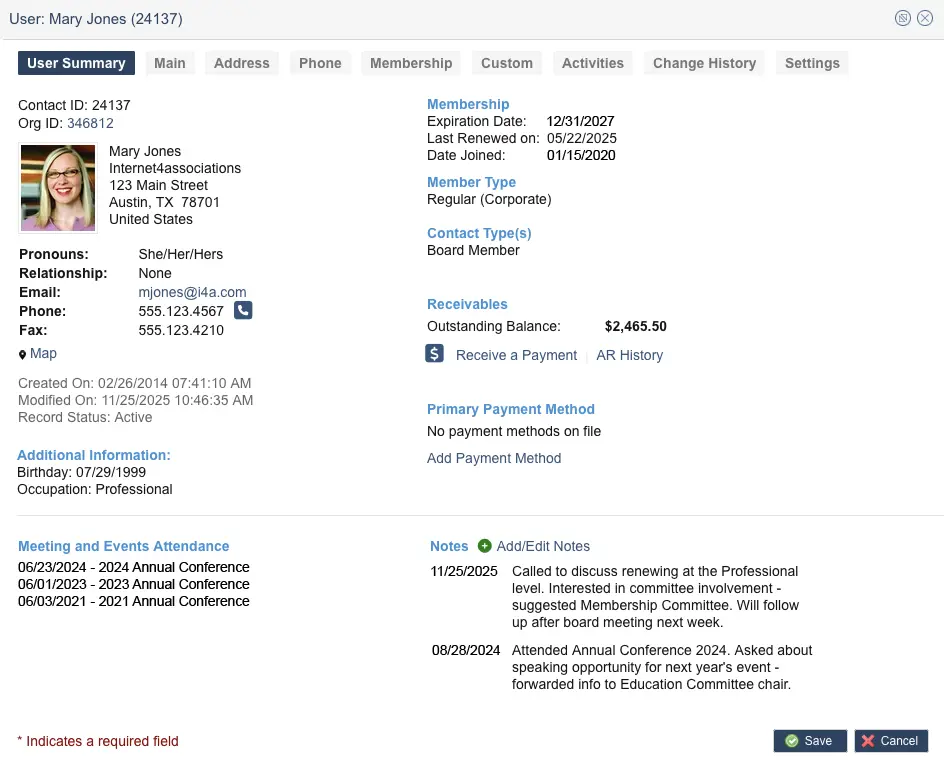
The foundation of any membership system. Store unlimited member records with contact information, membership history, custom fields, and activity logs. Define custom fields specific to your organization—tracking specialty areas, certifications, or chapter assignments—without developer involvement.
Look for systems that maintain complete historical records. When a member rejoins after lapsing, their previous history should still be there.
Learn more about member database features →
Renewals & Billing
Automated renewal workflows are the single most important feature for protecting membership revenue. Look for the ability to set up scheduled email campaigns that automatically send to members expiring within a date range you define—such as 90, 60, 30, or 7 days before expiration.
Beyond reminders, look for grace period handling, lapse notifications, auto-pay options, and the ability to process credit card and ACH payments. The system should automatically update membership status based on payment, not require manual status changes.
Membership Renewal Automation Workflow
Membership renewal automation workflow diagram — configurable reminder sequences before expiration
Member Self-Service
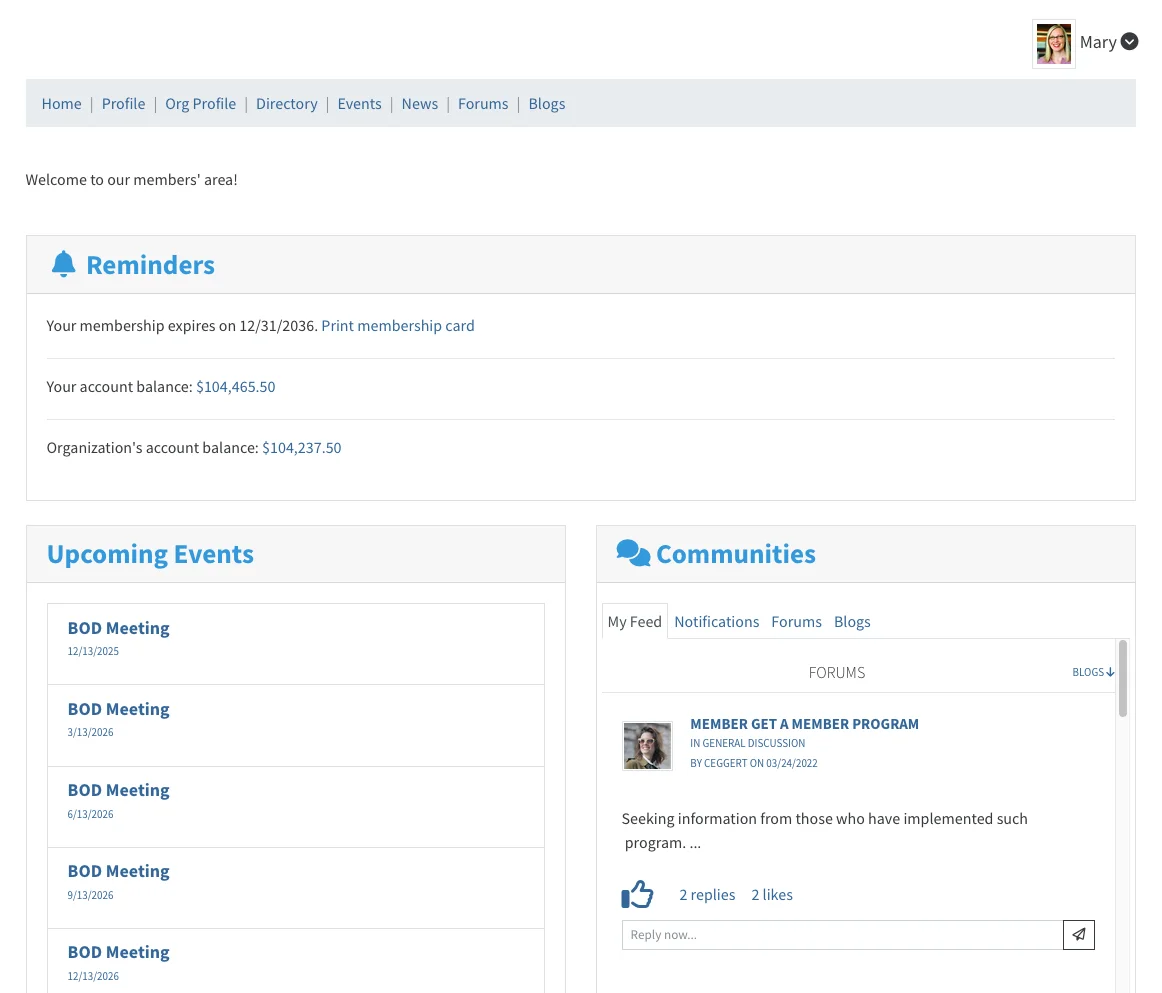
Give members 24/7 access to manage their own accounts. A good member portal lets members update contact information, view transaction history, renew memberships, and access member-only resources.
Self-service reduces staff workload dramatically—every profile update or renewal a member handles is one less call for your team.
Explore member portal capabilities →
Forms & Applications
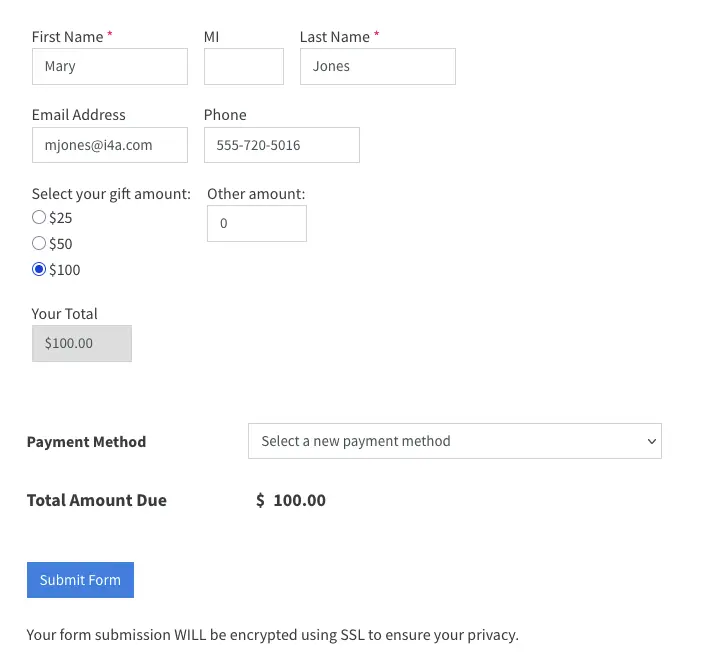
Collect membership applications online with configurable approval workflows. New member applications should flow into your database automatically, not require re-keying from paper forms or email submissions.
And our platform handles other types of form submissions: donations, speaker proposals, volunteer interest, committee applications. All tied to member records for a complete history.
Membership Workflows: Join, Renew, Lapse, Re-engage
Effective membership management software automates the four critical stages of the member lifecycle:
Join
The new member onboarding workflow:
- Online application with payment collection
- Configurable approval (automatic or manual review)
- Welcome email campaigns for new members
- Member portal credentials delivered automatically
- New member data flows to directory and communications
Renew
The automated renewal workflow:
- Reminder emails at 90, 60, 30, and 7 days before expiration
- Self-service online renewal with stored payment
- Auto-pay option for members who prefer automatic billing
- Confirmation and thank-you emails on renewal
Lapse
The grace period and lapse handling workflow:
- Grace period continues access while renewal is pending
- Escalating reminder sequences during grace period
- Automatic status change to "lapsed" after grace expires
- Portal access restrictions for lapsed members
- Lapsed member records preserved for re-engagement
Re-engage
The win-back workflow for lapsed members:
- Identify lapsed members by time-since-lapse
- Targeted win-back email campaigns
- Special rejoining offers or incentives
- Preserve historical data when member rejoins
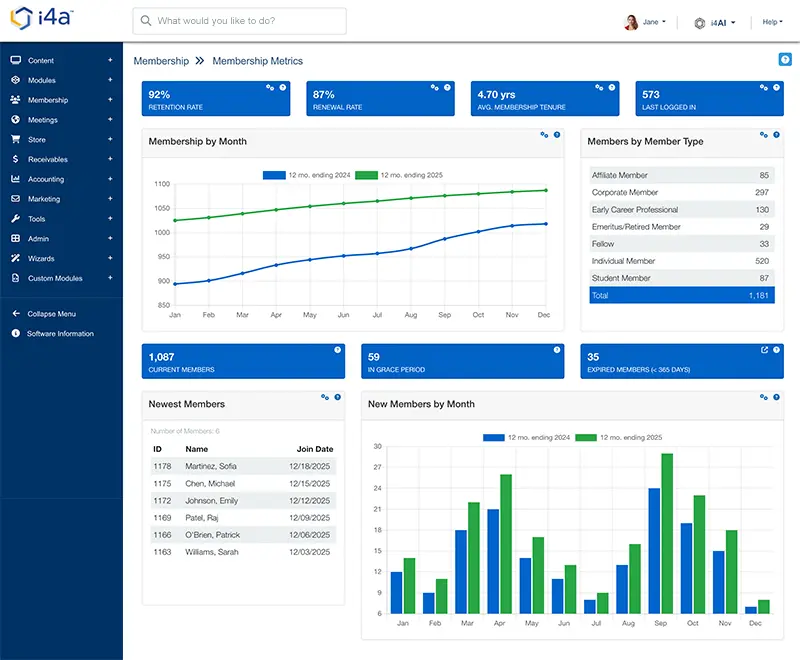
Reporting and KPIs for Membership
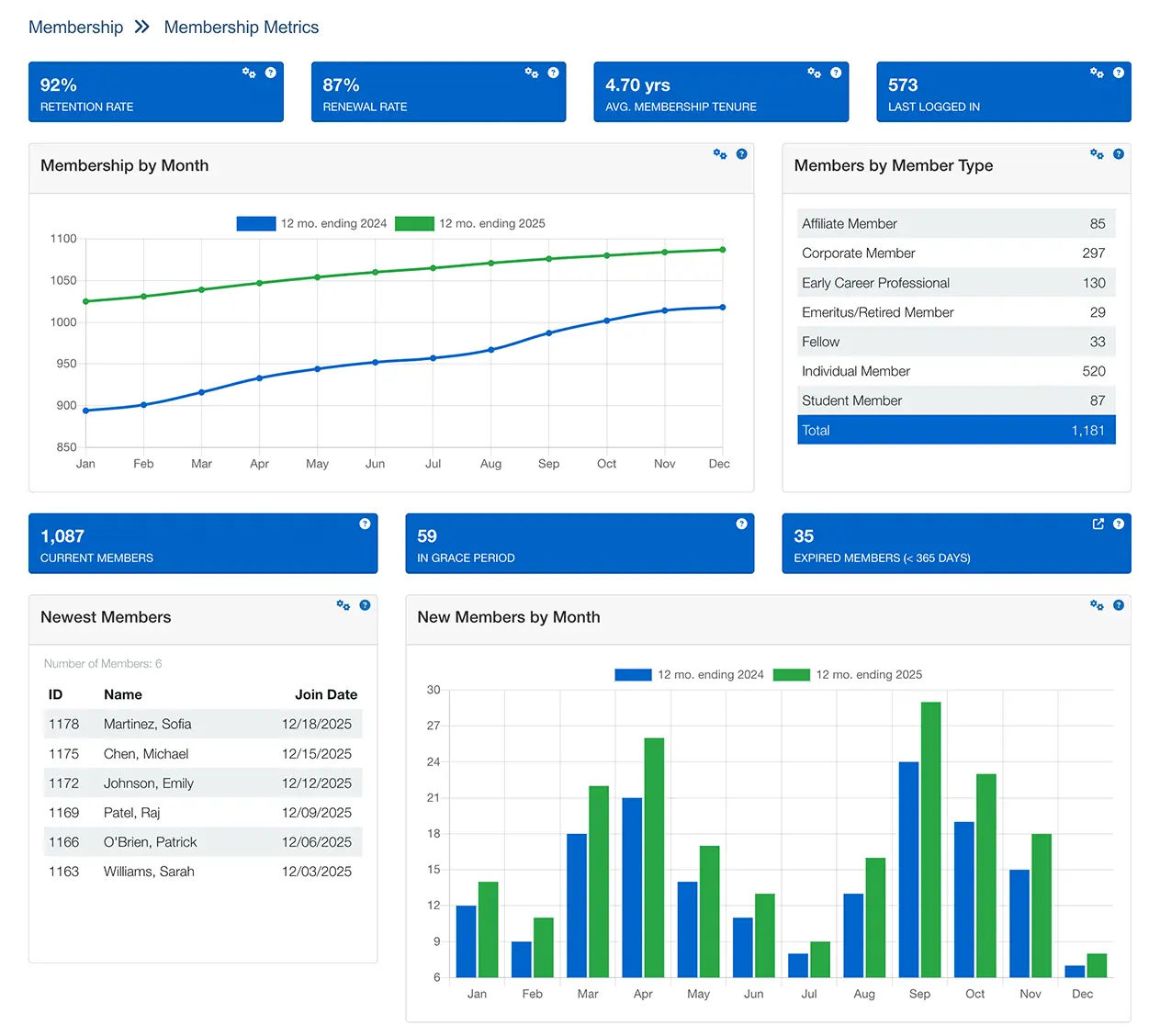
Membership management software should provide instant visibility into the metrics that matter for board reporting and strategic decisions:
Retention Rate
What percentage of members renew each year? Track overall and by membership type, chapter, or segment.
New Member Acquisition
How many new members join monthly/quarterly/annually? Track source of new members.
Lapse Analysis
Who lapsed, when, and why? Identify patterns to prevent future lapses.
Dues Revenue
Track revenue by membership type, payment method, and time period.
Transaction History
Complete payment records including dues, events, and store purchases per member.
Tenure Trends
Average member tenure and how it changes over time. Long-term retention health.
Good membership management software generates these reports with a few clicks—not hours of spreadsheet work.
Tying Membership to Events, Email, and Portal
Membership data becomes most valuable when it connects to every member touchpoint. The best membership management software platforms are part of an integrated system where:
Events Know Who's a Member
When members register for events, registration automatically records to their profile. Logged-in members receive member pricing without entering codes. See event management →
Email Uses Membership Data
Send targeted communications based on membership status, expiration date, chapter, or membership type. Renewal reminders can be scheduled as email campaigns. Explore email marketing →
Portal Reflects Member Status
The member portal shows each member their benefits, renewals, and resources based on membership level. View portal features →
Community Ties to Membership
Discussion forums and member directories pull from membership data. Only current members participate. Learn about community →
Membership Management Software by Association Type
Different organization types have unique requirements for their membership management software. The best platforms adapt to these specific needs:
Professional Associations
Individual practitioners are the members. Key features include:
- Searchable professional directory with custom fields
- Job board with employer postings and resume database
- CE/CLE/CPE credit tracking by member
- Member segmentation by designation and specialty
Trade Associations
Companies are the members with employee contacts. Key needs include:
- Organization as member entity with linked contacts
- Dues based on company size or revenue tier
- Primary/secondary contact designation
- Unlimited employee contacts per organization
Medical & Healthcare Associations
Healthcare professionals with specialized data needs. Key features include:
- Tiered membership levels (Fellow, Member, Resident)
- Multi-day conference registration with session selection
- Custom fields for specialties, subspecialties, and licenses
- Member directory searchable by specialty and location
Education Organizations
Teacher associations and educational councils. Key features include:
- Individual teacher and institutional memberships
- Tiered levels (Student, Active, Retired, Administrator)
- Custom fields for grade levels and subject specialties
- Track school district and building information
Nonprofit Membership Organizations
Budget-conscious organizations need affordable tools. Key features include:
- Unlimited members with no per-contact fees
- Multiple member types and tiers
- Self-service member portal for renewals
- Drag-and-drop website builder with members-only areas
Association Management Companies
Manage multiple client associations. Key features include:
- Separate databases with custom branding per client
- Unlimited members and events across all clients
- Consistent workflows so staff train once
- Self-service member portals for each client
Membership Management Software Pricing: Per-Member vs. Flat Rate
Understanding membership management software pricing models helps you compare true costs and avoid surprises that blow your budget:
Per-Member Pricing
Many vendors charge based on your database size:
- Software costs increase as you grow membership
- Budget uncertainty—can't predict next year's costs
- Pressure to delete historical member records
- Surprise bills after successful recruitment campaigns
- Your success becomes the vendor's profit center
Flat-Rate Pricing
i4a and some vendors charge a fixed fee regardless of member count:
- Predictable costs that don't punish growth
- Keep unlimited historical member data
- Budget with confidence for board presentations
- Grow from 1,000 to 50,000 members at the same price
- Focus on membership growth without cost anxiety
Questions to Ask About Pricing
- What happens to our price when we add 5,000 members?
- Are there per-transaction fees for dues payments?
- What features are included vs. add-on costs?
- Is data migration and implementation included?
- What's the total cost over 3-5 years?
Why Choose i4a Membership Management Software
i4a has provided membership management software to organizations since 1996. Here's what sets our membership management software apart:
- Flat-rate pricing with unlimited members — Whether you have 1,000 members or 50,000+ members, your price stays the same. Grow without watching your software bill grow with you.
- Real support from real people — U.S.-based team that knows your name and your organization. No offshore call centers or week-long ticket queues. Talk to humans who understand associations.
- 30 years of stability — No venture capital, no pressure to exit, no acquisition risk. We've been serving membership organizations for three decades and plan to keep doing it.
- Built for membership from day one — Not a generic CRM adapted for associations. Membership concepts like dues cycles, renewals, and retention are native to the platform.
- Complete member history — Track every interaction, transaction, and engagement over the full member lifecycle. Nothing gets deleted to save on per-member costs.
- Fast implementation — Most organizations go live in 60-90 days, not 6-12 months. Get your team trained and running quickly.
See Membership Management in Action
Schedule a personalized demo to see how i4a handles member data, automates renewals, and gives your members self-service access—without per-member fees.
TL;DR — Membership Management Software Summary
- What is membership management software: A specialized database system for storing member records, tracking membership status, automating renewals, and measuring retention
- Who uses membership management software: Associations, nonprofits, clubs, professional societies, and any dues-collecting organization of any size
- Core membership management software features: Member database, renewal automation, member self-service portal, online forms and applications, reporting dashboards
- Key membership management software workflows: Join → Renew → Lapse → Re-engage—all automated without staff intervention
- Important KPIs: Retention rate, new member acquisition, lapse analysis, dues revenue, member engagement
- Membership management software pricing: Per-member pricing (costs grow with membership) vs. flat-rate pricing (predictable costs regardless of size)
- i4a membership management software: Flat-rate pricing, unlimited members, U.S.-based support, 30 years serving membership organizations
Frequently Asked Questions About Membership Management Software
CRM software is built for sales teams tracking leads and opportunities. Membership software is purpose-built for organizations that collect dues and maintain ongoing member relationships—with native support for dues cycles, renewal automation, membership tiers, and member self-service portals.
Pricing varies significantly by vendor and model. Entry-level tools start around $50/month but often charge per member. Mid-market solutions range from $200-500/month. Enterprise platforms can exceed $1,000/month.
The critical factor is pricing model. Per-member pricing means your costs rise as you grow. Flat-rate pricing (like i4a offers) provides predictable costs regardless of database size. Always calculate 3-5 year total cost of ownership, including what happens if you double your membership.
Automated renewal systems send reminder emails based on each member's expiration date. You configure the timing (e.g., 90, 60, 30, and 7 days before expiration) and the message content once. The system then sends the appropriate reminder to each member automatically.
Good systems also handle grace periods (continuing to send reminders after expiration), lapse notifications, and can trigger different message sequences based on member type or history. This replaces staff manually tracking spreadsheets and sending individual emails.
Organizations typically outgrow spreadsheets around 300-500 members. Signs you need dedicated software include: spending significant time on manual renewal tracking, members complaining they can't do things online, juggling multiple disconnected tools, or difficulty producing reports for the board.
Most membership platforms serve organizations from 500 to 50,000+ members. i4a's flat-rate pricing makes it accessible to smaller organizations while scaling to handle large national associations.
Yes, data migration is a standard part of implementing new membership software. Most systems can import member records, transaction history, and activity data from spreadsheets, previous databases, or other AMS platforms.
The migration process typically involves exporting your current data to CSV/Excel, mapping fields to the new system, cleaning up inconsistencies, importing the data, and validating that records transferred correctly. Look for vendors that include migration support rather than leaving you to figure it out alone.
Organizational memberships (common in trade associations) require different database structures than individual memberships. The company or organization is the member entity, with individual employees linked as contacts.
Good membership software lets you: designate primary and secondary contacts, set limits on employee contacts per organization, bill the organization while communicating with individuals, track company-level and individual-level activity, and configure dues based on company size or tier.
Simple implementations go live in 30-45 days. Most mid-sized organizations complete in 60-90 days. Complex migrations may take 3-6 months. Be wary of vendors quoting 12-18 month implementations—that's often overly complex software.
