Quick Summary: Event Registration
- Friction kills registrations: Every extra field, page, or click increases abandonment—streamline to essential information and enable auto-fill.
- Early bird pricing creates urgency: Tiered pricing with visible deadlines drives action and improves cash flow predictability.
- Multiple payment options expand reach: Accept cards, ACH, purchase orders, and payment plans to remove barriers.
- Group registration drives revenue: Make bulk entry simple with single invoicing and automatic volume discounts.
Part of our event registration guide
Event registration best practices reduce friction, boost conversions, and set the tone for attendee experience. These 9 proven tactics—from tiered pricing to group registration—help associations fill more seats with less hassle.
According to Sequence Consulting's 2026 Association Trends Report
Events also serve as a top membership funnel. Industry benchmarking data shows 39% of associations identify their events as one of their most effective recruitment channels. That means a poor registration experience doesn't just cost you attendees—it may also cost you future members.
Whether you're hosting a conference, workshop, or virtual event, optimizing registration is one of the highest-ROI improvements you can make. After working with associations on their event systems for nearly three decades, I've seen the same patterns repeat: the organizations that treat registration as part of the attendee experience—not just an administrative step—consistently outperform those that don't.
Below are the best practices that consistently help associations create a registration experience that converts browsers into attendees.
Make registration fast and frictionless
Every extra click or unnecessary form field increases the risk of abandonment. Streamline ruthlessly—simplicity wins.
Ways to reduce friction:
- One-page checkout - Keep the process on a single screen when possible
- Minimal required fields - Only ask for what's essential
- Auto-fill for members - Preload existing data from their profiles
- Guest checkout - Don't force non-members to create an account
- Mobile optimization - Test on phones and tablets; your form builder should handle responsive design
- Progress indicators - If the form must be multi-step, show where users are in the process
Offer early bird and tiered pricing
Smart pricing structures drive urgency, improve cash flow, and give early insight into attendance. They also help you shape attendee behavior—encouraging early commitments and reducing last-minute stress on your team. Beyond filling seats faster, tiered pricing creates a natural sense of momentum that keeps registration activity steady throughout your campaign.
Effective pricing strategies:
- Early bird discounts - Meaningful savings for registrations 60+ days out
- Tiered pricing - Multiple tiers (early, regular, late) with visible deadlines
- Member vs non-member rates - Highlight membership value
- Group discounts - Encourage teams to attend together
- Student/nonprofit rates - Improve accessibility
- VIP premiums - Enhanced experiences for higher prices
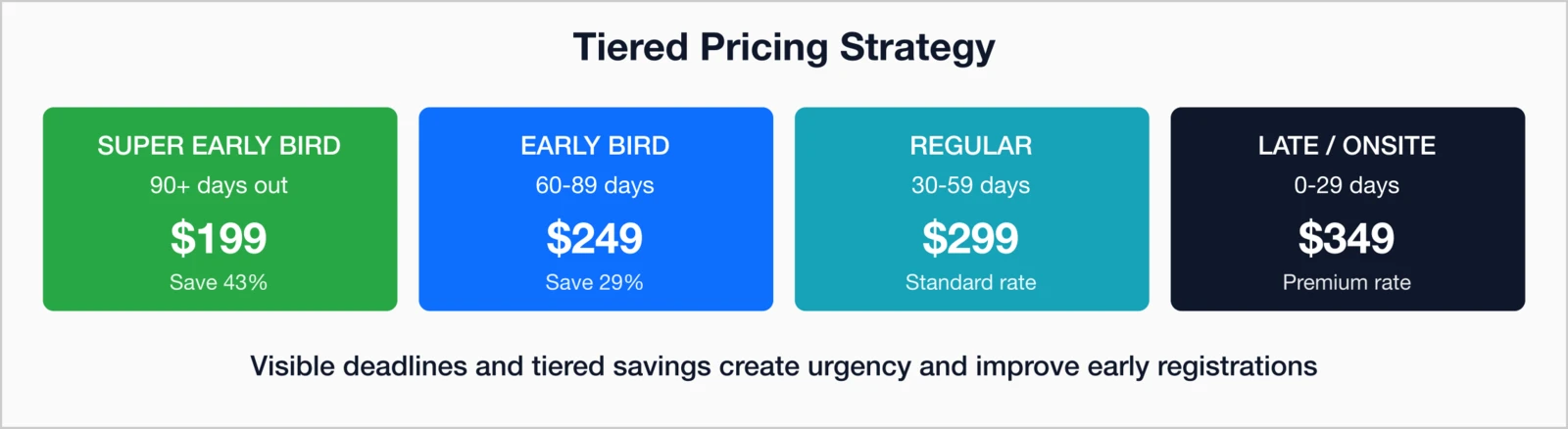
Example tier structure:
- Super Early Bird (90+ days): $199
- Early Bird (60–89 days): $249
- Regular (30–59 days): $299
- Late/Onsite (0–29 days): $349
These are guideposts, not fixed rules. Imagine sending an automated reminder three days before early bird pricing expires—many associations find that this single email drives a significant spike in last-minute early registrations. Deadlines work when visibility and communication are consistent.
Provide flexible payment options
Don't lose attendees because your system won't accept their preferred payment method. Each added option removes friction and expands accessibility, especially for group or corporate registrations. Flexible payment choices also show that your organization understands member needs—supporting inclusivity while boosting overall conversion rates.
Recommended payment methods:
- Major credit cards - Visa, Mastercard, Amex, Discover
- ACH/bank transfers - For larger transactions
- Purchase orders - For corporate registrations
- Installment plans - For flexibility
- Invoice later - For trusted groups or members
- Check payments - If still required by some organizations
Clearly communicate value
Your registration page should make it clear right away why someone should attend. Too often, key details end up buried below the payment section—bring them forward instead. Even if attendees have seen your marketing emails, it's worth reminding them what makes your event valuable right on the registration page.
Make sure these elements appear prominently:
- Featured speakers - Spotlight sessions and marquee presenters
- Learning outcomes - What will attendees take away?
- Networking opportunities - Who will they meet?
- CEUs or credits - Professional development value
- What's included - Meals, materials, recordings, etc.
- Testimonials - Social proof from past attendees
- Event size - "Join 500+ industry professionals"
Enable session selection and customization
For multi-track events, let attendees build their schedules during registration. This creates a sense of ownership and reduces onsite confusion.
Useful session selection features:
- Capacity tracking - Live availability indicators
- Conflict detection - Prevent overlapping sessions
- Clear descriptions - Help attendees make informed choices
- Modification options - Allow changes before the event begins
Modern event management systems
Best Practice: Allow participants to adjust their session selections up until a few days before the event. Flexibility improves both satisfaction and check-in efficiency.
Capture the right information
Here's a mistake I see regularly: associations ask for everything they might ever want to know, then wonder why completions are low. Balance data collection with the attendee experience. Too many fields discourage completions; too few leave you unprepared.
Essential fields:
- Name and email address
- Phone number (for urgent text alerts)
- Organization or employer
- Dietary or accessibility needs
- Emergency contact (for in-person events)
Optional fields:
- Job title and department
- Years of experience
- Industry or specialty
- Topics of interest
- Referral source ("How did you hear about us?")
Pro tip: Clearly mark optional fields. Users are more comfortable finishing a form when they can choose what to skip.
Send immediate confirmations
Instant confirmation reassures attendees, reduces staff inquiries, and sets the tone for a professional, well-organized event. It's also one of the simplest automations to implement—and one of the most important for building confidence. A prompt, detailed confirmation email shows attendees that their registration went through, their payment was processed, and that you're ready to welcome them.
Your confirmation email should include:
- Clear subject line - "You're registered for [Event Name]"
- Event details - Date, time, and location or login link
- Payment summary - Receipt and payment method
- Next steps - Action items before the event
- Add to calendar - One-click calendar button
- Contact info - Who to reach with questions
- Cancellation policy - Refund or transfer terms
When even your own staff feel unsure whether a test registration went through, your process needs tightening. An immediate, automated acknowledgment eliminates doubt and reinforces that attendees made the right decision in registering.
Support group registrations
Corporate groups, teams, and institutional attendees often make up a significant share of event revenue. When their registration process is simple, organizers win twice—more attendees with less administrative effort. A smooth group registration system saves time for staff and participants alike, encourages team attendance, and increases the likelihood of repeat participation year after year.
Unfortunately, many associations still make group registration tedious, requiring separate forms for each participant. That friction often discourages larger teams from signing up or delays payment. The goal is to make bulk registration as effortless as individual registration.
Key group registration features:
- Bulk entry forms - Register multiple attendees at once
- Single invoice - One consolidated payment per group
- Automatic discounts - Volume pricing (e.g., 5+, 10+, etc.) applied automatically
- Coordinator access - Let one person manage the entire group's registrations and updates
- Ticket transfers - Enable easy reassignment if someone can't attend
- Group reporting - Provide downloadable rosters for coordinators or finance teams
When a corporate coordinator can register 15 colleagues with one transaction, you remove administrative friction and create a streamlined experience that invites larger participation. The easier it is to register a group, the more likely organizations are to send additional attendees or return for future events.
Maintain pre-event communication
Registration is only the start of engagement. Stay connected leading up to the event to reduce no-shows and increase excitement.
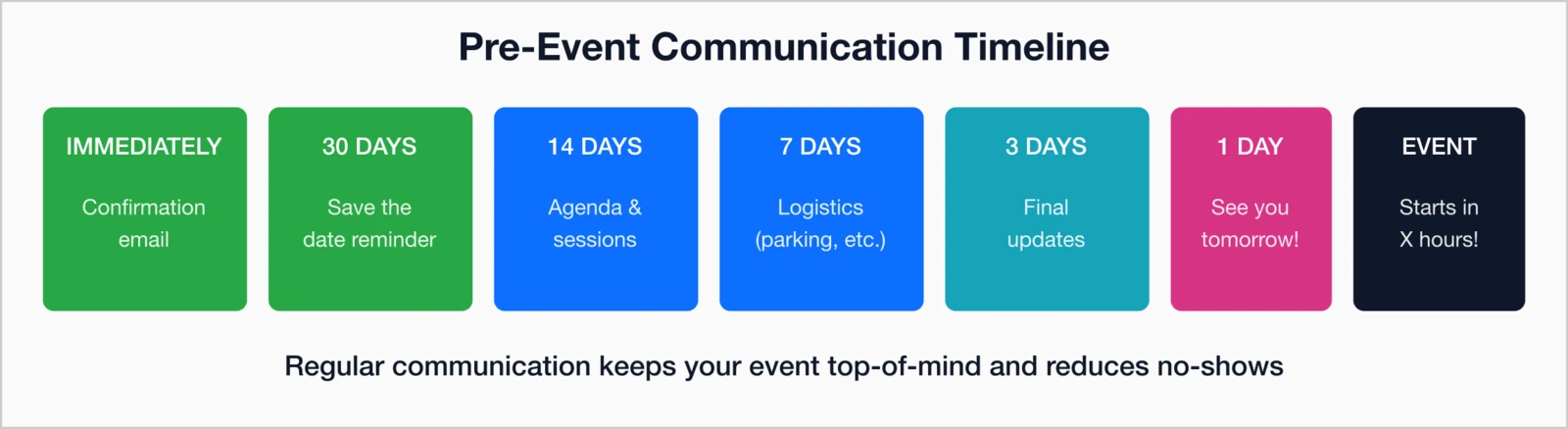
Suggested communication timeline:
- Immediately: Confirmation email
- 30 days out: "Save the Date" reminder
- 14 days out: Agenda and session details
- 7 days out: Logistics (parking, dress code, etc.)
- 3 days out: Final updates
- Day before: "See you tomorrow!" cue
- Event day: "Starts in X hours" reminder
- After the event: Don't forget post-event follow-up to maintain engagement
Extra touchpoints:
- Speaker spotlight emails (see our event promotion email templates)
- Pre-event networking opportunities
- Mobile app download reminders
- Sponsor or exhibitor previews
Automated email marketing tools
Prioritize technical reliability
Strong front-end design requires equally strong back-end systems. The right technology underpins a flawless registration experience.
Critical system requirements:
- PCI compliance - Secure payment processing is non-negotiable
- Mobile responsiveness - Perfect display on all devices
- Database integration - Automatic data sync
- Real-time analytics - Track registration metrics as they happen
- Customizable forms - Adapt to different event types
- Automated confirmations - No manual work required
- Waitlist management - Automatically notify when spots open
- On-site check-in tools - Badge printing, scanning, walk-up registration (see our badge printing and check-in guide)
- Abstract submission - For academic events, integrated abstract submission software with peer review workflow
Behind the scenes, this infrastructure ensures smoother attendee experiences and fewer manual interventions.
Track and improve registration metrics
Measurement turns experience into insight—and insight into better results. Tracking your key registration metrics helps you understand what's working, where potential attendees are dropping off, and how changes to your process impact conversions over time. The goal isn't just to collect numbers but to use them as a roadmap for continuous improvement.
Regularly reviewing these metrics gives you a real-time view of your event performance and the opportunity to fix issues before they cost you registrations.
Key registration KPIs:
- Conversion rate - Percentage of visitors who complete registration
- Abandonment rate - Where and when users leave the process
- Average completion time - How long it takes to finish a registration
- Source of registration - Which marketing channels drive the most signups
- Mobile vs desktop - Device-specific performance insights
- Early bird take rate - Share of attendees registering at early pricing
- Revenue by ticket type - How each pricing tier performs
Real-time analytics shine a light on bottlenecks and opportunities, allowing your team to fine-tune the registration experience for future events. Over time, even small adjustments—like shortening a form or improving a call-to-action—can deliver measurable gains in conversion rates and attendee satisfaction.

Registration excellence drives event success
Your registration process directly influences attendance, revenue, and the overall attendee experience. When you streamline forms, optimize pricing, and automate communication, you not only make registration easier—you make your entire event stronger.
By refining your registration process, you can:
- Lift conversion rates and reduce drop-offs
- Improve cash flow through early registrations
- Enhance the attendee experience from the very first interaction
- Collect better data to shape future events
- Save staff time and reduce manual work through automation
Take time to audit your own process. Register on a mobile device and ask colleagues who aren't involved in event planning to do the same. You'll be surprised by how much you notice when you experience it as an attendee—especially the small friction points analytics alone can't reveal.
Your registration form is doing more than collecting payments—it's shaping first impressions, building trust, and setting the tone for the event itself. The good news? Big results often come from small, targeted improvements. You don't need a full overhaul to create a measurable impact.
Over time, each adjustment compounds, improving every event that follows. That's what makes refining your registration experience one of the smartest, highest-ROI investments you can make in your association management software
key takeaways
- Friction kills registrations: Every extra field, page, or click increases form abandonment—streamline to essential information only and enable auto-fill for faster completion
- Early bird pricing works: Tiered pricing (early bird, standard, late) with visible deadlines creates urgency—early registrants are also more likely to actually attend than last-minute sign-ups
- Multiple payment options increase conversions: Accept credit cards, ACH/bank transfer, purchase orders, and payment plans to remove financial barriers—offering installments meaningfully increases registrations
- 9 best practices: Fast frictionless forms, early bird/tiered pricing, multiple payment options, clear value proposition, session selection tools, capture right information (not too much), immediate confirmation emails, group registration discounts, and pre-event communication sequence
Streamline Your Event Registration
i4a includes powerful event registration tools with session selection, multiple pricing tiers, group registration, and automated communications—all integrated with your membership database.
Talk to Us About EventsRelated resources
How to calculate and report on conference ROI.
Best practices for events with both in-person and virtual attendees.
Create sponsorship tiers that deliver value.
Complete guide to planning and executing successful association events.
